CB-MF-SOP-002
A/1
20
Note: the options in the setting page cannot be changed during detection.
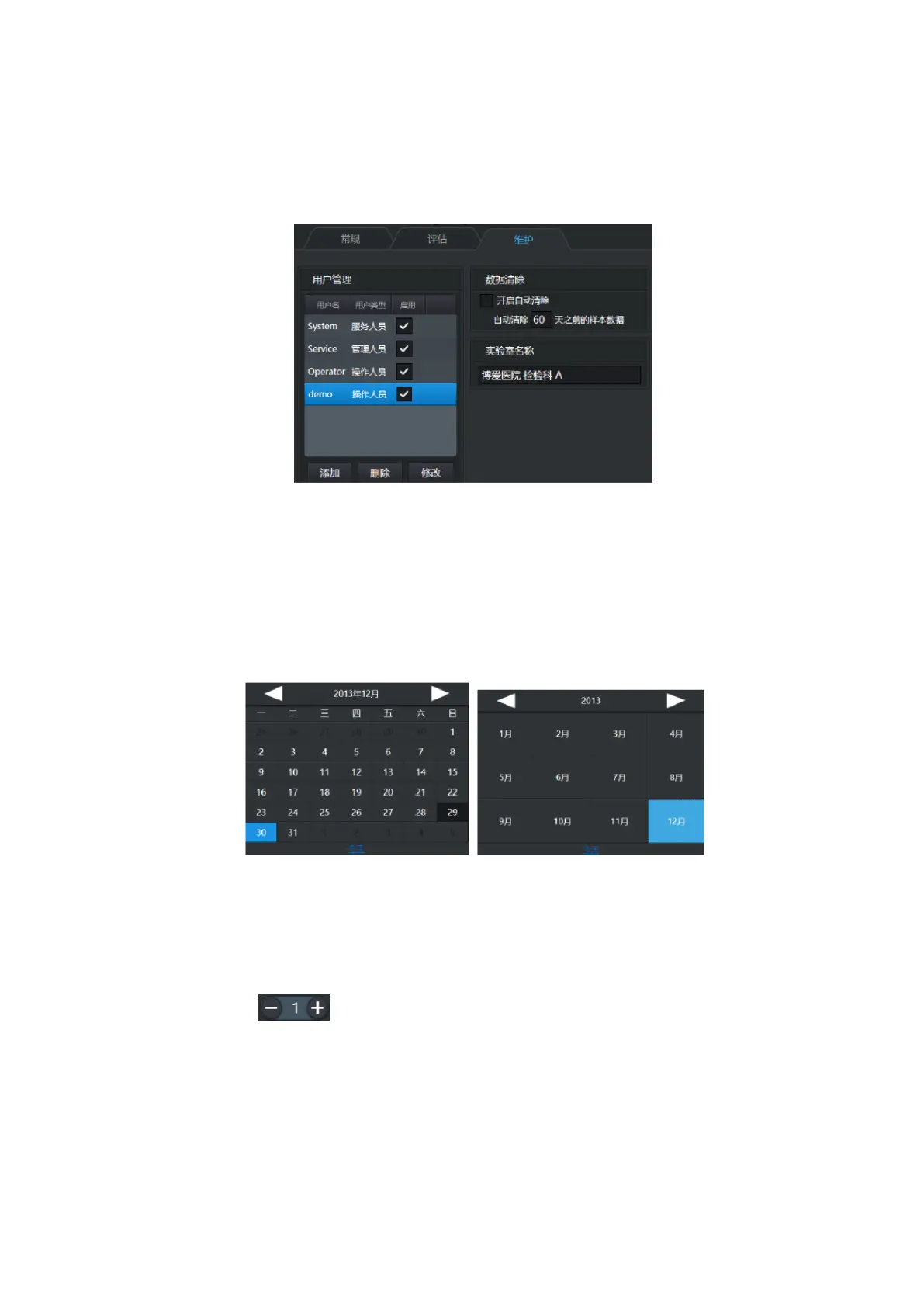
3.3.2 Maintenance
Figure 3-12
User list is that records all users using the system.
Automatic clearing, used to clear historical data on computer disks to make room.(Note: This
will only clear the default archive, not a copy of the sample stored.)
The name of the laboratory will appear on the copy or printed report to indicate the source.
3.4 Others
Figure 3-13
1. The dark background is today, and the blue background is the date you choose
2. Click the title at the top of the calendar control to switch to the year/month selection panel.
Click the title again to switch to the year/decade (ten years) selection panel
3. Click on the bottom of [today] and it will jump to today
Spinner Control:
Press and hold the mouse button or long press the + and - on both sides to rapidly increase and
decrease the value.
4 Operation
1. Open the door of S80 equipment under the shutdown state.


 To Next Page