CB-MF-SOP-002
A/1
17
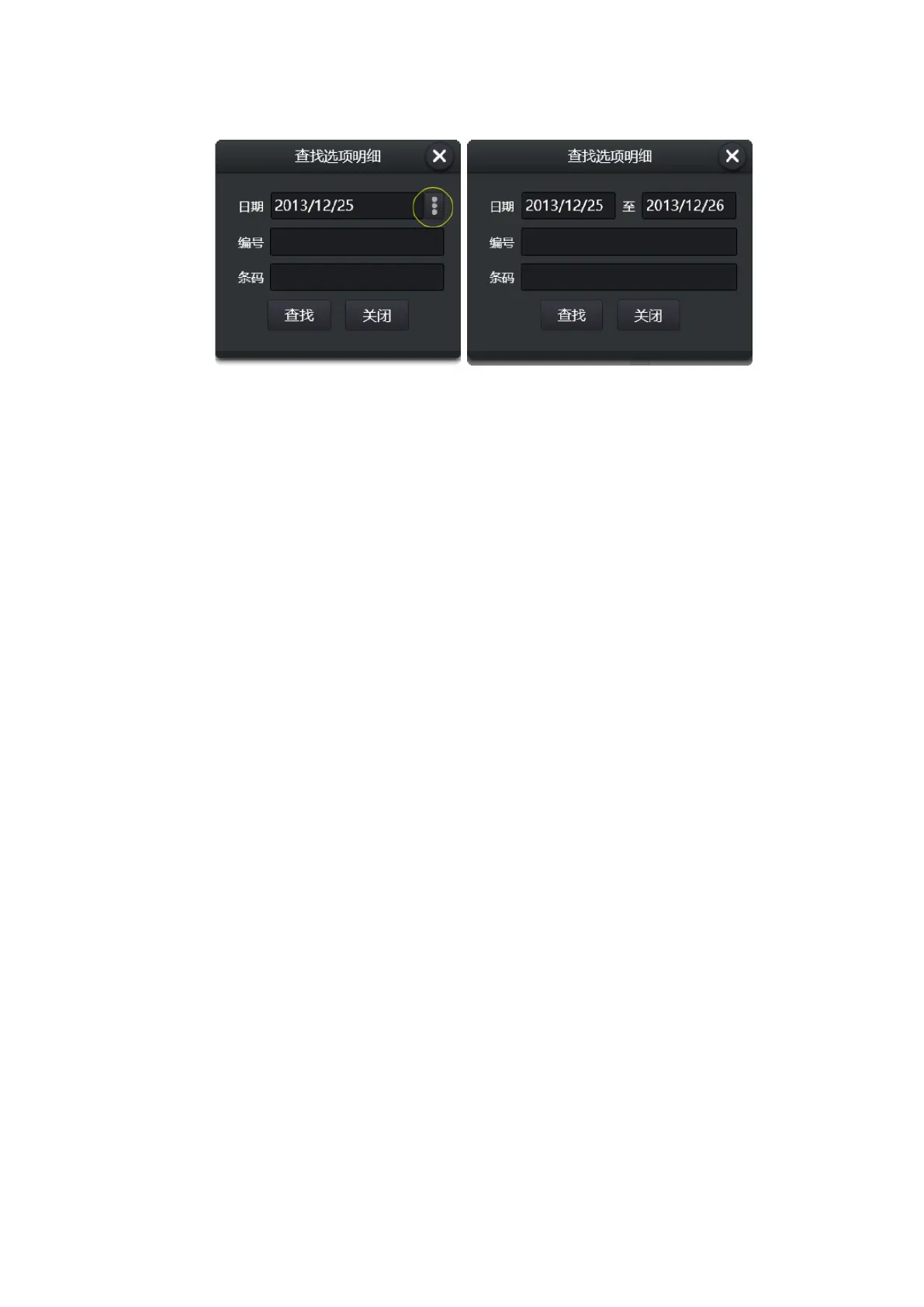
Figure 3-8
The date can be specified either as a day or as a time period.
Multiple conditions, the "and" relationship: if a number (or bar code) is specified, indicates the
date of the screening, and the number (or bar code) is a sample of a value.
3.2.4 Elements Information Modifying
In the elements statistics results section, select a elements and click the [edit] button at the top
right of the list to modify the content or qualitative results of the elements. When modified, the list
item background is highlighted. Press the [restore] button to restore the elements results
automatically recognized by the device.
3.2.5 Sample backup
The [save as] button at the bottom of the elements list can be used to store a copy of the sample.
The copy is saved in the form of a web page. For relevant Settings for storing copies, see the top bar
icon: Figure 3-2 Settings -> routine subpage.
3.2.6 Image Thumbnail
On the far right is the list of thumbnail images of the sample. Double-click the mouse or long
press a thumbnail to see the high clear image and its elements distribution. Some images can be left
out of the composition statistics (see image editing section), and the thumbnail will appear gray-white
if not in the statistics. The left side of the graph is involved in the statistics, and the right side is not
involved in the statistics)


 To Next Page