18
4.7 – Alarm
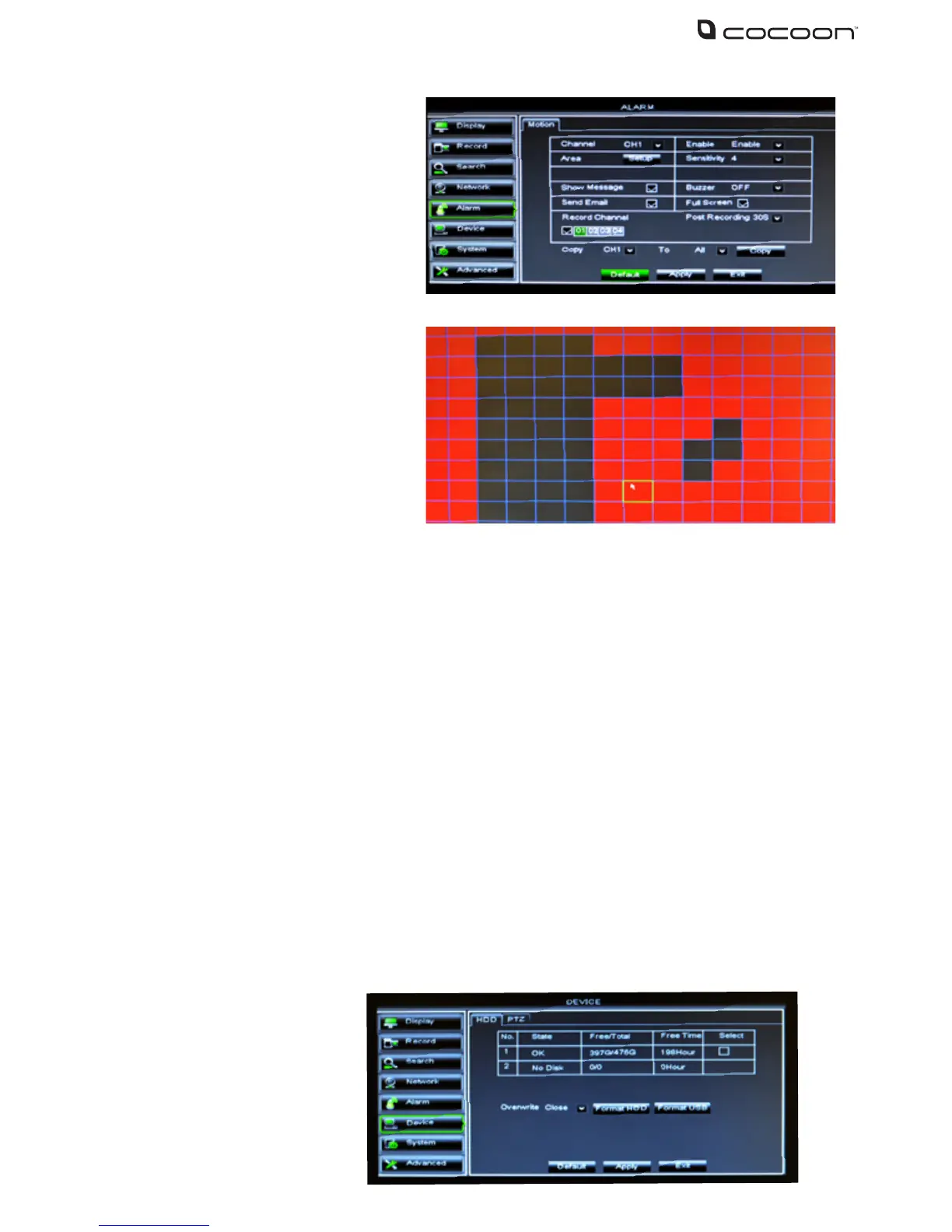
4.71 Motion
• Show Message: An M in red will appear on screen when motion is detected and recording
when this option is active
• Buzzer time: Set duration of the buzzer when motion is detected (10s, 20s, 40s, 60s, O)
• Send Email: Allows DVR unit to send images where alarm is triggered to specied email address
• Full Screen: When the motion is detected, the corresponding channel will be switched to
full screen mode
• Record Channel: When motion is detected, the selected channel(s) will start recording
• Post Recording: Set duration of recording after event ends (30s, 1 min 2 min 5 min)
• Copy: Copy current channel parameters to other selected channel or all channels
IMPORTANT NOTE: Always click “Apply” after making any changes within the menu system. If you
do not click Apply your changes will not be saved
To access the Device features click Device from the Main Menu. Device features hard disk and ash
drive maintenance as well as PTZ setup
Channel: Select the channel 1-4 to setup
Enable: Set to Enable to turn on Motion
Detection
Area: Set the area to monitor for motion.
Click and drag to select or deselect larger
areas at once. Only sections highlighted
in red will detect and record motion. If for
example you did not want false triggers
from a tree on part of the screen you would unmark this area to prevent false motion events
Sensitivity: Set the sensitivity level of motion detection, 1 being the least sensitive or 8 being the most sensitive.
If Motion Detection is constantly detecting motion at night, turn down the sensitivity level
To access the alarm setting, click
Alarm in the Main Menu. This DVR
unit System is equipped with Motion
Detection technology. Each detection
is considered an alert or alarm which
can be set to trigger a recording. Using
Motion Detection will save on disk
space and keep you from spending
hours searching through recorded footage by only viewing when motion has occurred
4.8.1 HDD
The HDD tab shows the current
hard drive status including free
memory vs total memory and
number of hours recording
remaining based on current
recording rates
4.8 – Device



 To Next Page