4
3 – Using the DVR unit for the First Time
3.1 Remote Control
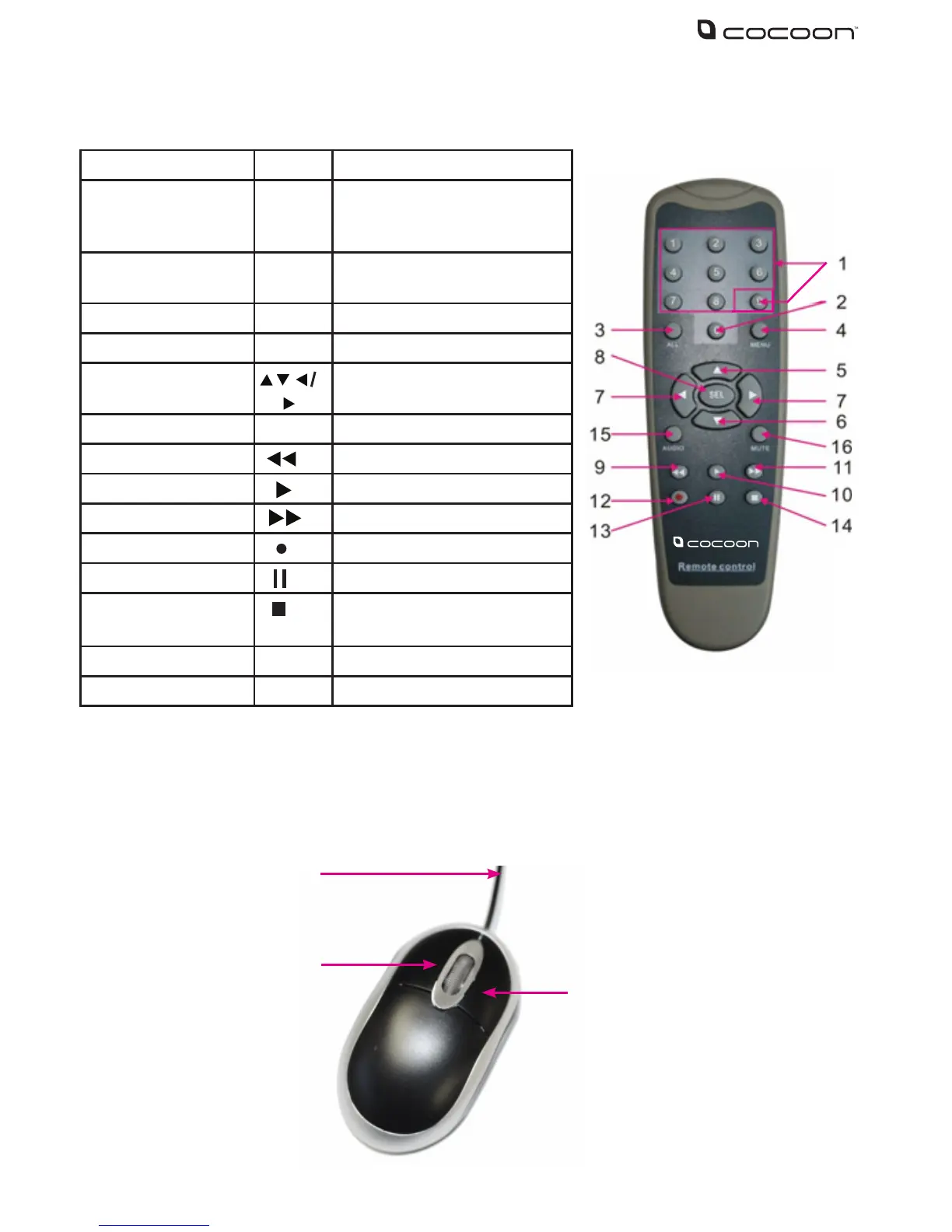
Item Key title Key function
1 1-9 Channel select 1-4 / Numeric
key entry for passwords or
menu entries
2 0 Switch to GUI (Graphical user
Interface) function
3 ALL Toggle camera display mode
4 Menu Enter / Exit the main menu
5, 6, 7,
Directional arrows – navigate
menus
8 SEL SEL Button - conrm selections
9 Rewind Button
10 Play Button
11 Forward Button
12 Record Button
13 Pause Button
14 Stop manual record / stop
playback
15 Audio Not used
16 Mute Toggle audio on / o
3.2 Mouse
1. USB Connection – connect to back of DVR unit
2. Left Mouse Button (LMB) – click to see main menu and make selections
3. Right Mouse Button (RMB) – click to return to previous screen or exit menus
1
2
3



 To Next Page