20
4.9 – System
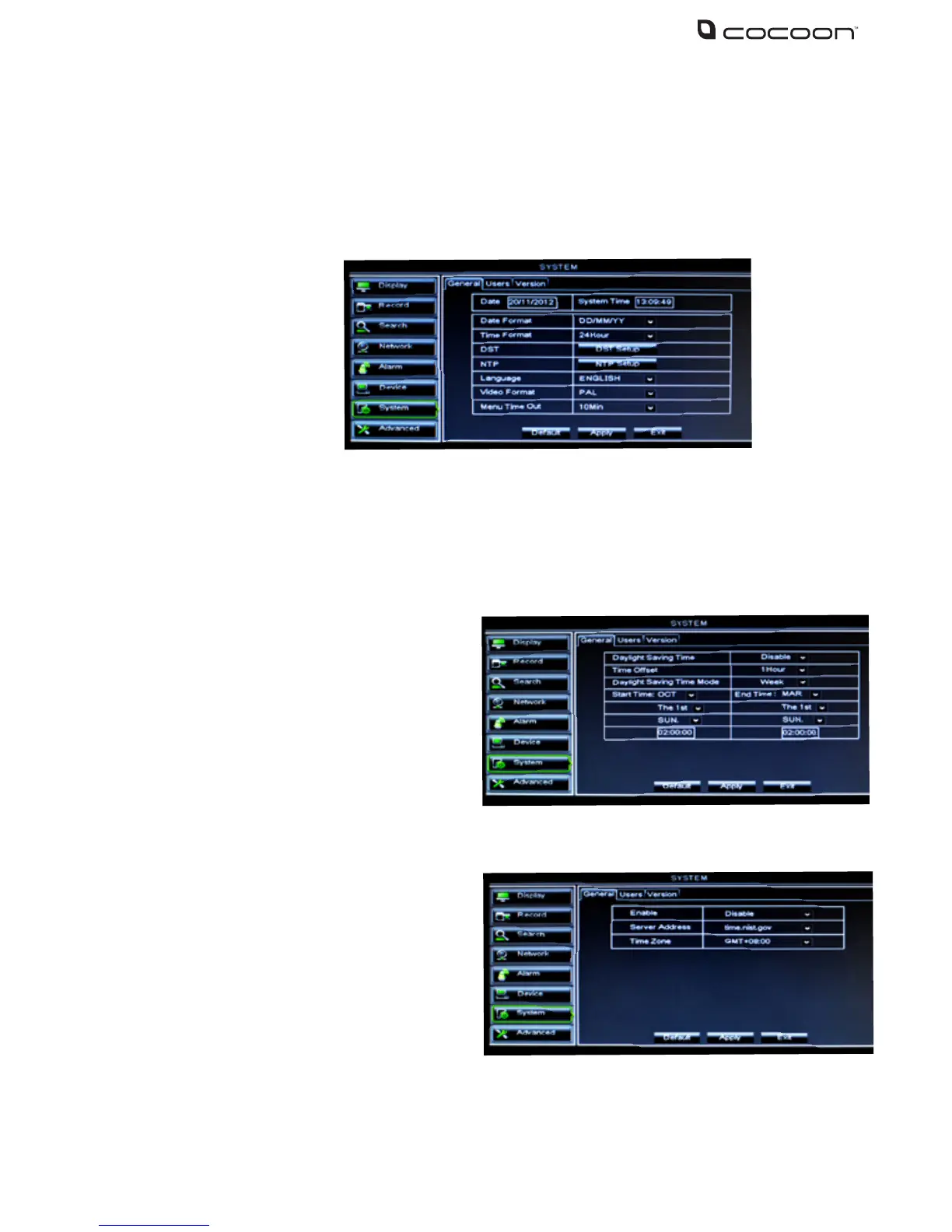
To access the System menu click System from the Main Menu. System contains controls to setup
the date and time as well as user accounts and version information
4.9.1 General
The General Setup interface allows you to setup general settings such as time and date, language
and day light savings settings
Day Light Saving (DST) Setting
Network Time Protocol (NTP) Service
Note: The above changes will be available only when DVR unit is connected to the internet
When NTP function is enabled, the system will calibrate the time every 00:07:50 and every time
system starts up
Day Light Saving Time:
Select to enable/disable the Day Light Saving
function
Time Oset: Select oset for DST
Daylight Saving Time Mode: Switch
between week mode or date mode
Start Time: Set the start time of Daylight Saving
End Time: Set the end time of Daylight Saving
Select to enable/disable NTP service
Server Address: currently support
three servers, including time.
windows.com, time.nist.gov and
pool.ntp.org
Time Zone: Set the current GMT time in your region
Date: Display the current date. Click on the digit to change the date
Time: Display the current time. Click on the digit to change the time
Date Format: Select desired date format from the drop down list
Time Format: Choose between 24 hour or 12 hour time format
DST: See next section for DST (Day Light Saving) settings
NST: See next section for NST (Network Time Protocol) settings
Language: Choose desired language for user interface
Menu Time Out Set the automatic exit time if no activity is detected in menus



 To Next Page