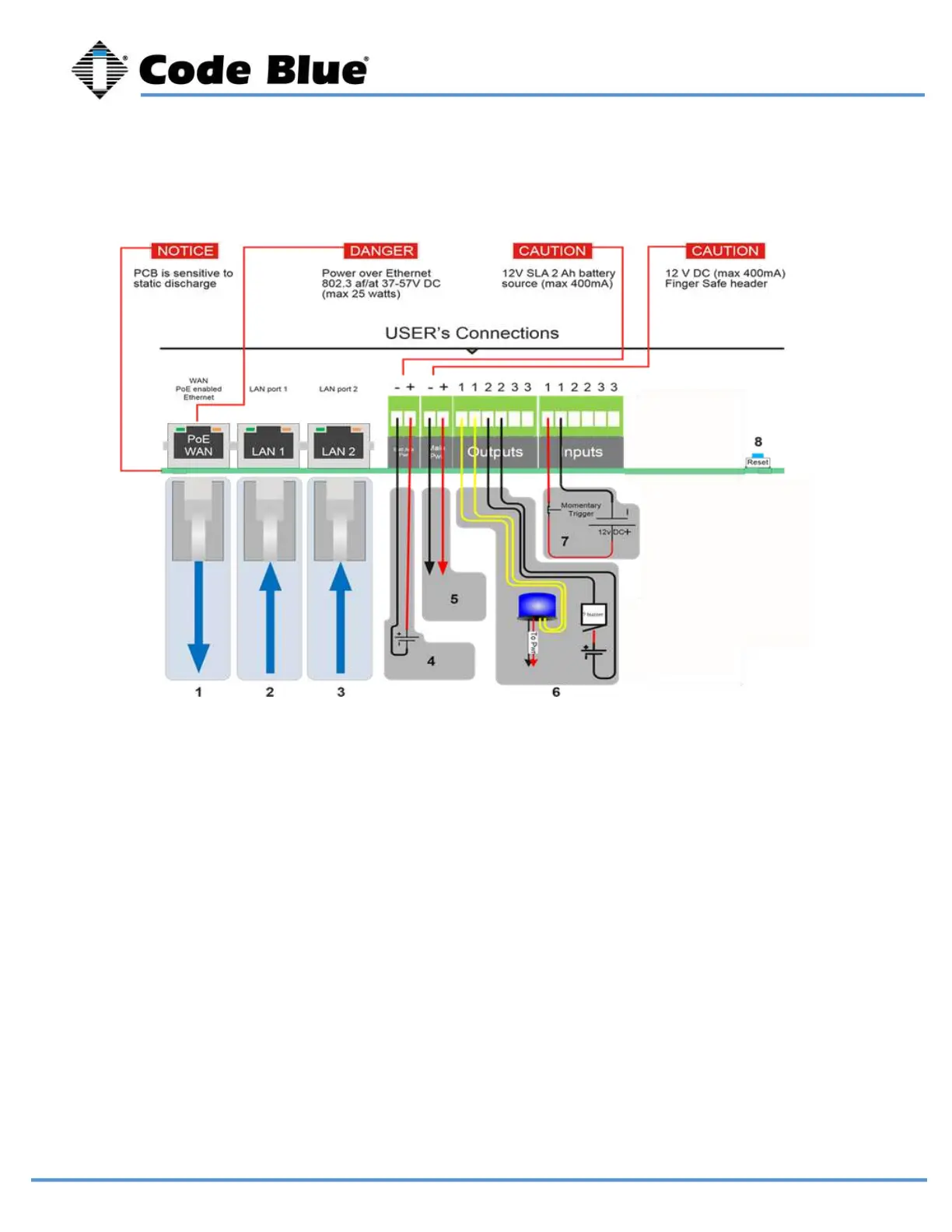
1 - Cat 5e - Connect to Switch (100 Mb)
2 - Cat 5e - Connect to Peripheral (100 Mb)
3 - Cat 5e - Connect to Peripheral (100 Mb)
4 - Optional 12V battery
5 - 12V DC power
6 - Aux outputs (3)
• The auxiliary outputs are Normally Open and can be triggered in your action script to close.
Duration is defined in your action script.
7 - Aux inputs (3)
• The auxiliary inputs are Normally Open and are triggered by voltage. The voltage range is 9 to
32V AC or DC with current protection of 1.25 Amps.
8 - Factory Reset Switch
• With power connected to LS1000, hold down this reset switch for 12 seconds and then release.
The unit will reboot. All settings will be lost.
LS1000 VoIP Speakerphone
Administrator Guide
page 15 of 54 GU-164-B
Code Blue
• 259 Hedcor Street • Holland, MI 49423 USA • 800.205.7186 • www.codeblue.com
8 Wiring Diagrams



 To Next Page