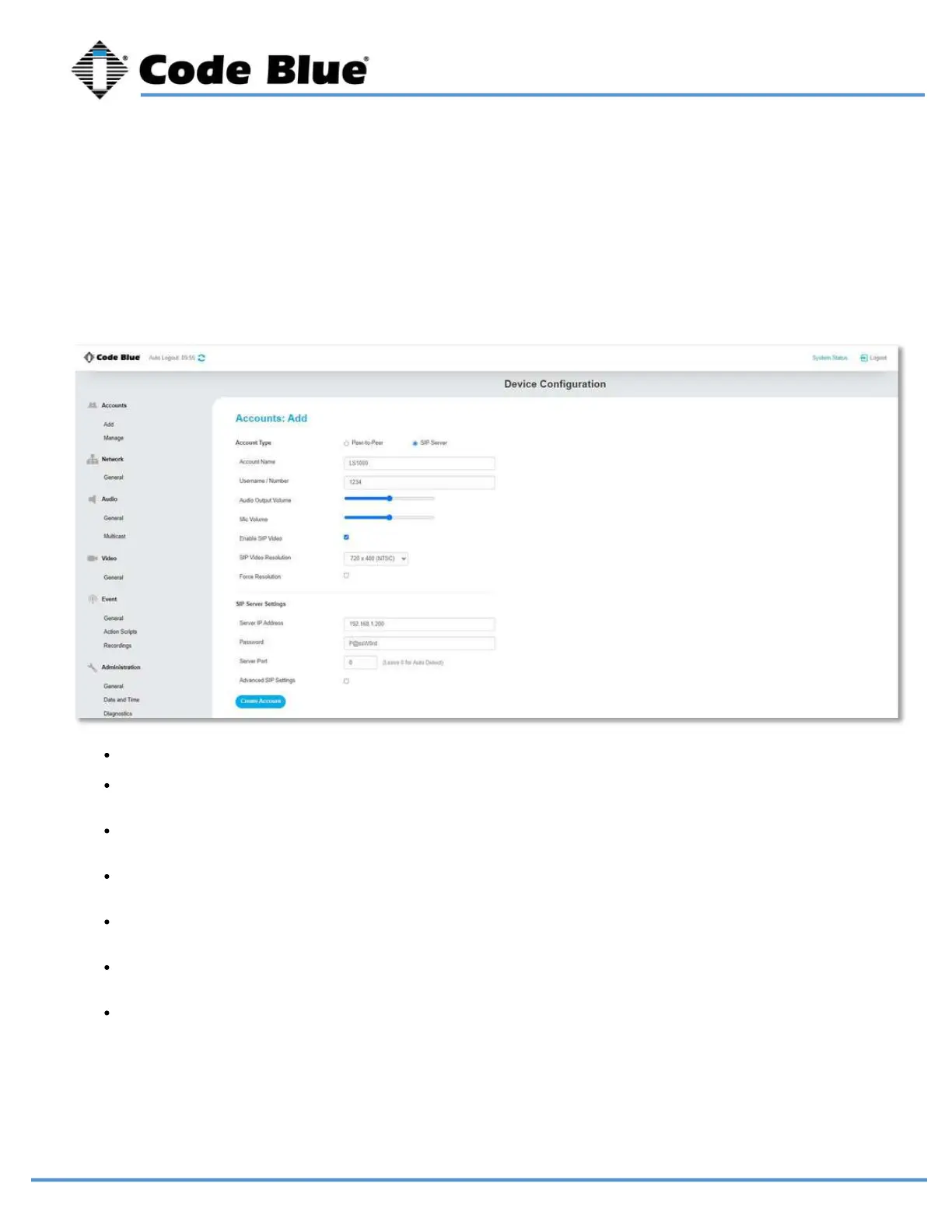
These settings are usually provided by IP PBX, SIP server or SIP gateway personnel. When
setting up a SIP or peer-to-peer account, make sure the correct Account Type is selected
Accounts
Add Account
LS1000 VoIP Speakerphone
Administrator Guide
page 21 of 54 GU-164-B
Code Blue
• 259 Hedcor Street • Holland, MI 49423 USA • 800.205.7186 • www.codeblue.com
Account Name: Free form field to identify the account.
Username/Number: Phone number or extension for the LS1000. This is still required for peer-
to-peer; Any number value can be entered.
Speaker Volume: You can set the speaker volume gain here in the GUI, as well as from a
touch-tone phone using in-call commands. This becomes the default volume level.
Mic Volume: You can set the mic volume gain here in the GUI, as well as from a touchtone
phone. using in-call commands. This becomes the default volume level.
Enable SIP Video: Select this option to allow SIP video packets to be transmitted. RTSP video
will still be available but note that only one format will be available at a time.
SIP Video Resolution: Use drop down menu to select resolution for SIP video. This does not
apply to RTSP video quality.
Force Resolution: Some desk phones will overwrite the resolution set in the LS1000 to their
native resolution. Select this option to force the selected resolution.



 To Next Page