C001537_15_CR2_User_Manual 28
Save Settings
1.10 - Imager Field of View and Resolution
The CR2’s dual fi eld optical system may be modifi ed based on your scanning environment. The CR2’s megapixel imager
may be set to the following three modes:
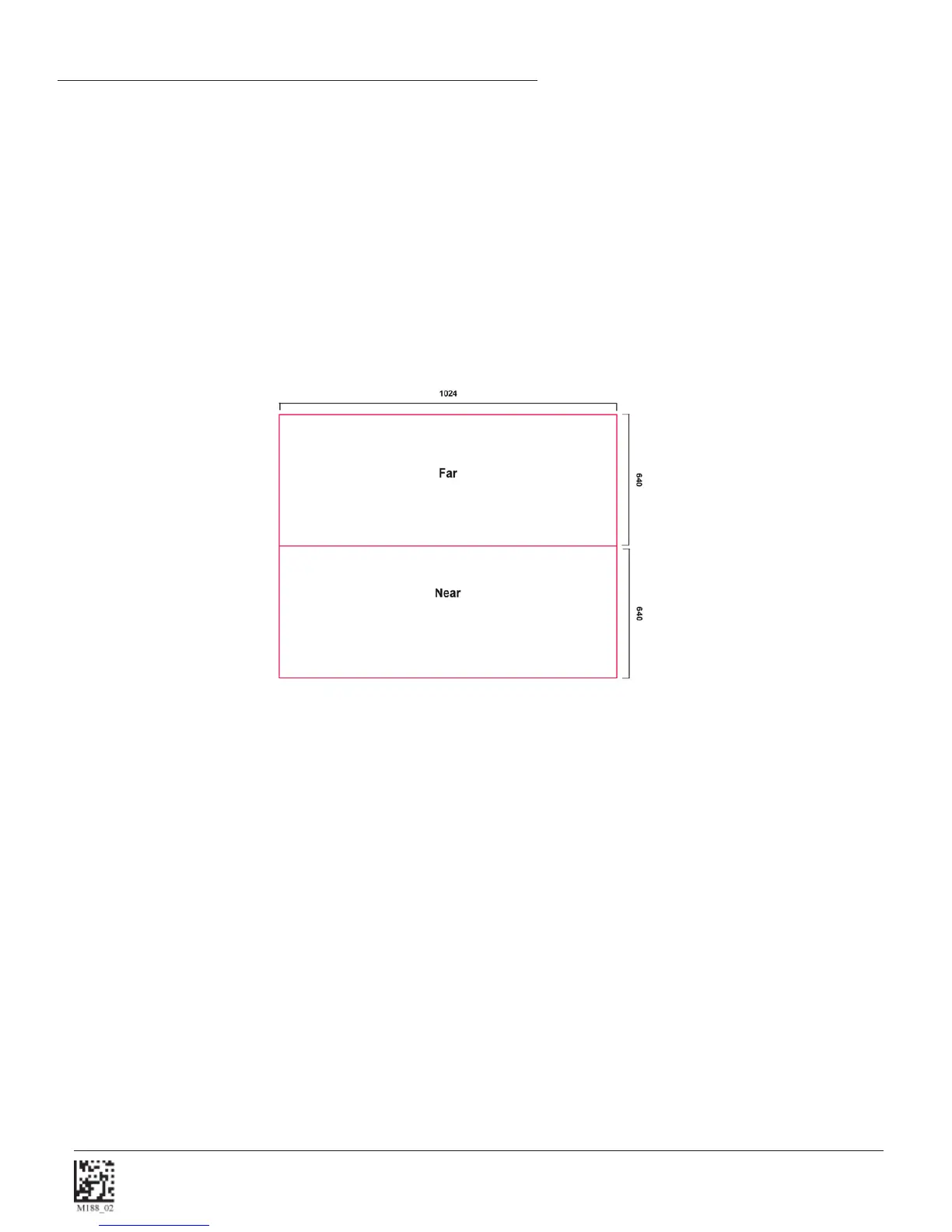
The 1.3 Million Pixel imager is divided into near fi eld and far fi eld decode zones. In each zone the resolution is 1024 x 640
pixels (see Figure 1.25). In this mode of operation the reader utilizes the highest resolution creating the widest working
range on bar code and 2-dimensional symbols of all densities. The trade-off is the amount of time the reader spends
processing the image. This time can be reduced by optimization functions:
If only the near fi eld is used (small symbols), the far fi eld image can be ignored. If only the far fi eld is used (large
symbols), the near fi eld can be ignored. Further optimization may be obtained by "windowing" the fi eld to a smaller area.
Each focal area may be narrowed by enabling the windowing feature found in section 5.2.
SXGA Imaging Area
Figure 1.25


 To Next Page