Set Up the PC
8
2.3 Configure the PC’s Network Settings (Non-DHCP)
This section provides information on how to configure Microsoft Windows network settings in
order to connect to a wafer reader running In-Sight software on a non-DHCP network.
NOTE The steps listed below and the example dialogs are specific to Windows XP Professional.
2.3.1 Configure the IP Address and Subnet Mask
1. Click Start.
2. Click on the Control Panel shortcut to open the Control Panel icon group.
3. Click the Network and Internet Connections icon to open the Network and Internet
Connections Dialog.
4. Click the Network Connections icon to open the Network Connections Dialog.
5. Right-click the Local Area Connections icon and click Properties to open the Local
Area Connections dialog.
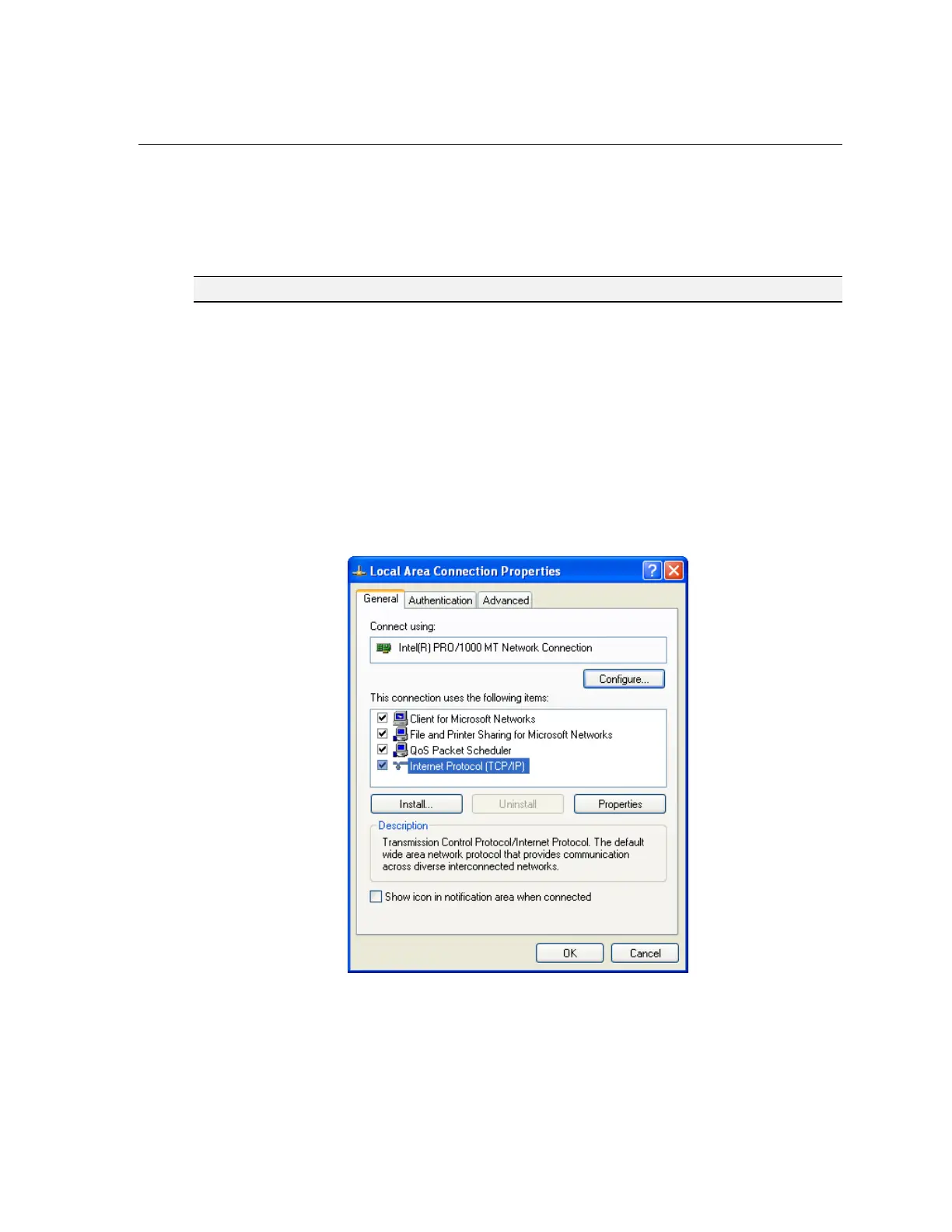
6. Highlight Internet Protocol (TCP/IP) in the General tab and click Properties to open
the Internet Protocol (TCP/IP) Properties dialog (Figure 2-4).
Figure 2-4: Local Area Connection Properties Dialog




 To Next Page