Installing In-Sight
®
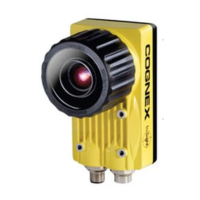
1720 Series Wafer Readers
iii
Precautions
Observe these precautions when installing the In-Sight wafer reader to reduce the risk of injury or
equipment damage:
• The wafer reader is intended to be supplied by a Cognex power source (24V ±10%).
Any other voltage creates a risk of fire or shock and can damage the In-Sight
hardware.
• Do not install the wafer reader in locations that directly expose it to environmental
hazards such as excessive heat, dust, moisture, humidity, impact, vibration, corrosive
substances, flammable substances, or static electricity.
• To reduce the risk of damage or malfunction due to over-voltage, line noise,
electrostatic discharge (ESD), power surges, or other irregularities in the power
supply, route all cables and wires away from high-voltage power sources.
• Although the wafer reader is a Class 1 LED Product, it is not recommended to stare
directly into the illumination LEDs when the wafer reader is receiving power. Note
that the In-Sight 1722 wafer reader LEDs emit infrared light, therefore the illumination
LED lights are not visible.
• Do not open the wafer reader. This device does not contain user-serviceable parts.
Do not make electrical or mechanical modifications to the In-Sight hardware. The
LED emitted light levels have not been tested when the wafer reader is open,
therefore Class 1 LED Product certification is not guaranteed if the wafer reader is
open. Unauthorized modifications violate your warranty.



 To Next Page