KEYBOARD
NOTES
On the C128 keyboard some keys function
in
all three modes of the
computer. Other keys can only be used
in
a particular mode or modes. The
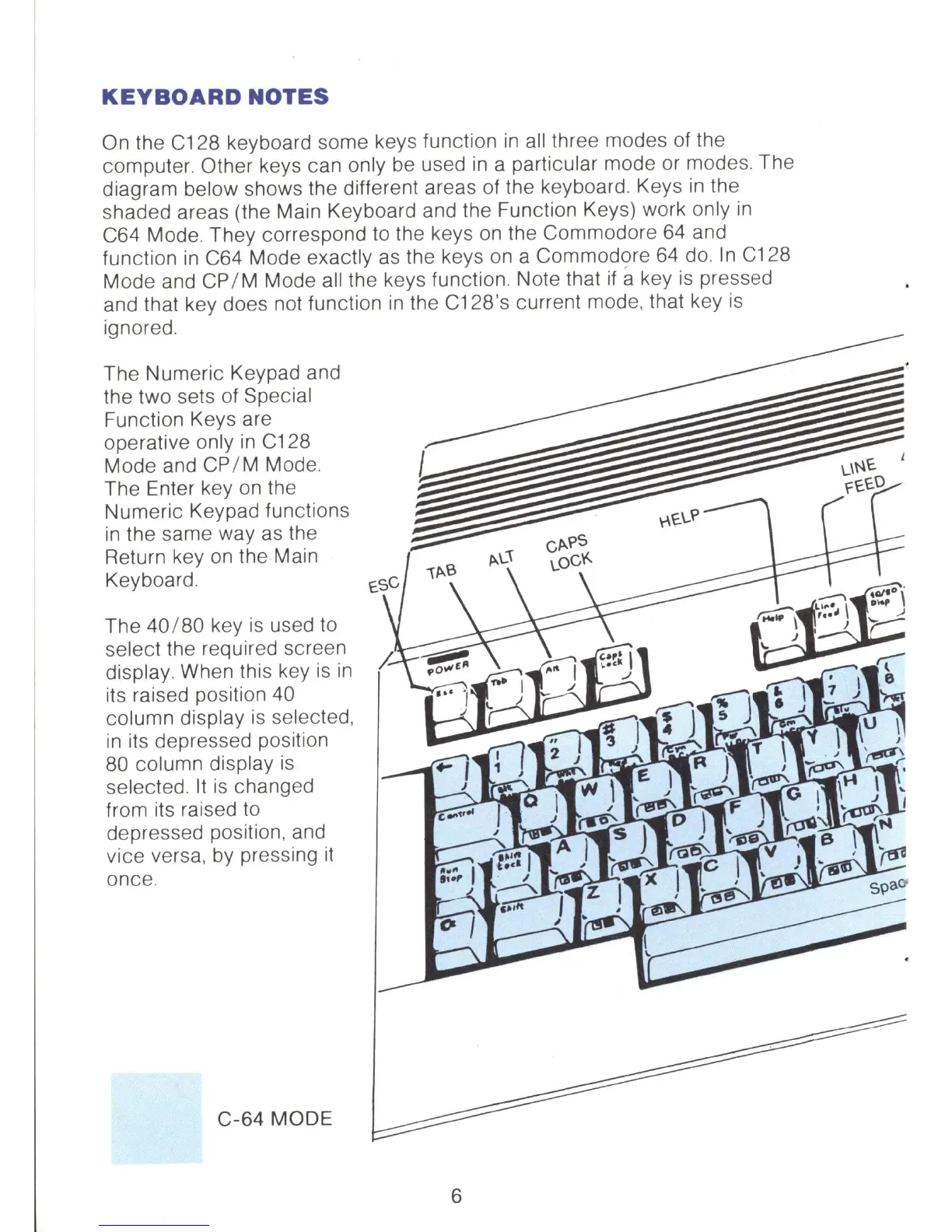
diagram below shows the different areas of the keyboard. Keys
in
the
shaded areas (the Main Keyboard and the Function Keys) work only
in
C64 Mode. They correspond to the keys on the Commodore
64
and
function
in
C64 Mode exactly
as
the keys
on
a Commodore
64
do.
In
C128
Mode and
CP
/ M Mode all the keys function. Note that
if
a key
is
pressed
and that key does not function
in
the C12S's current mode, that key
is
ignored.
The Numeric Keypad and
the two sets
of
Special
Function Keys are
operative only
in
C128
Mode and
CP
/ M Mode.
The Enter key on the
Numeric Keypad functions
in
the same way
as
the
Return key
on
the Main
Keyboard.
The 40 /
S0
key
is
used to
select the required screen
display. When this key
is
in
its raised position 40
column display
is
selected,
in
its depressed position
80
column display
is
selected.
It
is
changed
from its raised to
depressed position, and
vice versa, by pressing
it
once.
C-64
MODE
6



 To Next Page