MODE
SWITCHING
CHART
~
TO
OFF
C128
C128 C64 CP/M
CP/M
40COL
80 COL
40COL
80
COL
C128
1.
Check
that
1.
Press
ESC
key
; t.
Check
thai
Check
that
1.
Check
Ihat
40 COL
40/80
key
is
release
.
40
/
80
key
IS
40/
80
key
is
UP
40/80
key
is
Up.
UP
.
2.
Pre
ss
X
key
.
UP
.
Turn
computer
2.
Turn
computer
2.
Turn
computer
OR
2.
Turn
computer
OFF
.
Ihen
ON
OFF.
then
ON
.
ON
.
1.
Check
that
OFF
,
Ihen
ON
.
40
/
80
key
is
UP
.
2.
Pre
ss
RE
SET
button
.
C128
1.
Pre
ss
40
/
80
1.
Press
ESC
key
;
Press
40
/
80
1.
Press
40
/
80
key
1.
Check
that
80 COL
key
DOWN
.
release
key
DOWN
.
DOWN
.
40
/
80
key
is
2.
Turn
computer
Press
X
key
Turn
computer
2.
Remove
CP
IM
DOWN
.
ON
.
OR
OFF
,
then
ON
.
syslem
disk
Irom
2.
Remove
CP
I M
Press
40
/
80
drive
. il
system
disk
Irom
key
DOWN
.
necessary
.
drive
.
II
2.
Press
RESET
Turn
com
puler
necessary
.
button
OFF
.
then
ON
. 3.
Turn
computer
OFF
,
then
ON
.
C64
1.
Hold
(.
key
1.
Type
GO
64
.
1.
Typ
e
GO
64
;
Turn
compu
te
r
1.
Turn
computer
DOWN
.
press
RETURN
.
press
RETURN
.
O
FF
.
OFF
.
2.
Turn
compu
ler
2.
The
computer
2.
The
computer
2.
Check
Ihat
40
1
2.
Check
that
40
1
ON
.
responds
'
responds
:
80
key
is
UP
.
80
key
is
UP.
OR
ARE
YOU
SURE?
ARE
YOU
SURE
?
Hold
DOWN
(.
3.
Hold
DOWN
(.
Insert
C64
Type
Y;
press
Type
Y;
press
key
while
turning
key
while
turning
cartridge.
RETURN
.
RETURN
.
computer
ON
.
computer
ON
.
2.
Turn
computer
OR
OR
ON
.
Turn
computer
Turn
computer
OFF
OFF
.
I
nsert
C64
2.
Insert
C64
cartridge .
cartridge .
Turn
power
ON
.
3.
Turn
power
ON
.
CP/M
Turn
disk
drive
1.
Turn
disk
drive
1.
Turn
disk
drive
Check
that
1.
Insert
CPIM
40COL
ON
ON
.
ON
.
40
/
80
key
is
utilities
disk
in
Insert
CPIM
2. Insert
CPIM
2.
Insert
CPIM
UP
.
dr
iv
e.
system
di
sk
In
system
disk
In
sys
tem
disk
In
2.
Turn
disk
drive
2.
At
screen
drive drive
.
drive
.
ON
.
prompt,
A)
type
:
Check
that
3.
Check
that
3.
C
he
ck
that
3.
Insert
CP
I M
OEVICECO
N
OUT:
::
4QCOl
40
/
80
key
IS
40
/
80
key
IS
40
/
80
key
is
system
disk
in
3.
Press
RETURN
,
UP
UP.
UP
.
drive
.
Turn
computer
4.
Type
:
800T
4.
Type
:
BOO
T 4.
Turn
computer
ON
5
Press
RETURN
5
Press
R
ET
URN
OFF
.
then
ON
.
CP/M
Turn
disk
drive
1.
Turn
disk
drive
Turn
disk
drive
Press
40
/
BO
Insert
CPI M
80 COL
ON
.
ON
.
ON
.
key
DOWN
ut
ilities
disk
In
Insert CPI M
Insert
CP
I M
Insert
CP
I M
Turn
disk
drive
drive
.
system
disk
In
system
d
isk
In
system
disk
In
ON
.
2.
At
screen
drive
drive
.
drive
.
Insert
CP
I M
prompt.
A)
type
'
Press
40/
80
3.
Press
40
/
80
3.
Check
that
system
diSk
In
OEVICECOfrrtQtJT
-80COl
key
DOWN
.
key
DOWN
.
40
/
80
key
IS
drive
.
3
Press
RETURN
,
4.
Turn
computer
4.
Type
:
BOOT
DOWN
.
4.
Turn
computer
ON
5.
Press
RETURN
4.
Type
:
BOOT
OFF
,
then
ON
.
5.
Pres
s
RE
T
URN
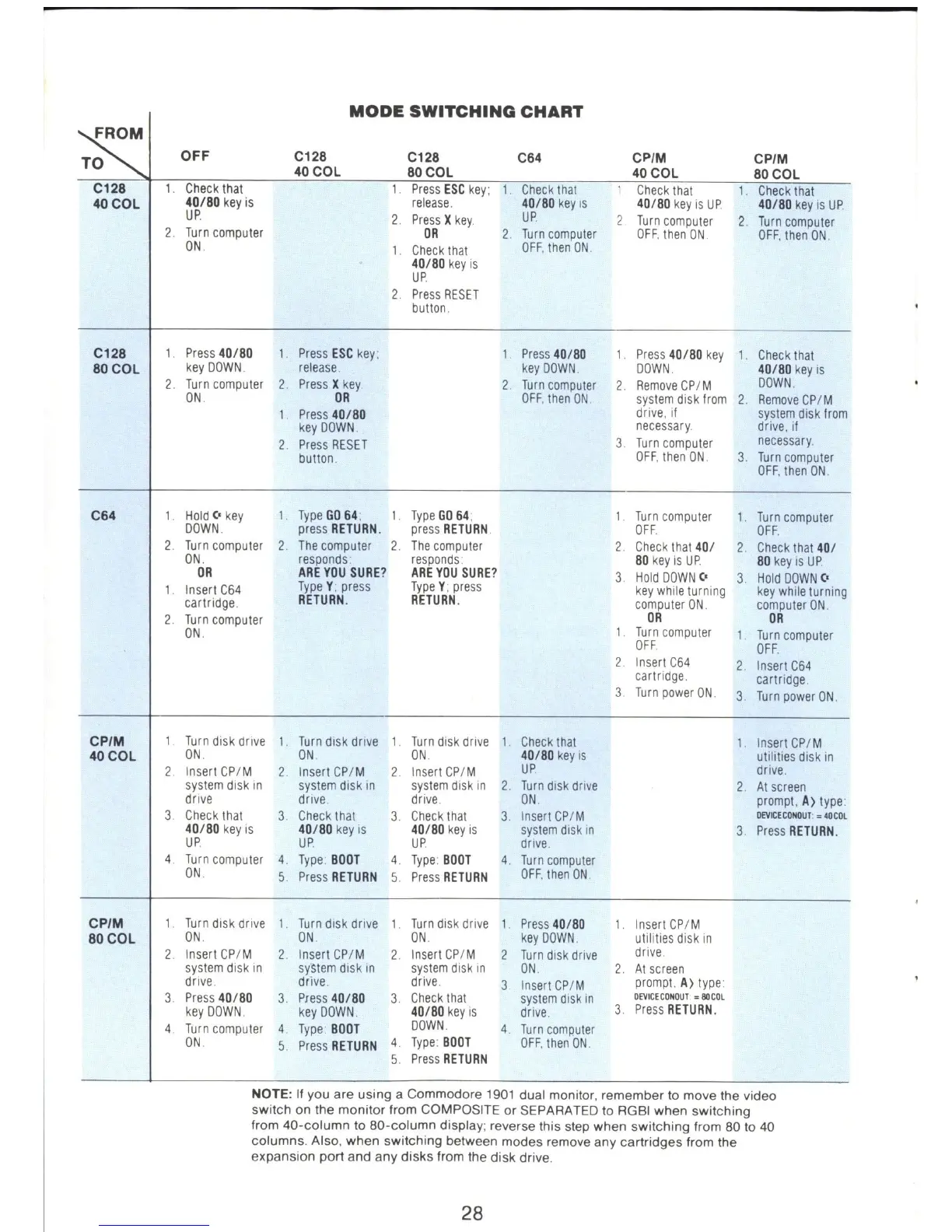
NOTE: If you are using a Commodore
1901
dual monitor, remember to move the video
switch on the monitor from COMPOSITE or SEPARAT
ED
to RGBI when switching
from 40-column to
BO
-co
lumn display; reverse this step when switching from
BO
to
40
columns. Also, when switching between modes remove any cartridges from the
expansion port and any disks from
th
e disk drive.
28



 To Next Page