Chapter 2: Product overview
LED Icon Description Online LED status LED status description
Blue/Green
(alternating)
Acquiring IP addresses
IP Link/Online
Firmware downloads in progress
Green (slow blink)
Green (on)
Green (fast blink)
Blue (slow blink)
Blue (on)
Blue (fast blink)
No clients found (5 GHz or dual-band)
Clients found, but no traffic (5 GHz or dual-
band)
Clients with active traffic/WPS (5 GHz or
dual-band)
No clients found (2.4 GHz band only)
Clients found, but no traffic (2.4 GHz band
only)
Clients with active traffic/WPS (2.4 GHz
band only)
CAUTION: If all LEDs are blinking blue (fast blink), a grounding defect was detected.
Unplug the SBG8300 until the grounding defect can be addressed.
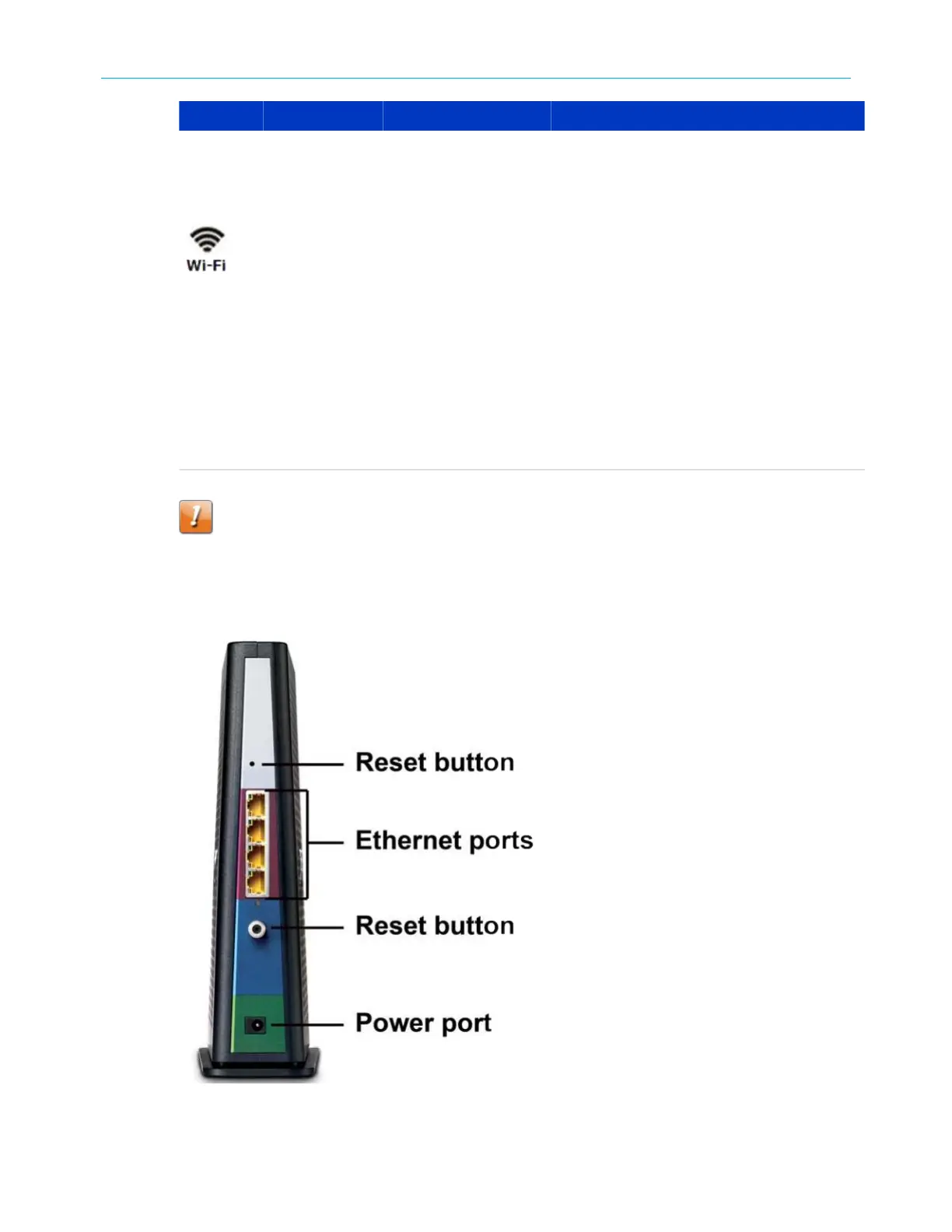
Rear panel
Figure 2: SBG8300 rear view
SURFboard
®
SBG8300 DOCSIS 3.1 Wi-Fi cable modem User Guide STANDARD Revision x.5 13



 To Next Page