Chapter 4: Setting up a Wi-Fi network connection
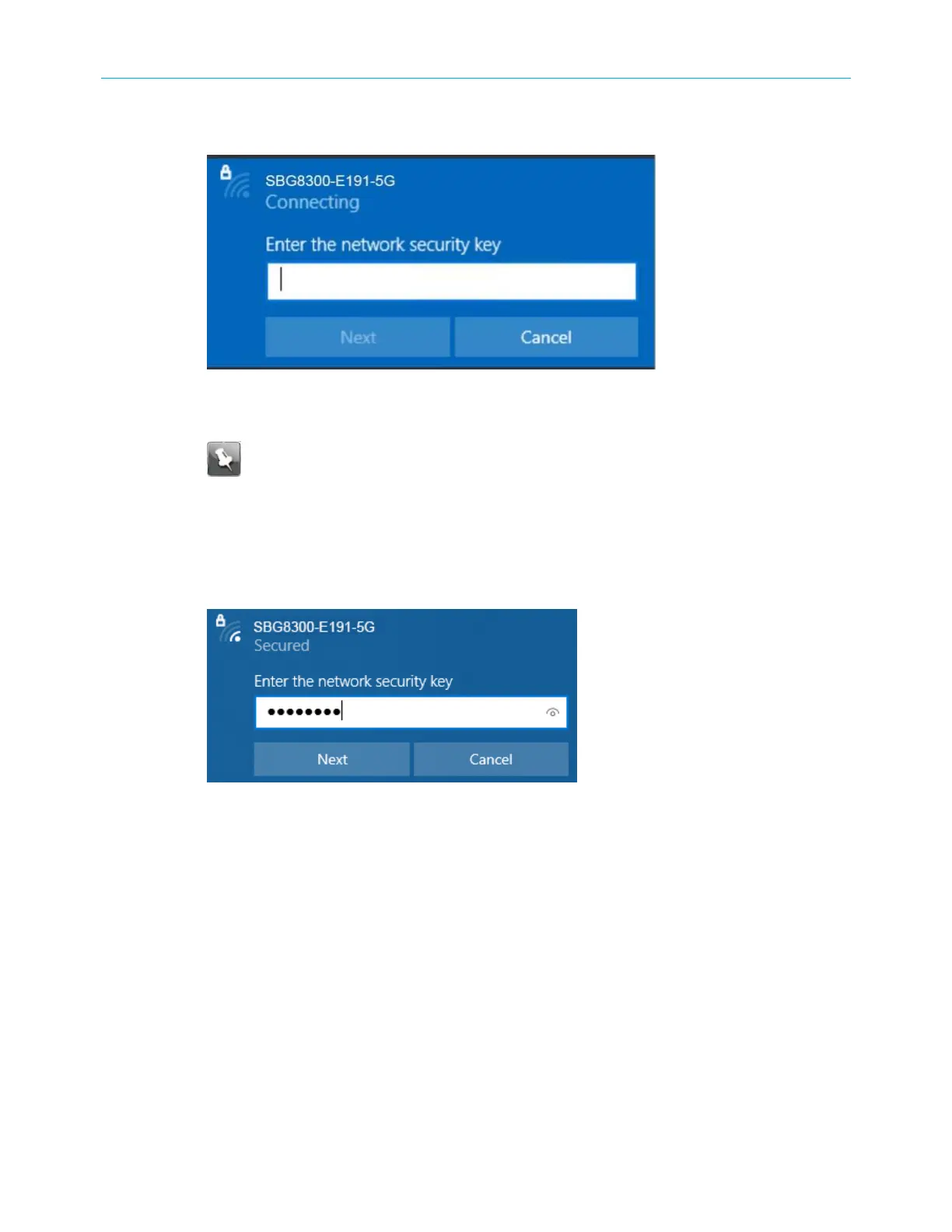
4. Click Connect to open the Connect to a Network window and set up your new network
password.
Figure 12: Network security key window
5. Enter the Network Security Key (your Wi-Fi network password) in the Security key field.
Note: You can use the default Wi-Fi Security Key code listed on the SBG8300 Wi-
Fi cable modem label or enter your own personal Wi-Fi network password. See
Change the login password (page 46) for more information on creating login
passwords.
If you have already changed your Wi-Fi network password using the SBG8300 Web
Manager, enter that password in the Enter the network security key field and then click
Next.
Figure 13: Network connection-create network password window
Connect using the Windows control panel
1. From the Windows taskbar on your computer, click Start button and then click Control
Panel.
2. Click Network and Sharing Center to open the Network and Sharing Center window.
Figure 14: Control panel-network and sharing center window
SURFboard
®
SBG8300 DOCSIS 3.1 Wi-Fi cable modem User Guide STANDARD Revision x.5 24



 To Next Page