3
Installation
Installation l 3-7
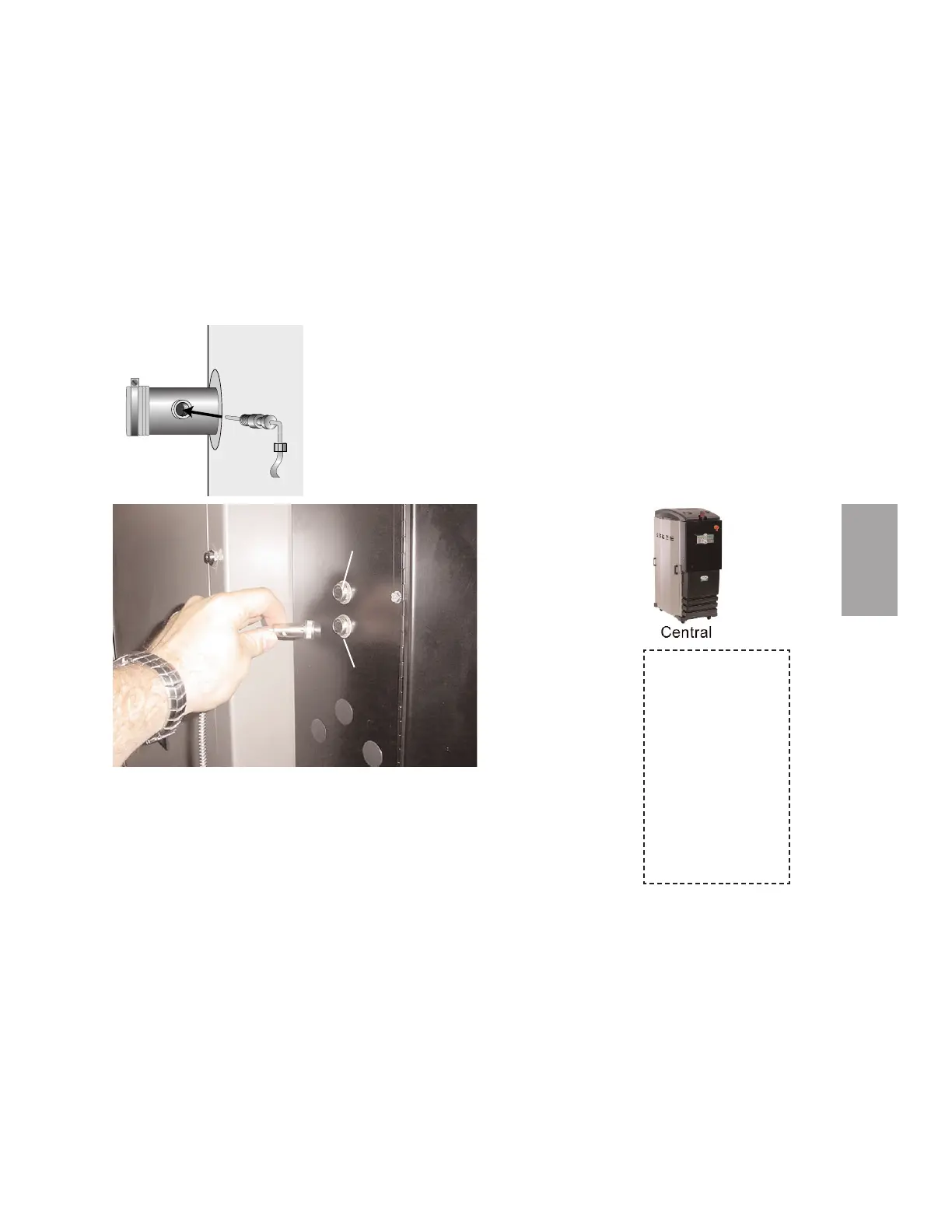
Connecting the Process RTD Probe
The process RTD probe monitors the temperature of the drying air as it enters the
hopper. If the probe is not installed correctly, temperature readings will be inaccurate.
1 Insert the probe at the inlet to the
hopper. The end of the probe must not
touch the walls of the inlet. The tip of the
probe should be approximately in the cen-
ter of the tube. Tighten the compression fit-
ting to lock the probe in place.
2 Plug the probe’s
cable into the
receptacle
labeled process
on the left side of
the electrical
enclosure. Hand
tighten the con-
nector. Coil any
excess cable and
secure it with a
wire tie.
Connecting the Setback RTD
1 Insert the probe in the hopper outlet at the top of the hopper. The end of the
probe must not touch the walls of the inlet. The tip of the probe should be
approximately in the center of the tube. Tighten the compression fitting to lock
the probe in place.
2 Plug the probe’s cable into the receptacle labeled setback on the left side of
the electrical enclosure. Hand tighten the connector. Coil any excess cable
and secure it with a wire tie.
Process RTD
Setback RTD
When configured as
a central dryer, moni-
toring the drying air
temperature is not
necessary since there
is no process heater
in the system.
Therefore, installa-
tion and connection
of the RTD probe
and/or setback probe
is not applicable.








 To Next Page