Carousel Plus W Series Dryer
Control Functions
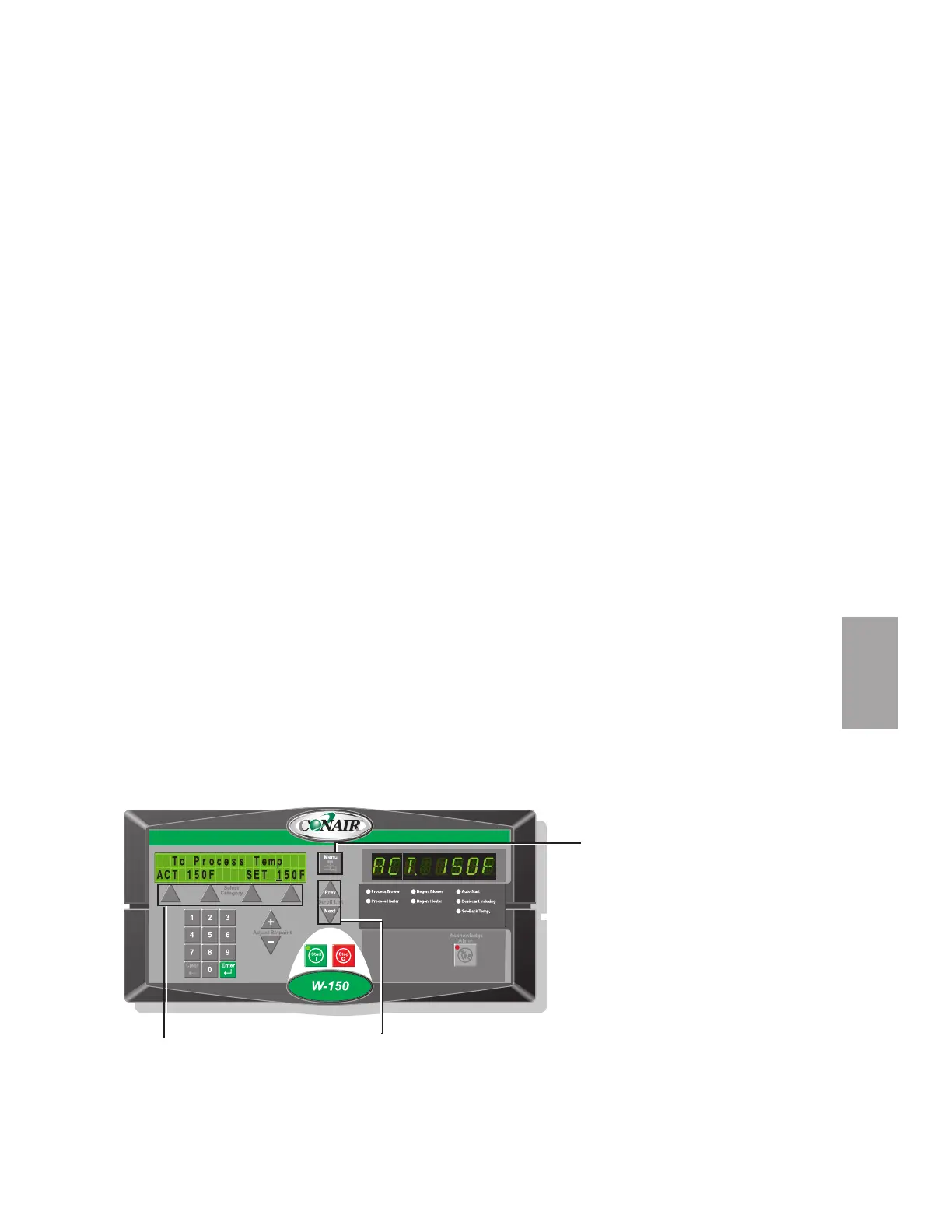
Dryer functions are values that you can set or monitor in the Screen Title and
Status Display windows. Press the Menu button then the Scroll List “Next” or
“Prev” buttons until the function you want to set or monitor appears in the Screen
Title window.
Control Function Flow Charts
The charts beginning on page 4-4 provide a quick summary of the control func-
tions. For an explanation of each control function, see Control Function
Descriptions (page 4-11). The screen numbers correspond with the numbers
beside each block in the flow chart.
NOTE: In the flow charts of the display screens that follow this page, the grey shaded
screens denote optional functions. If the options were not purchased with the dryer,
those screens will not appear. Most options can be purchased and installed in the field.
How to Navigate the Menu Tree
To scroll through main menu, use scroll buttons (“Next”, “Previous”). Push
“Menu” to access Dryer Main Menu . To access the Status, Setup, Diagnostic and
Password screens, use the select category buttons under the digital read-out and
then the scroll buttons (“Next”, “Previous”) to scroll through the parameter lists.
Operation l 4-3
4
Operation
✐
Scroll Buttons
Select Category Buttons
Menu Button








 To Next Page