4 - 6 8 l Op e ra ti o n
C o n t r o l Fun c ti o n D es c ri p ti o ns -
S t a n d Al o ne Co n f i g u r a t i o n ( c on t in u e d )
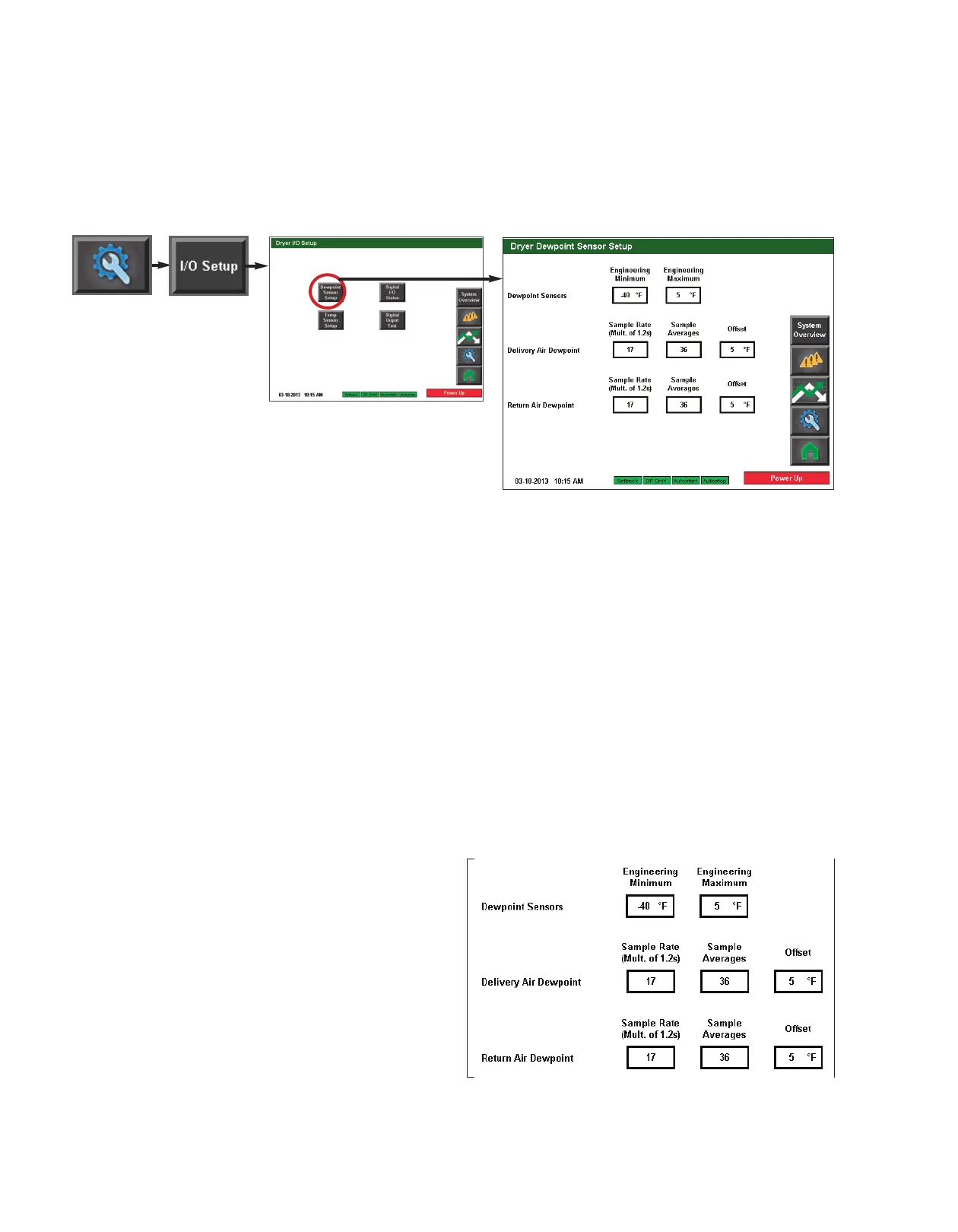
Dewpoint Setup screen
To access the Dryer Dewpoint Sensor Setup screen:
1 Press the Settings button from the Home screen.
2 Press the I/O Setup button.
3 Press the Dewpoint Setup button.
The Dryer Dewpoint Sensor Setup screen provides the user with the ability to adjust the set-
tings for the Dewpoint sensors. This screen allows for adjustment of:
• Sensor minimum and maximum
• Delivery air dewpoint sample rate, sample averages, and offset
• Return air dewpoint sample rate, sample averages, and offset
To change a setpoint:
1 Press the text inside
white box with thick
black outline of the set-
ting you would like to
change.
2 Use the keypad to enter
the new setting. Setting
range will be displayed at
the bottom of the pop up
keypad.
NOTE: Proper login is required to
change these settings.
✐
IMPORTANT: Factory default
settings should not be
changed without first con-
sulting with Conair.
Conair’s Instant Access 24/7
Parts and Service number is
800-458-1960.
Outside the U.S., dial
814-437-6861.








 To Next Page