ConMet | 5701 SE Columbia Way, Vancouver, WA 98661, USA | 800.547.9473 | conmet.com
Part No. 10085397A
10-2021 Printed in the USA
DISC BRAKE ROTOR REPLACEMENT
Install the brake rotor using only the hardware provided in the kit.
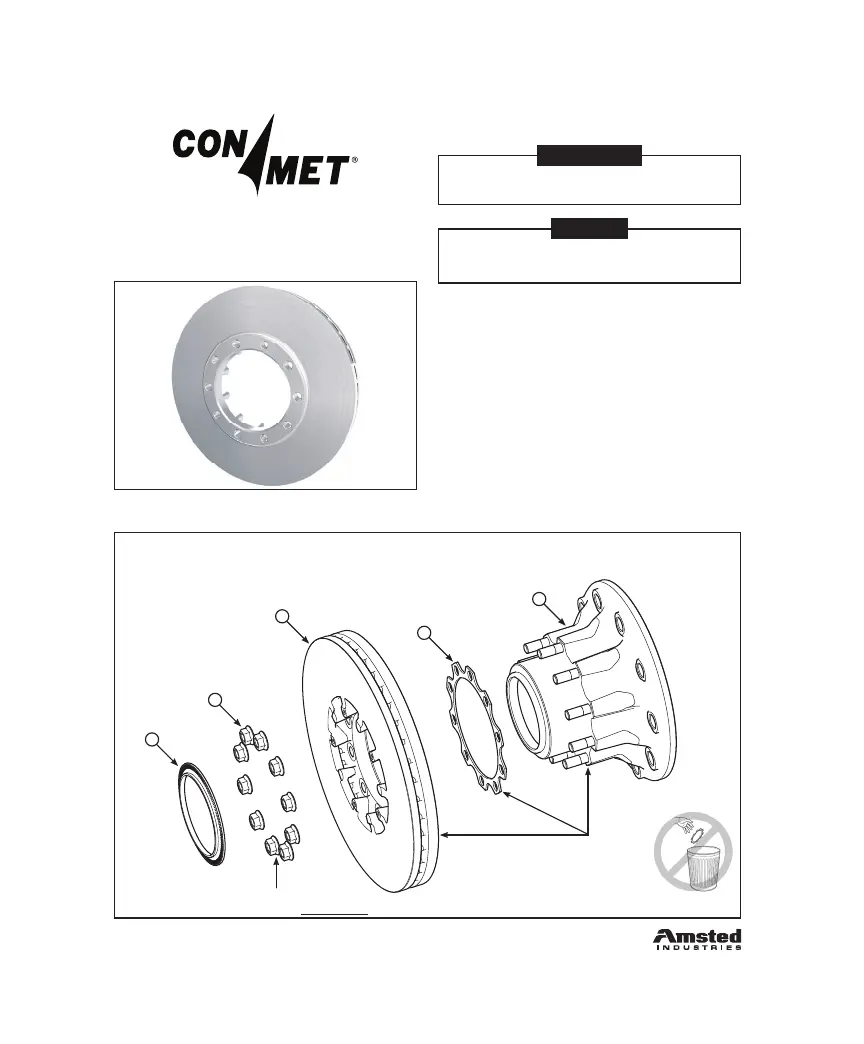
If present, retain stainless steel insulator (see image below).
1. If the rotor mounting studs were removed from the hub during disassembly,
apply Loctite® 272 to the coarse end of the doubleended stud and to the rotor
mounting threads in the hub. (If Loctite® 272 is not available, use Loctite® 262.)
Install and torque the rotor studs to 65 ft-lbs. for iron hubs and 50 ft-lbs. for
aluminum hubs.
2. Clean all mating surfaces.
3. Place the stainless steel insulator (for aluminum hubs only) and the rotor on the
hub.
4. Install and torque the new, included rotor mounting nuts in a star pattern to
200 ft-lbs.
5. Press the ABS ring onto the hub.
Service Kit Part Number 10041215
ConMet FF-Front Flat Rotor10037760
Rotor Minimum Thickness 1.46” (37mm)
ConMet 10037760 Flat Rotor
1. Hub Assembly (not included)
2. Stainless Steel Insulator (not included, for aluminum hubs only)
3. 10037760 Flat Rotor
4. 5/8”-18 UNF Flanged Hex Head Nut (10 ea.)
5. ABS Tone Ring
SEE CONMET SERVICE MANUAL FOR
DETAILED HUB SERVICE INFORMATION
Clean all component mating
surfaces before reassembly
NOTE
Failure to follow the stated instructions can jeopardize the rotor attachment
and potentially lead to failure of the rotor and/or damage to the wheel hub.
WARNING
DO NOT THROW AWAY STAINLESS STEEL INSULATOR
5/8-18 UNF anged hex head nuts.
Torque to 200 ft-lbs in a star pattern.
1
2
3
4
5
60 ConMet


 To Next Page