EasyManua.ls Logo

Consilium ST450EC - Control and LC-Display

Consilium ST450EC
44 pages
Print Icon
To Next Page IconTo Next Page
To Previous Page IconTo Previous Page
Loading...
16
ST450EC
v1.11
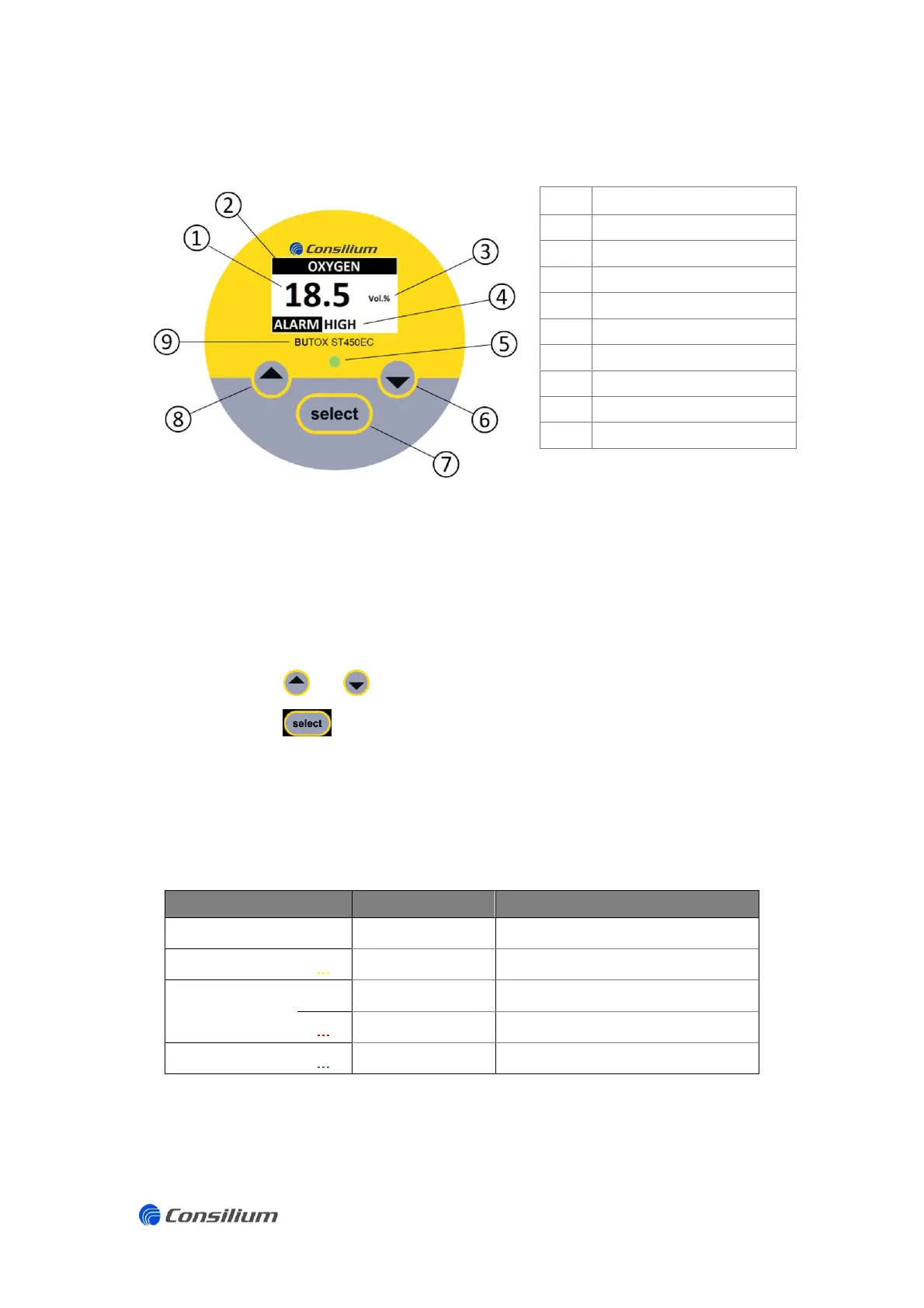
3.2 Control and LC-Display
No.
Description
1
Measured value
2
Gas type
3
Units
4
Error / status alert
5
Status LED
6
‘Down’ button
7
‘Select / enter’ button
8
‘Up’ button
9
Type / model
3.2.1 Control buttons
The ST450EC features capacitive control buttons which can be operated through the glass
cover, without the need to remove the lid.
Use the and buttons are to navigate through various menus.
Use the button to select the highlighted option.
3.2.2 Front panel Status-LED
The front panel status LED offers fast status information of the sensing head and offers the
following information.
Colour
LED
Description
GREEN
Continuous
Normal operation
YELLOW
Flashes
System failure
RED
Continuous
Low alarm (A1)
Flashes
High alarm (A2) and Overload
BLUE
Flashes
Menu active

Related product manuals