5
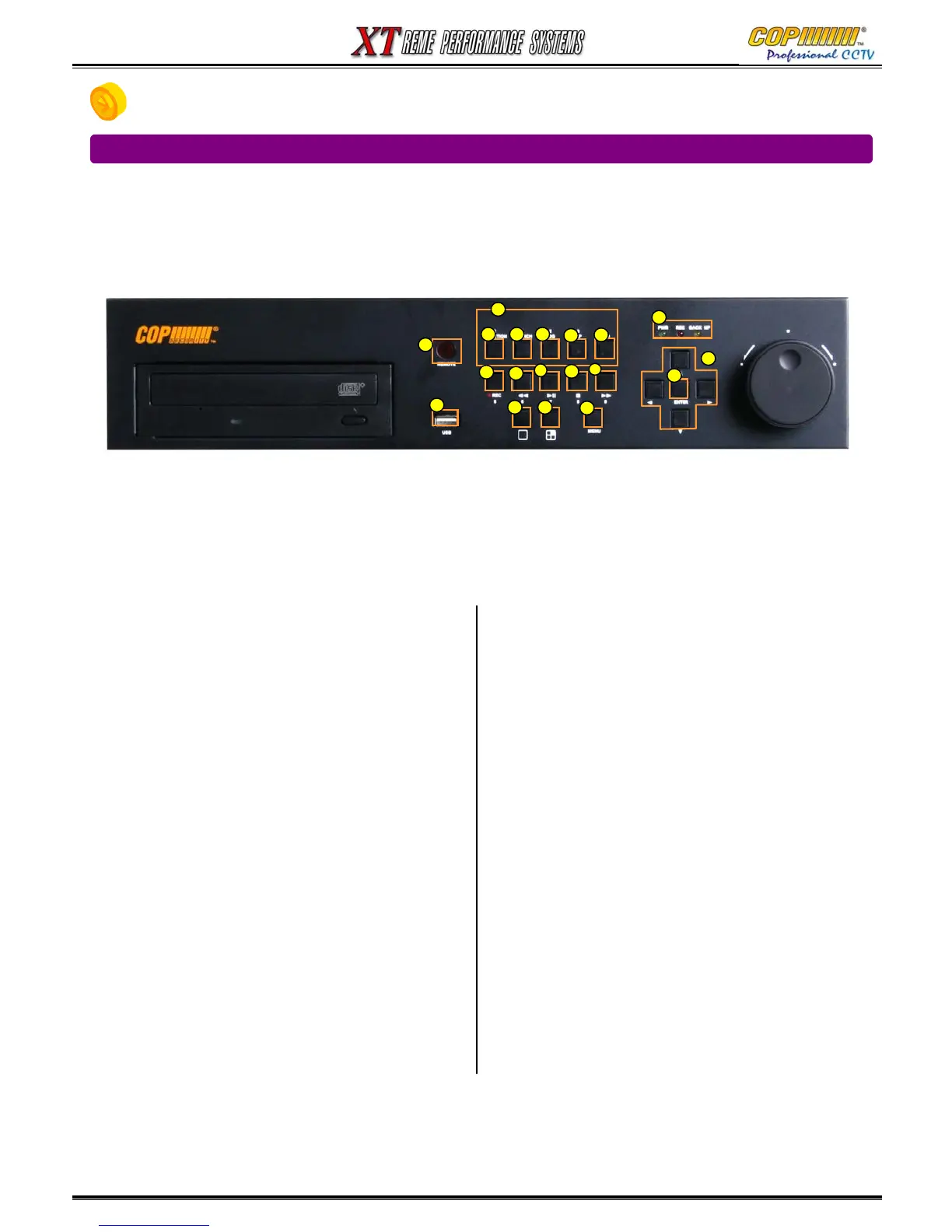
1. Buttons & Connections
1) Number Buttons – Dual Function Buttons
Provide Menu Data entry and Alternative Functions:
See 3), 8), 7), 14) & 16) Below.
2) Manual Record Button
Starts & Stops Continuous Recording.
(Not required for Schedule or Event Recording)
3) Function Button – Displays the User Function Menu
Status, Audio, Backup, P/T/Z, SEQ, Log list
4) Menu Button
Displays the Main Menu, after correct password entry,
and Exits the current Menu.
5) Cursor Buttons
Provide navigation through menus. Also provides Pan
Tilt &
Zoom operation of PTZ cameras.
6) Enter Button
Enters Sub-Menus and performs setup changes.
7) Log Button
Displays the Log Menu, and Exits the Log Menu.
8) Search Button
Displays Playback Search Menu
9) Fast Rewind Button
Plays backward upto 128x normal speed.
Reverse frame by frame playback when play paused.
10) Play/Pause Button
Pauses and re-starts playback
11) Stop Button
Stops playback and reverts display to Live mode
12) Fast Forward Button
Plays forward upto 128x normal speed.
Advance frame by frame playback when play paused.
14) PIP Button Shows “Picture In Picture” on Main Monitor
16) Sequence Button
Shows Sequence of Single or Quad Images
17) Single Channel Button
When pressed repeatedly will scroll from 1 thru 4
18) Quad Channel Button
21) Led Condition Indicators
Indicates present system status information
(PWR: System On/Off, REC: Record On/Off,
BAK: Backup On/Off )
22) Infra-Red Remote Control Receiver
23) USB 2.0 Socket
For backup / archive of recordings to USB device.
1-1 FRONT PANEL – 4 Channel
1. USAGE OF FUNCTION KEYS
1
2
3
4
5
6
78
9
10
11
12
14
16
17 18
21
22
23



 To Next Page