7
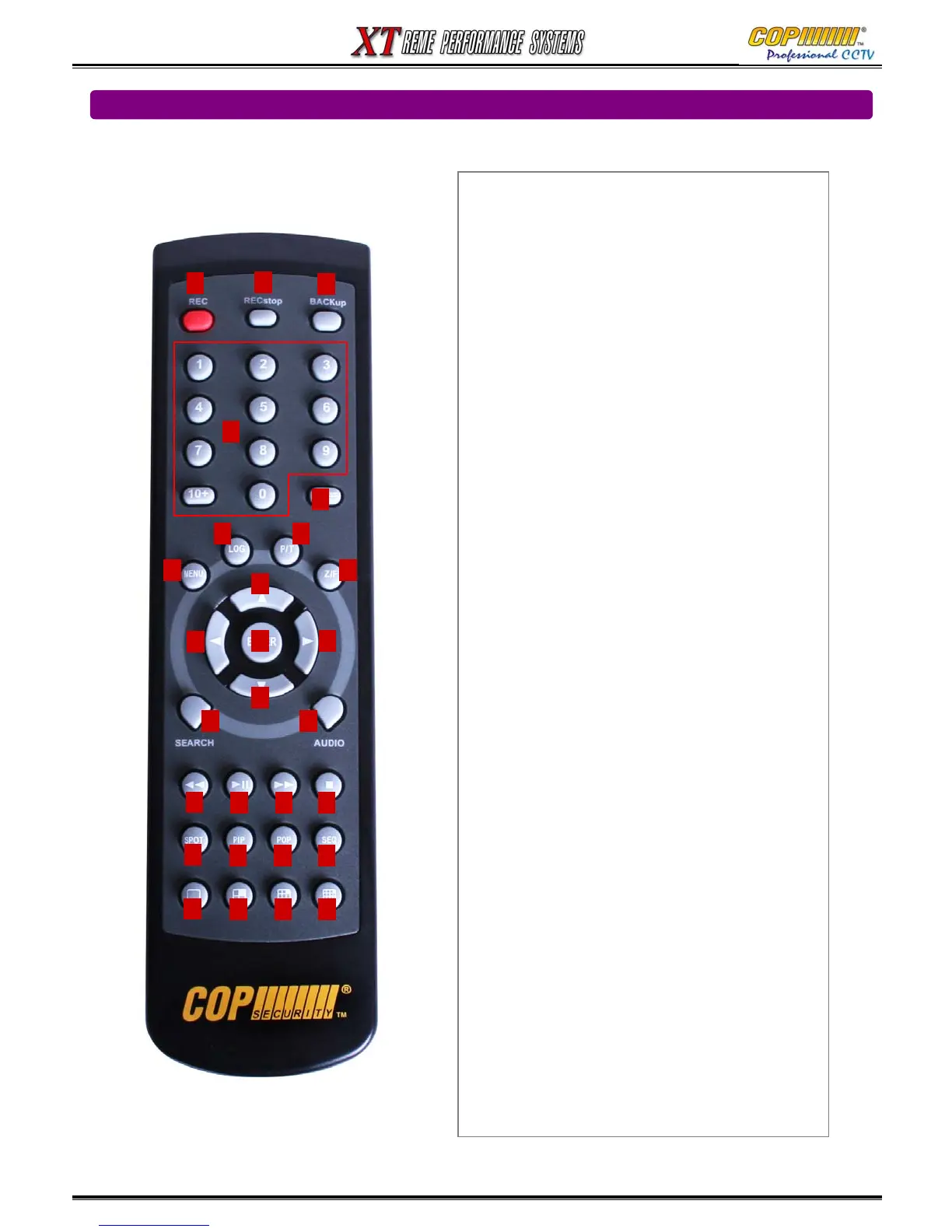
1) Number Buttons
Provides channel selection and Menu Data entry
2) Status Button
Shows the current status of DVR system
3) Audio Button
Displays Audio Options Menu
4) Backup Button
Displays Backup Options Menu
5) P/T Button
Enables Pan & Tilt Functions
6) Z/F Button
Enables Zoom & Focus Functions
7) REC. Button
Records images
8) Manual Record Button
Starts & Stops Continuous Recording
(Not required for Schedule or Event Recording)
9) Menu Button
Displays the Main Menu, after correct password entry
Exits the current Menu
10) Cursor Buttons
Provide navigation through menus & PTZ Operation
11) Enter Button
Enters Sub-Menus and executes setup changes
12) Search Button
Displays (& Exits) Playback Search Menu
13) Log Button
Displays (& Exits) the Log Menu.
14) Fast Rewind Button
Plays backward upto 128x normal speed
Reverse frame by frame playback when play paused
15) Play/Pause Button
Pauses and re-starts playback
16) Fast Forward Button
Plays forward upto 128x normal speed
Advance frame by frame playback when play paused
17) Stop Button
Stops playback and reverts display to Live mode
18) SPOT button
Displays Spot monitor setup menu
19) PIP Button Shows “Picture In Picture” on Main Monitor
20) POP Button Shows “Picture On Picture” on Main Monitor
21) Sequence Button
Shows Sequence of Single or Quad Images
22) Single Channel Button
23) Quad Channel Button
24) Nine Channel Button
25) Sixteen Channel Button
1
2
3
4
5
6
8
7
9
1011
12
13
14
15 16 17
18
19 20 21
22
23 24 25
1.3 Remote controller
1. USAGE OF FUNCTION KEYS
10
10
10



 To Next Page