Cosman G4 Radiofrequency Generator Service Manual (SPI 11291 Rev A)
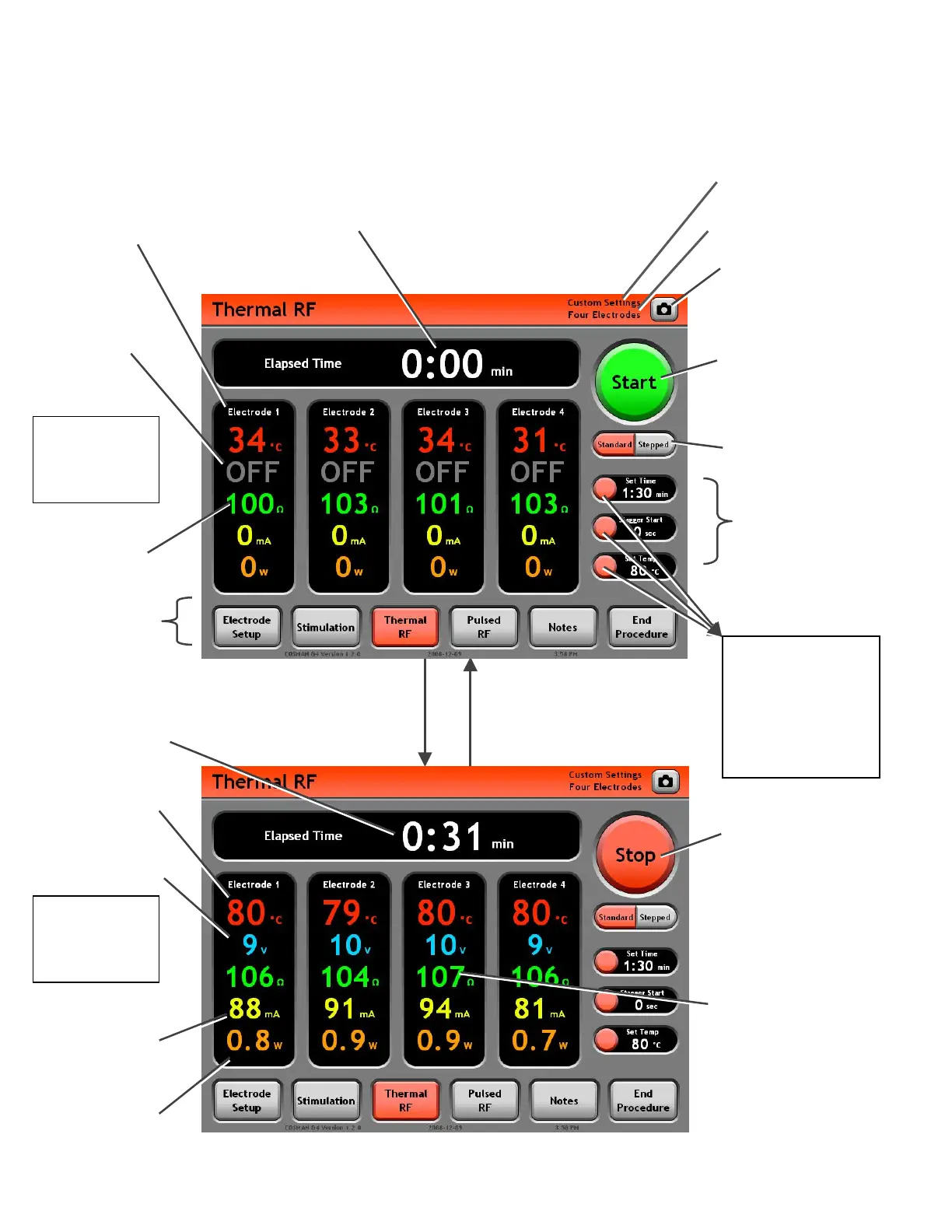
9.2 Thermal RF Screen
Time
: Holds value from
last instance of Thermal
RF output.
Screen Shot Button:
Save an image of the
screen to the Procedure
Record.
Mode Ba
: A
other procedur
screens
ccess
e
Standard
Mode
Output Off
Electrode Panel (Black area):
Displays all readings for the
indicated electrode output. When
enabled, RF output is delivered to
this output.
Standard
Mode
Output On
Output Off
Indicator
Electrode Setup Indicator
(Section 7.1)
Personal Settings Preset
Indicato
Time
: Counts up to Set
Temp in Minutes and
Seconds (min:sec) w
RF output is on.
hen
RF Current Reading:
In units of RMS
Milliamps.
RF Power Reading:
In units of RMS
Watts.
Mode: Select Standard
or Stepped control mode
Settings Panels:
Lists the current
Thermal RF settings.
Thermal RF
Settings
Section 9.2.2
• Change settings
associated with
the target
Settings Panel
Press front-panel or on-screen
Start Button or depress
Footswitch: Thermal RF output
is delivered to all active
electrodes.
Press front-panel or on-screen
Stop Button, release Footswitch,
timed output completes, or error
occurs: Electrode output is
turned off.
Press a Settings
Panel button
Start/Stop Button:
Press “Start” to turn
electrode output on.
Press “Stop” to turn
electrode output off.
RF Voltage Reading:
In units of RMS Volts.
Impedance reading:
• Held at latest value
(gray color) when
during Stagger S
Reads “
tart.
• --- ” when
Impedance greater
than 3000 (open
circuit
.
Temperature reading:
Reads “-- °C” when
Temperature is less
than 10°C or absent.
Start/Stop Button:
Press “Start” to turn
electrode output on.
Press “Stop” to turn
electrode output off.
Impedance
Readin
Section 9


 To Next Page