Snack / Refreshment Center Setup and Operator's Guide
Page 14April, 1999 1670001
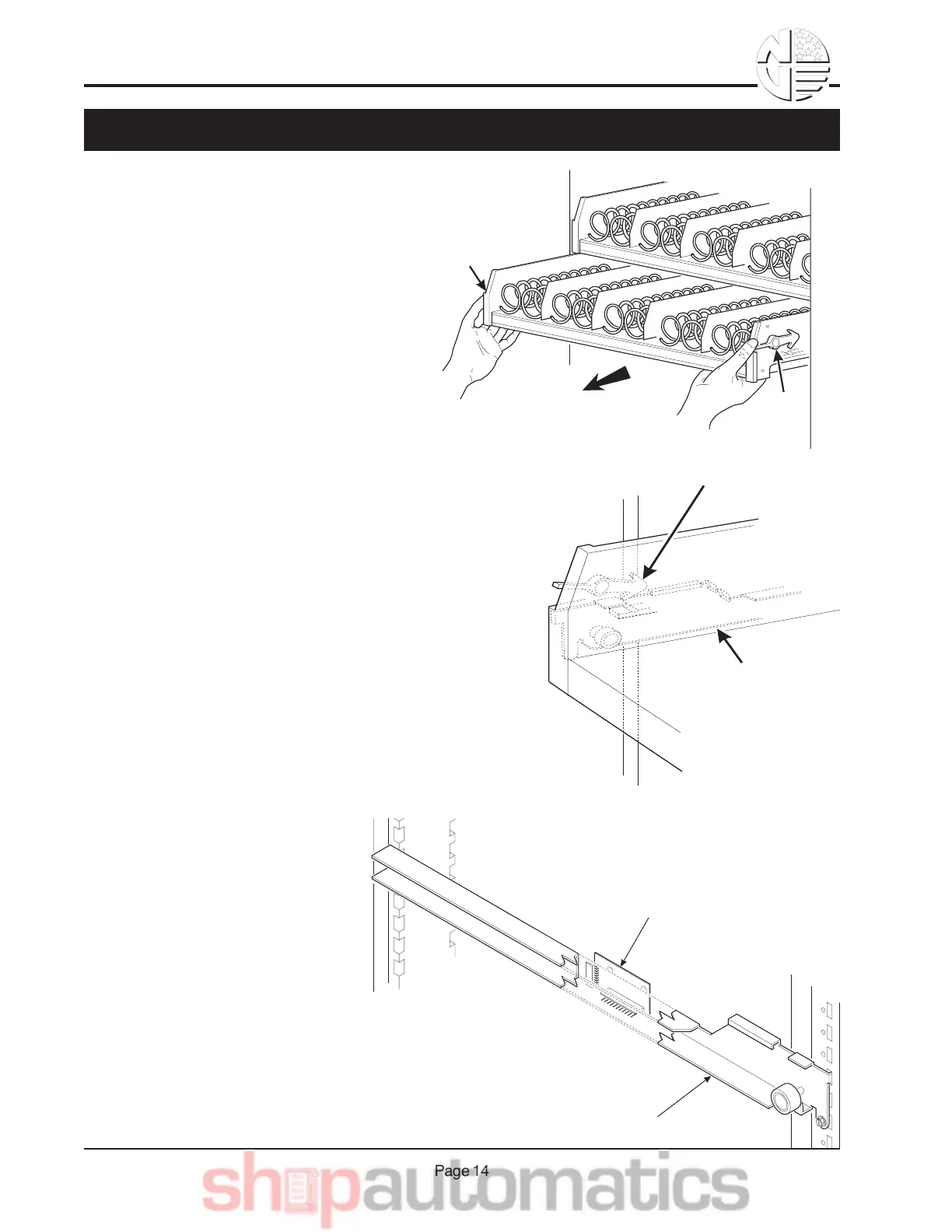
•Study this procedure before you install a tray for the first
time; while you are holding the tray you will not be able to
see this area. Proceed as follows:
1. Push back on the tray slightly with your
palms. This releases the tray latches.
2. Push down on the tray latches with your
thumbs.
TRAY
LATCH
TRAY
LATCH
PULL
TRAY
LATCH
TRAY
GUIDE
RAIL
PC BOARD
ATTACHED TO
TRAY GUIDE
TRAY GUIDE RAIL
'$+"C*,D& 1& =% 1 F
3. Pull the tray forward until you hear and
feel the rear tray rollers drop into a cut-out in the top of the guide
rail.
4. Unplug the tray wiring harness
from the PC board mounted on
the tray guide rail JUST ABOVE
the tray you are removing.



 To Next Page