thecrowgroup.com Page | 9
Installing the SHEPHERD™
Note: Be sure that the control panel is mounted near a socket outlet that is easily accessible. The socket outlet for the power
supply of the control panel should have its own fuse circuit
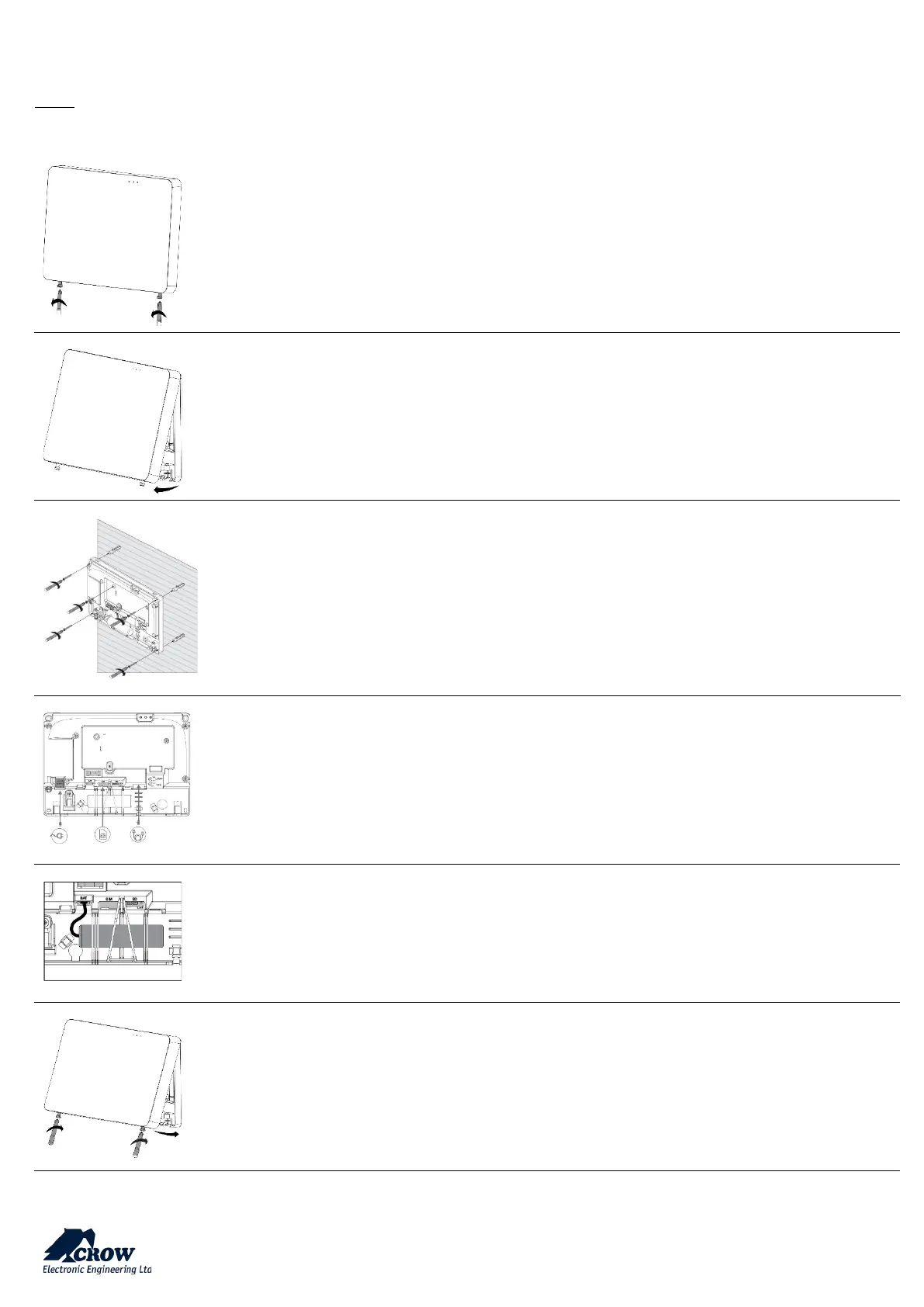
Use Philips screwdriver to unscrew the 2 holding screws located at the bottom of the panel
The screws are handling by a hidden spring. They cannot be totally removed
Remove the front cover of the panel by tilt it outside
Place the unit on the wall
Use the water level indicator to position it straight on the wall
Mark the holding holes on the wall and drill the wall
Mount the unit on the wall with screws
Ethernet – Connect the Ethernet cable to a router or an internet outlet
GSM – Insert micro-SIM card into the SIM card slot
AC – Plug into a power outlet
Connect the backup battery
Insert back the front cover by tilting it inside
Close the 2 holding screws


 To Next Page