thecrowgroup.com Page | 61
Overview
Walk Test
A Walk Test is a method for testing sensors without causing false system alarms. During a walk test, you will go through
and intentionally activate sensors so that they are recognize by the system. The faulted zones will be display, but no alarms
will be report to the central station.
Read more: https://www.alarmgrid.com/faq/what-is-a-walk-test
Parameter Description Default Configuration
Start Walk Test
Walk test mode is usable in installer mode. By going
through all the detectors registered in the system and
activating them, the associated zone examined will be
displayed on the page of the overview screen page and in
order to allow verification that all zones are functioning
-
Start Maintenance Mode
The purpose of this function is to prevent alerts, reports,
sounding of sirens or keyboards in areas when performing
installer maintenance work such as battery replacement.
Stop Maintenance Mode Stop and exit from Maintenance Mode
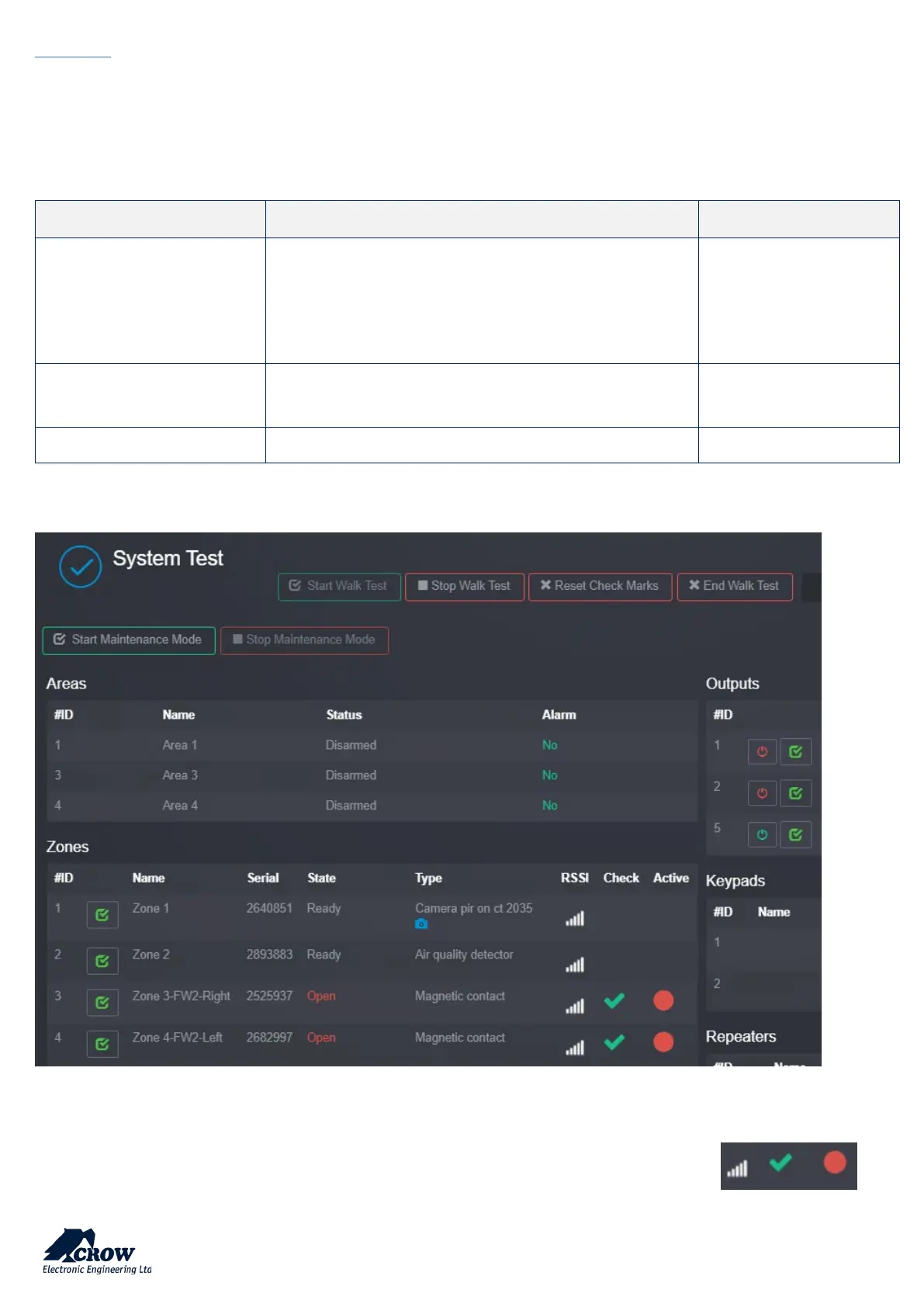
Example of walk test screen
Walk test mode is usable in installer mode. By walking through all the detectors registered in the system and activating
them, the associated examined zone will be displayed on the page of the overview screen page and in order to allow
verification that all zones are functioning properly by indicating a green check mark and a red dot. . By


 To Next Page