thecrowgroup.com Page | 65
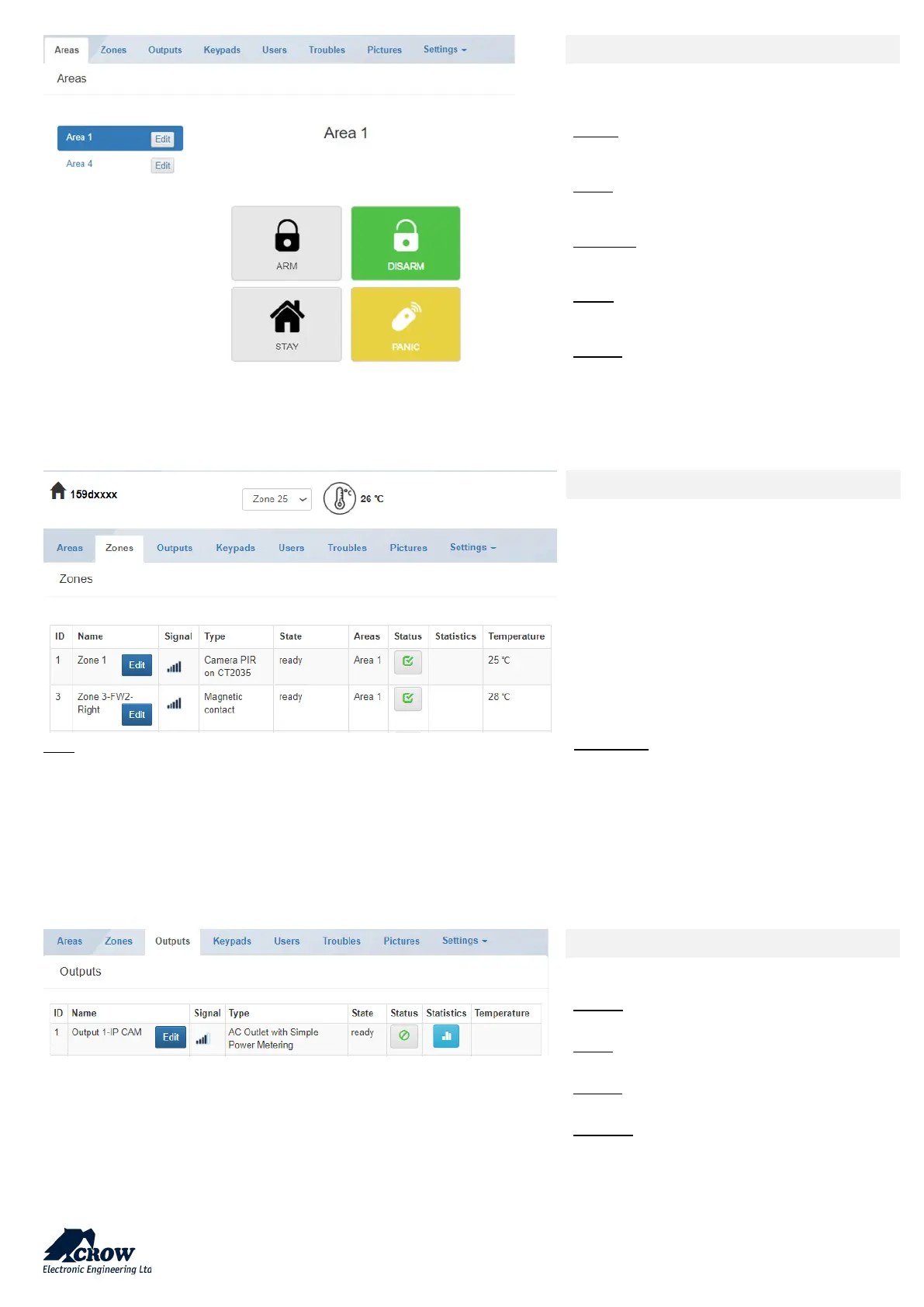
Areas
This part enables control of SHEPHERD™
panel
Areas:
Selection of the area to monitor/control
ARM:
Arming of the selected Area
DISARM:
Disarming of the selected Area
STAY:
Stay Arming of the selected Area
PANIC:
Press 5 sec to generate immediate Panic
Note: Only active zones will be listed
Zones
This part provides info/control on Zones
Names of the active zones
RSSI Signal of the zone
Type of connected device
State of the device
Related area of the zone
Status (Active/Bypass) of the zone
Statistic (if device compatible) for
Temperature, Air Quality, Humidity…
Add Zones: online learning of devices
Outputs
This part enable control on Outputs
NAME:
Name of the outputs (ex: outdoor siren)
TYPE:
Type of Output: Wired, Siren, Smart Plug…
STATE:
Info on output trouble
STATUS:
Activation / Deactivation of the output


 To Next Page