thecrowgroup.com Page | 67
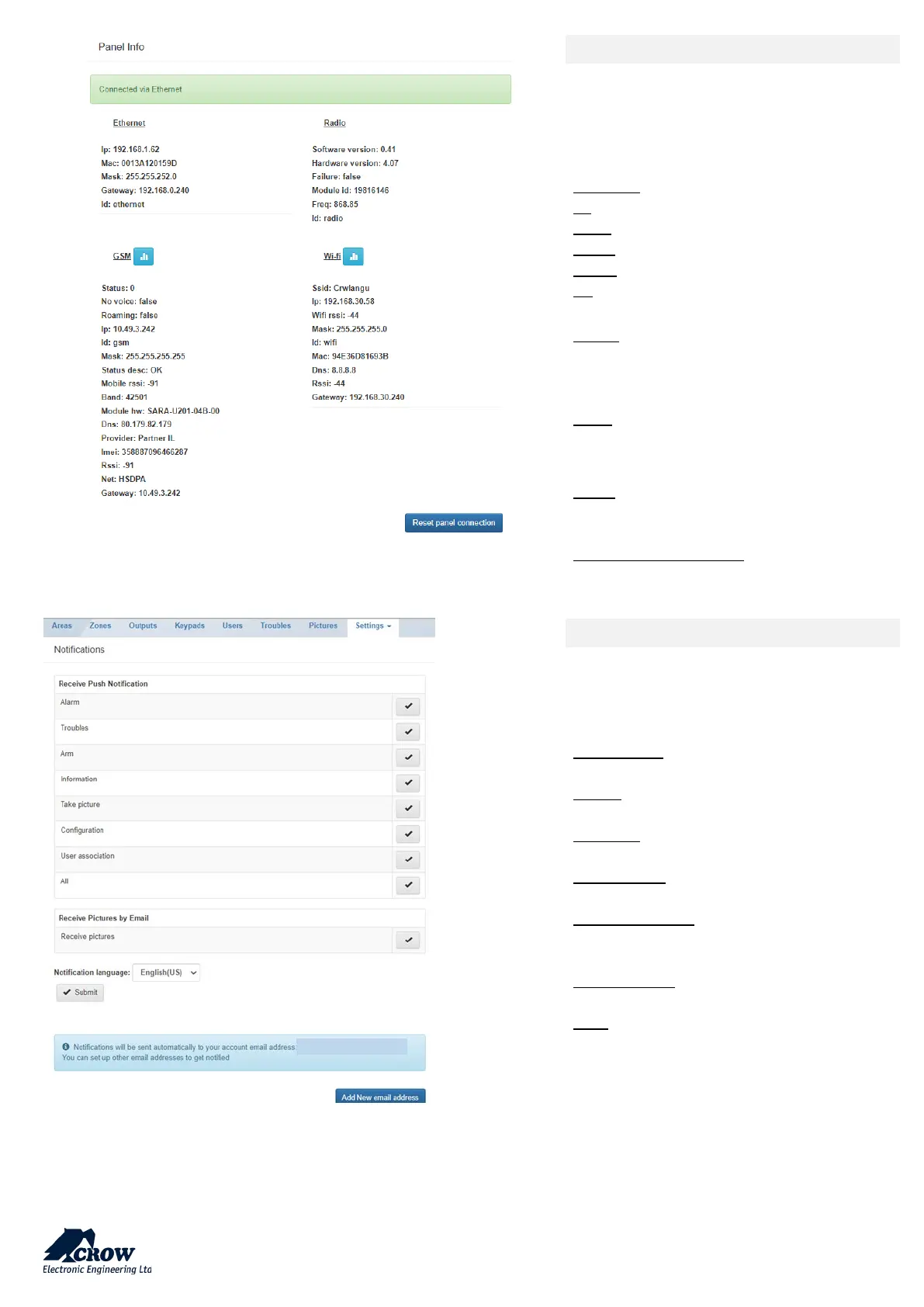
Panel Info
This part provides info of current
communication status:
Display of the current connection method
Ethernet:
IP: internal IP of the panel in your network
MAC: Ethernet MAC of the SHEPHERD™
Mask: Network subnet mask
Panel: IP of the router
ID: Name of the communication method
Radio:
Information on the Two Way wireless RF
module for wireless ISM devices
GSM:
Information received from cellular provider
on the current GSM/GPRS/3G/4G connection
Information on the Wi-Fi connection status
inside your personal network
Reset panel connection:
Restart panel communication methods
Details
You can easily set up events notifications and
select type of events sent to each emails
addresses registered
Information: All type of information.
Alarm: Alarm occurs
Troubles: When the panel reports troubles
Take picture: In case of picture is requested
User association: When a new user is
registered on the panel
Configuration: Enter in installer mode
Arm: When arming the system
You can also select which email is allowed to
receive alarm pictures.


 To Next Page