12
4.3 Display
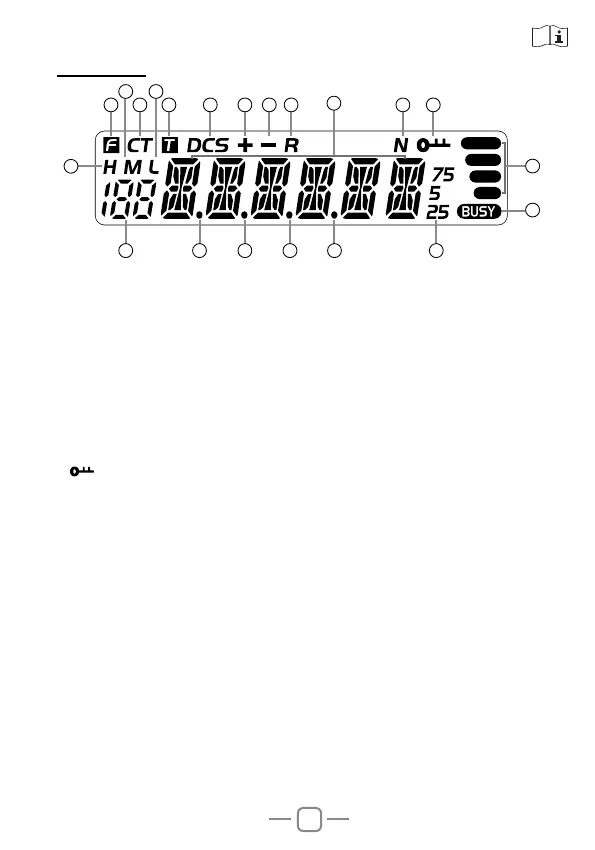
1.F: Display when press FUN key
2.CT: Display when setting CTCSS
3.T: Display when setting TX CTCSS
4.DCS
:
Display when setting DCS
5.+: Display when setting positive offset direction
6.-: Display when setting negative offset direction
7.R
:
Display when turn on reverse frequency function
8.N: Display when setting narrow band
9.
:Display when setting keypad lock function
10.H: Display when setting high power
11.M: Display when setting middle power
12.L
: Display when setting low power
13.188: Display memory channel number in memory mode
14.Decimal point: Display when store channel indicate empty channel
15.Decimal point: Display this icon when setting channel scan skip
16.Decimal point: Indicates the decimal point of frequency and the
scanning function
17.Decimal point: Display this icon when setting CTCSS/DCS scan
18.
888888
: Indicate frequency or memory channel name
19.25/5/75: Display this icon when indicates the end of the frequency.
20.BUSY: Display when receive the signal or turn on the monitor
function
21.RSSI: Display TX/RX signal strength
1
13 14 15 16 17
18
19
2
11 12
3 4 5 6 7 8 9
10
20
21


 To Next Page