10 TECHNICAL SERVICE
In case of failure, contact the Technical Service by sending an e-mail to support@custom.it detailing:
1. Product code
2. Serial number
3. Hardware release
4. Firmware release
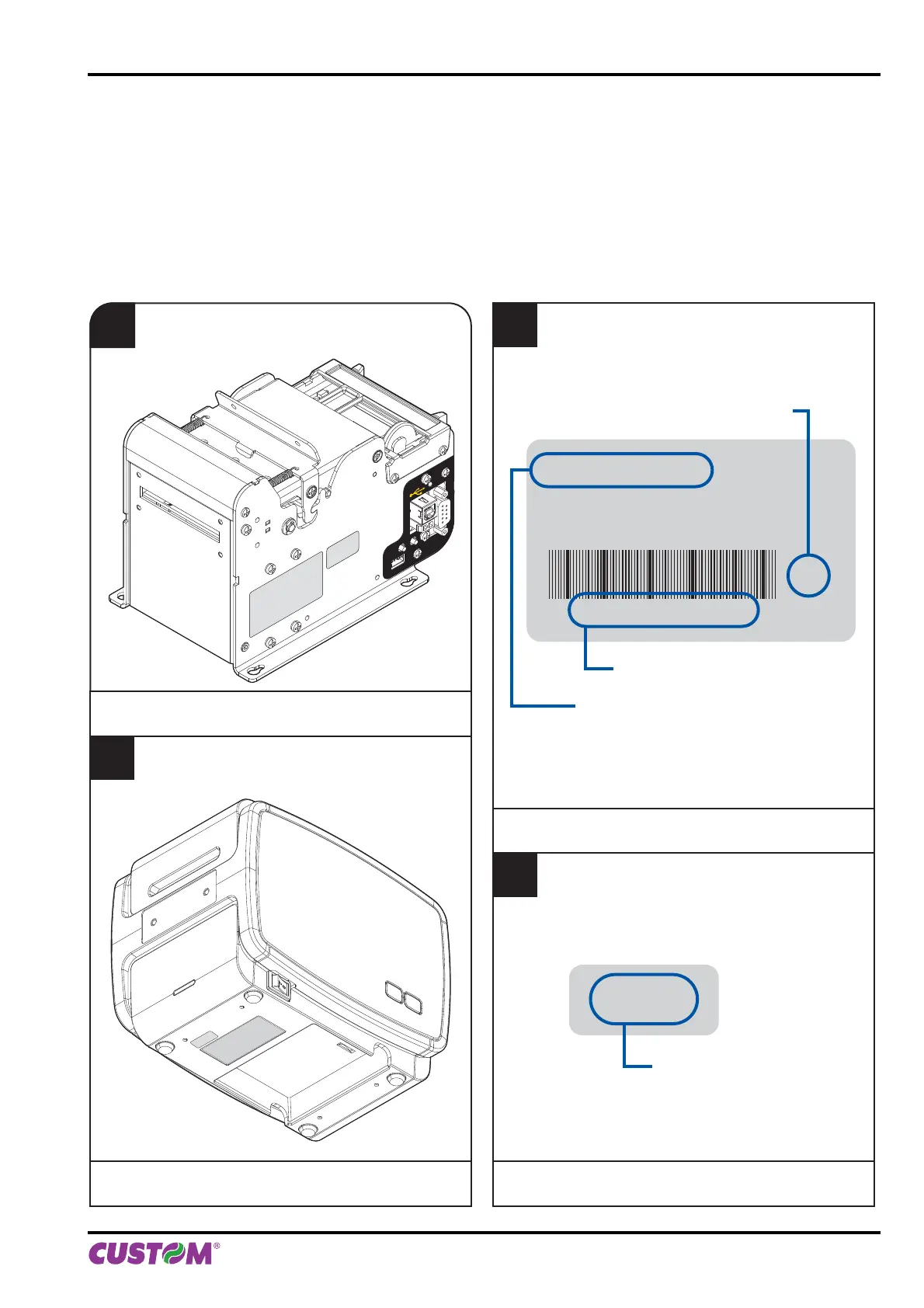
To get the necessary data, proceed as follows:
2
The product label shows the product code,
the serial number and the hardware release.
1
Find the product and the firmware label
located on the bottom of the printer.
for B202H
1
Find the product and the firmware label
located on the side of the printer.
for KPM150H
product code
(14 digits)
XXXXXXXXXXXXXX
xxxxxx xxx xxxx xxxx
xxxxxx xxx xxxx xxxx
Rx
hardware release
serial number
0000000000000000000
E xx
firmware type
3
The firmware label
shows the firmware type.
STATUS
NEAR PAPER
END
LF
FF
FIRMWARE
LABEL
PRODUCT
LABEL
LF
FF
PRODUCT
LABEL
FIRMWARE
LABEL
10. TECHNICAL SERVICE
User manual KPM150H-AERO 103



 To Next Page