mask setting, the format can be either 192.168.1.1/255.255.255.0 or 192.168.0.1/24. Please see below for
the example for permitting the IP range
To delete the IP address simply click the Delete Host button, check the unwanted address then click Apply.
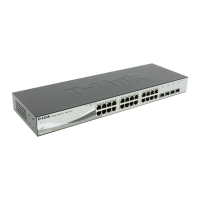
Security > Safeguard Engine
D-Link’s Safeguard Engine is a robust and innovative technology that automatically throttles the impact of
packet flooding into the switch's CPU. This function helps protect the Web-Smart Switch from being
interrupted by malicious viruses or worm attacks. By default this is enabled.
Figure 67 – Security > Safeguard Engine
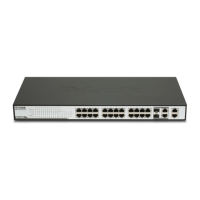
Security > Broadcast Storm Control
The Broadcast Storm Control feature provides the ability to control the receive rate of broadcasted packets. If
enabled (default is disabled), threshold settings of 8,000 ~ 4,096,000 bytes per second can be assigned.
Press Apply for the settings to take effect.
Figure 68 – Security > Broadcast Storm Control



 To Next Page