5D-Link DIR-890L User Manual
Section 1 - Product Overview
Hardware Overview
Connections
4
53 71
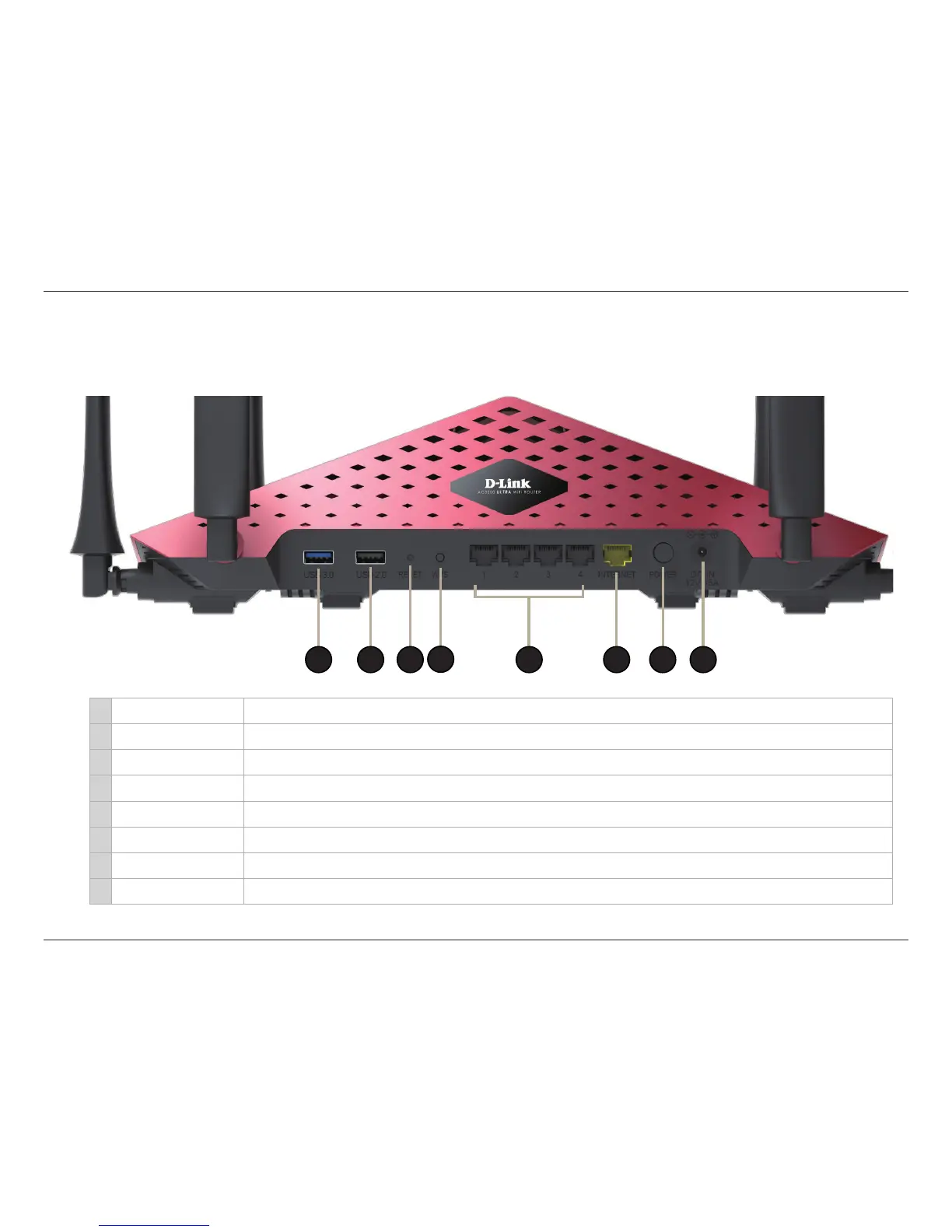
1 USB 3.0 Port Connect a USB ash drive to share content throughout your network. Port supports USB 3.0 and USB 2.0 devices.
2 USB 2.0 Port Connect a USB ash drive to share content throughout your network. Port supports USB 2.0 devices.
3 Reset Button Press and hold the reset button with a paper clip for ten seconds to reset the router to the factory default settings.
4 WPS Button Press to start the WPS process. The 2.4G or 5G LED will blink fast.
5 LAN Ports (1-4) Connect Ethernet devices such as computers, switches, and game consoles.
6 Internet Port Connect a broadband modem to this port using an Ethernet cable.
7 Power Button Press to power the router on and o.
8 Power Port Connect the supplied power adapter.
2
6 8



 To Next Page