DIR-620S Wireless N300 Router with 3G/LTE Support and
USB Port
User Manual
Configuring via Web-based Interface
Parameter Description
Type
An IP version which will be used by this connection. Select the
IPv4, IPv6, or Dual value from the drop-down list.
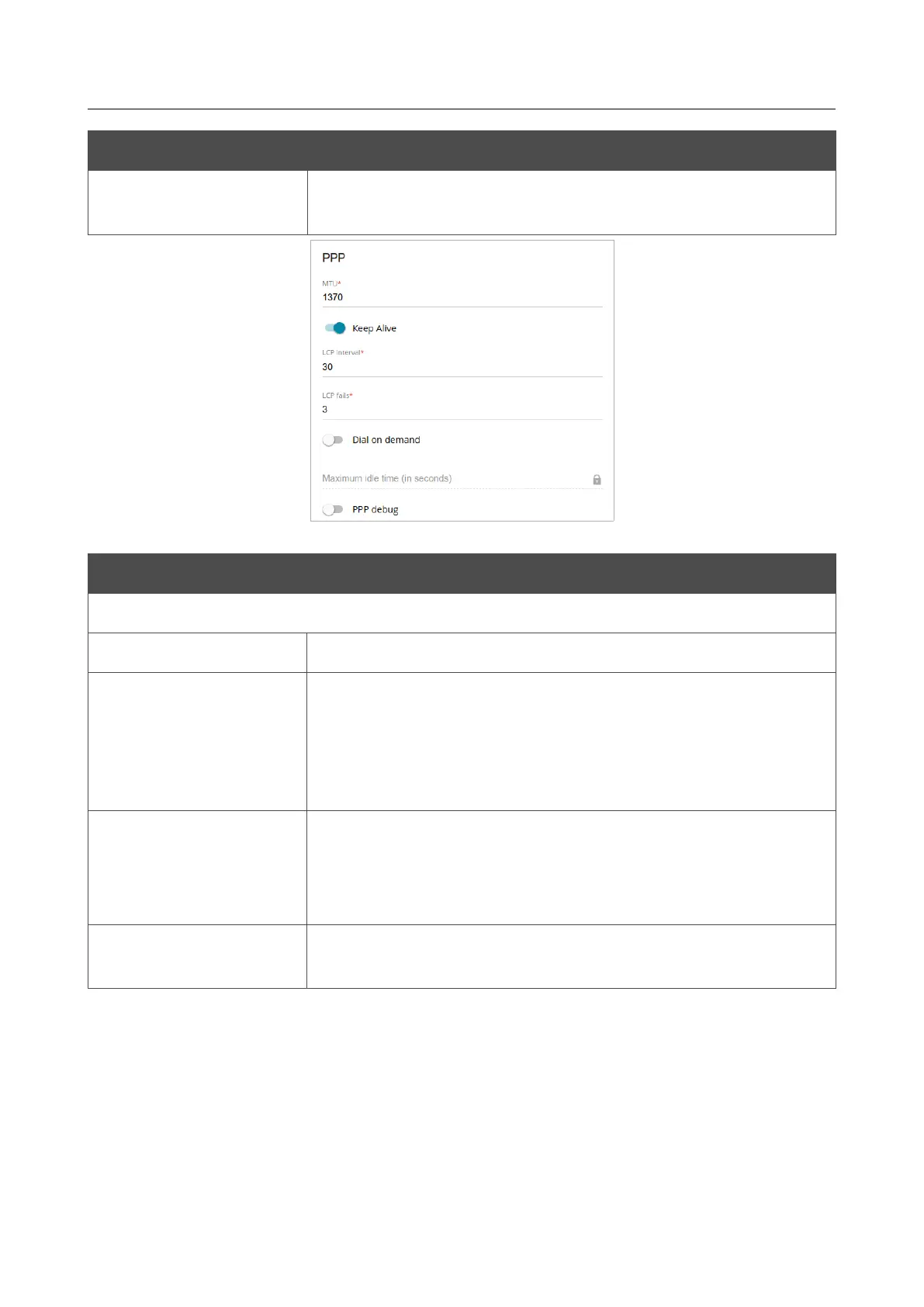
Figure 87. The page for creating a new Mobile Internet connection. The PPP section.
Parameter Description
PPP
MTU
The maximum size of units transmitted by the interface.
Keep Alive
Move the switch to the right if you want the router to keep you
connected to the network of your operator even when the
connection has been inactive for a specified period of time. When
the checkbox is selected, the LCP interval and LCP fails fields
are available. Specify the required values.
Dial on demand
Move the switch to the right if you want the router to establish
connection to the Internet on demand. In the Maximum idle time
field, specify a period of inactivity (in seconds) after which the
connection should be terminated.
PPP debug
Move the switch to the right if you want to log all data on PPP
connection debugging.
Page 103 of 238










 To Next Page