13
www.d16.pl
DESCRIPTION OF OPERATION GENERATORS SECTION
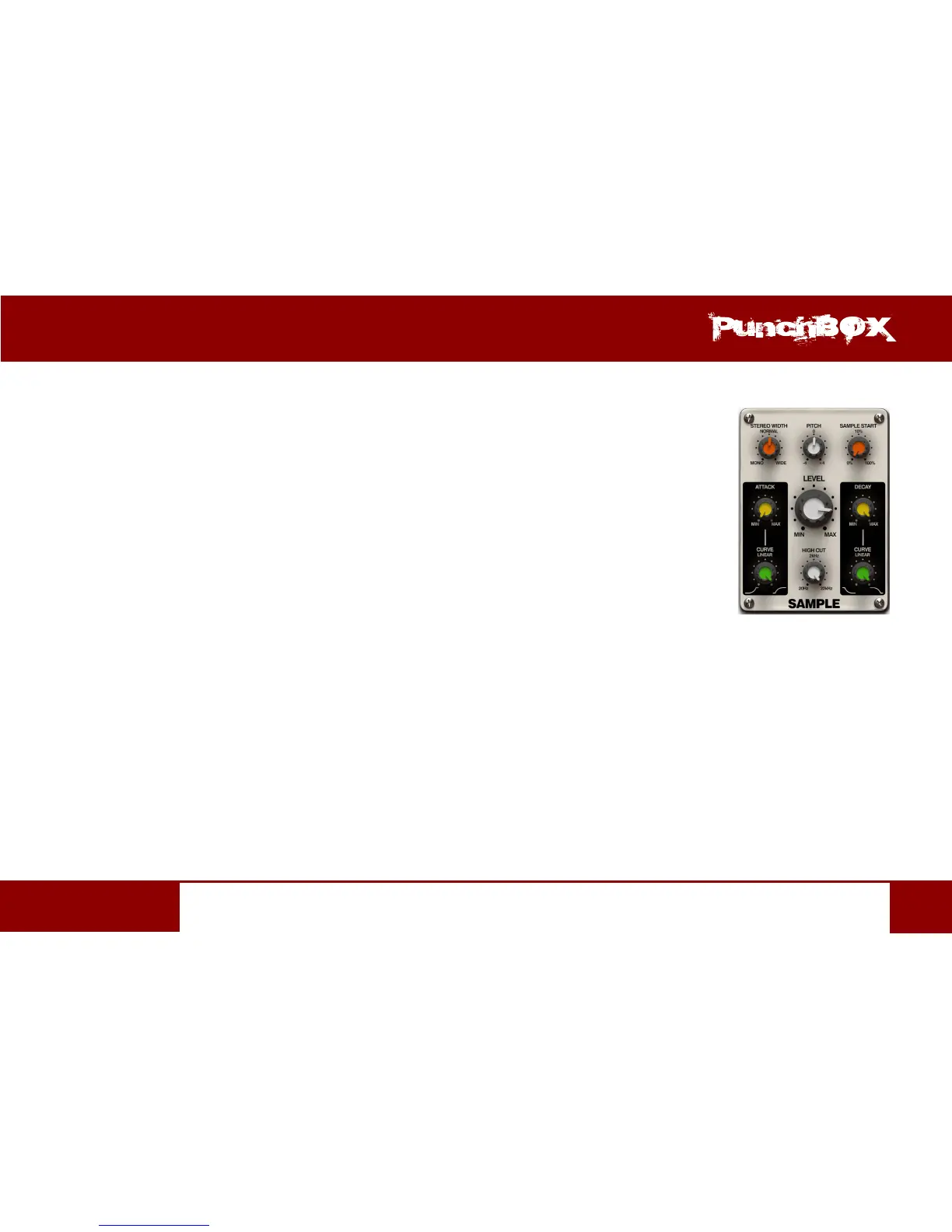
Sample
A Sampler allows to use the samples as a sound source for Kick. To use it select Sample for Mode. The Sampler
contains the following parameters:
• St. Width – Wider or narrower stereo image of the played sample. The central posion
(Normal) is a neutral seng that plays the sample with the stereo image unchanged.
• Pitch – Relave sample tuning from -4 up to +4 semitones.
• Sample Start - Denes a starng point from which the sample is played. This parameter can be set
from 0% up to 100%, where 0% means that the sample is played from the beginning.
• Level – Output generator volume.
• High Cut - Low-pass lter cut-o frequency. The parameter operates
from 2 [Hz] up to 22 [kHz].
• Aack – Amplitude’s aack me from 0 [ms] up to 200 [ms]
• Aack Curve - Amplitude aack’s curve - from concave, through linear to convex
• Decay – Amplitude envelope decay me relave to the overall sample duraon. Max means that the
decay me is the same as the sample duraon.
• Decay Curve - Amplitude decay curve - from concave, through linear to convex


 To Next Page