23
www.d16.pl
DESCRIPTION OF OPERATION EFFECTS SECTION
Bitcrusher
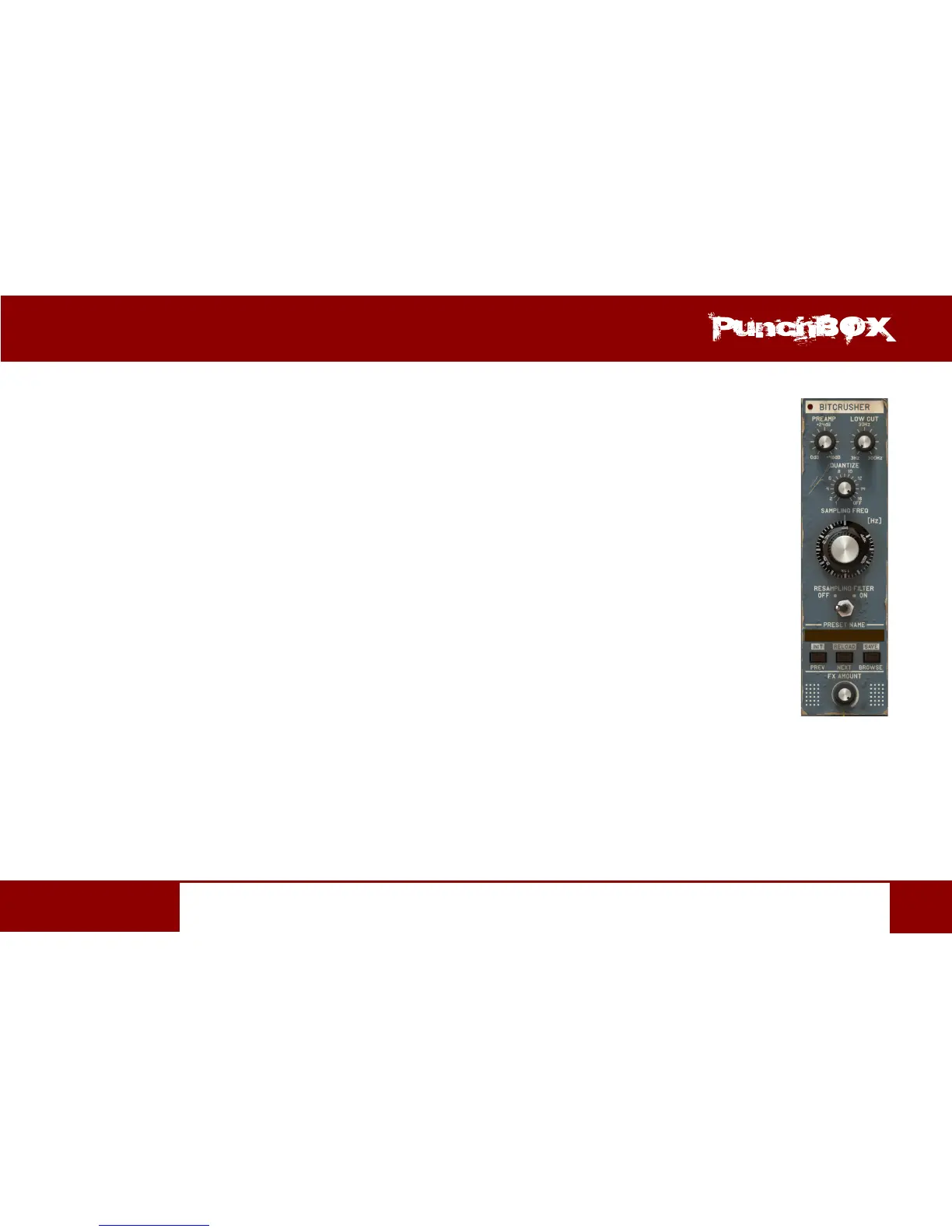
Bitcrusher is controlled with the following set of parameters:
• Preamp – Input signal’s amplitude gain from 0 [dB] up to 48 [dB]
• Lowcut – Cut-o frequency of the passive high-pass lter that processes the signal before it is sent to the quanzer.
The lter operates from 3 [Hz] up to 300 [kHz].
• Quanze – The number of bits the signal is reduced to. O means that the quanzer block is disabled.
• Sampling Freq – Resampler frequency from 44 [Hz] up to 44 [kHz]
• Resampling Filter – Acvaon of the image lter that processes the resampled signal.
• Bitcrusher preset management secon
• Next/Prev – Navigaon through the Bitcrusher preset bank. Loading of the next or previous preset
• Browser – Opens the Preset Browser (for more details on the operaon please refer
to the Preset Management chapter)
• Init (Prev + CTRL) – Restoring the inial eect values
• Reload (Next + CTRL) – Restoring the last loaded master preset (Master Preset) values for the Bitcrusher
secon
• Save (Browse + CTRL) – Saving the current eect sengs as a preset
• FX Amount – Proporons between the Dry and Wet signals that will be sent to the next cascade eect.


 To Next Page