English 115
Oven (Lower Oven)
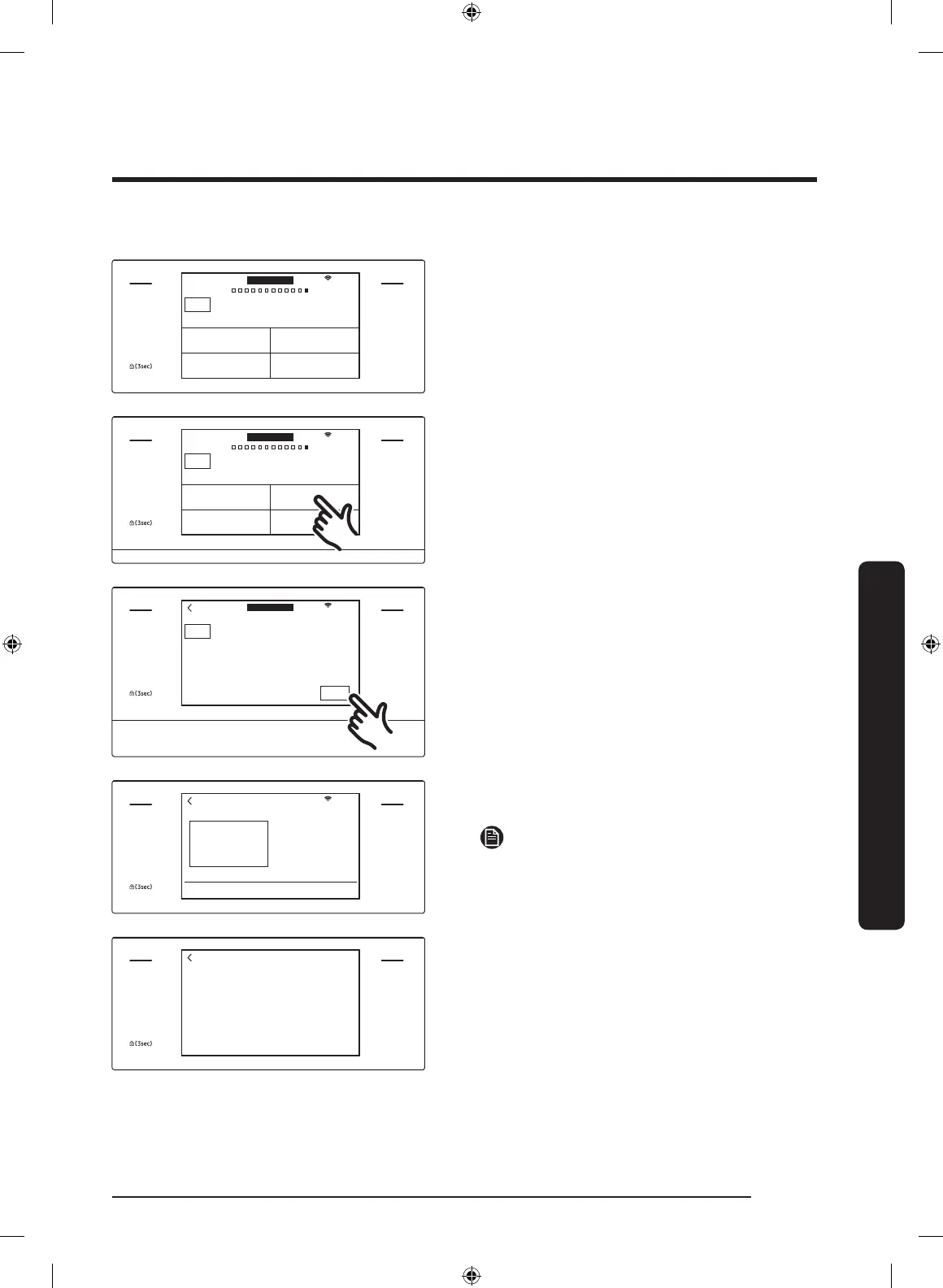
How to run a green-cleaning cycle
MICROWAVE
PAUSE/OFF
TIMER
SETTINGS
LOWER OVEN
OFF
LIGHT
OPEN/CLOSE
RESERVOIR
4:35 PM
OVEN
MODE
Clean
Self clean GreenClean™
Descale Draining
LOWER
Oven cleaning
1. Tap LOWER OVEN and swipe the
screen to Clean. The display will show
4 cleaning selections.
MICROWAVE
PAUSE/OFF
TIMER
SETTINGS
LOWER OVEN
OFF
LIGHT
OPEN/CLOSE
RESERVOIR
4:35 PM
OVEN
MODE
Clean
Self clean GreenClean™
Descale Draining
LOWER
Oven cleaning
2. Tap GreenClean™.
MICROWAVE
PAUSE/OFF
TIMER
SETTINGS
LOWER OVEN
OFF
LIGHT
OPEN/CLOSE
RESERVOIR
4:35 PM
OVEN
MODE
GreenClean™
Quick 20 minute steam clean
START
Clean Time
0 hr 20 min
LOWER
3. Tap START to begin Green cleaning.
MICROWAVE
PAUSE/OFF
TIMER
SETTINGS
LOWER OVEN
OFF
LIGHT
OPEN/CLOSE
RESERVOIR
4:35 PM
GreenClean™
Pour 20oz (600ml) of water
into Water Reservoir.
OK
4. Follow the on-screen instructions.
Green cleaning will start automatically.
NOTE
Lower oven door is locked during Green
cleaning.
MICROWAVE
PAUSE/OFF
TIMER
SETTINGS
LOWER OVEN
OFF
LIGHT
OPEN/CLOSE
RESERVOIR
Cleaning is complete.
Please wipe remaining residue from interior cavity.
5. When Green cleaning is complete, clean
the oven’s interior. There will be a
significant amount of water remaining
on the bottom of the oven after a
Green cleaning cycle. Remove the
residual water with a sponge or soft
dry cloth.
NQ9300M_MOD_DOC30M977D_DE68-04463A-01_EN.indd 115 5/2/2017 4:00:00 PM


 To Next Page