English 117
Oven (Lower Oven)
Descale
If you use Steam Bake or Steam Roast functions frequently, we recommend descaling
regularly to remove minerals from the oven that may affect the taste or quality of food
cooked. When running a descaling cycle, use only descaling agents that are specific to
steam ovens or coffee machines.
NOTE
If you use Steam Bake or Steam Roast functions for more than a total of 12 hours,
the Descale indicator turns on. You can still enable the Steam Bake or Steam Roast
functions for the next two hours without descaling. However, after those two hours are
up, the Steam Bake or Steam Roast functions will be disabled until you run a descaling
cycle.
How to run a descale cycle
MICROWAVE
PAUSE/OFF
TIMER
SETTINGS
LOWER OVEN
OFF
LIGHT
OPEN/CLOSE
RESERVOIR
4:35 PM
OVEN
MODE
Clean
Self clean GreenClean™
Descale Draining
LOWER
Oven cleaning
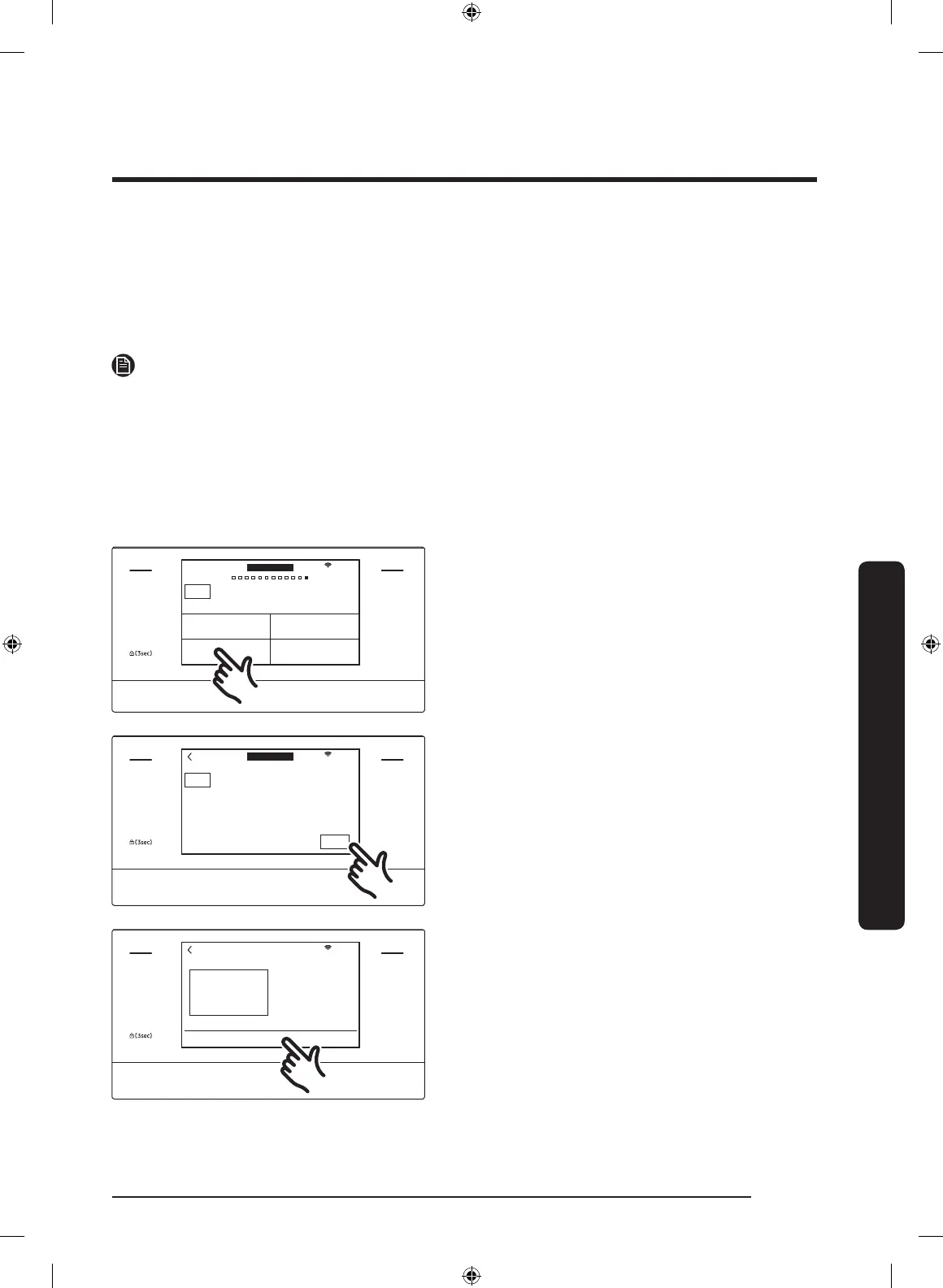
1. Tap LOWER OVEN and swipe the
screen to Clean. The display will show
4 cleaning selections.
2. Tap Descale.
MICROWAVE
PAUSE/OFF
TIMER
SETTINGS
LOWER OVEN
OFF
LIGHT
OPEN/CLOSE
RESERVOIR
4:35 PM
OVEN
MODE
Descale
Please descale Water Reservoir to improve quality.
START
Clean Time
3hr 00min
LOWER
3. Tap START.
MICROWAVE
PAUSE/OFF
TIMER
SETTINGS
LOWER OVEN
OFF
LIGHT
OPEN/CLOSE
RESERVOIR
4:35 PM
Descale
Pour 13.5oz (400ml) water
and 1.7oz (50ml) descaling
solution into Water
Reservoir.
OK
4. Follow the on-screen instructions. It
takes 3 hours to complete the cycle.
• Empty and clean the water
reservoir, and then fill it with 1.7 oz
(50 ml) of descaling agent and 13.5
oz (400 ml) of drinkable water.
NQ9300M_MOD_DOC30M977D_DE68-04463A-01_EN.indd 117 5/2/2017 4:00:01 PM


 To Next Page