SQLC-214-097
38
Items Setting and operation procedures Page
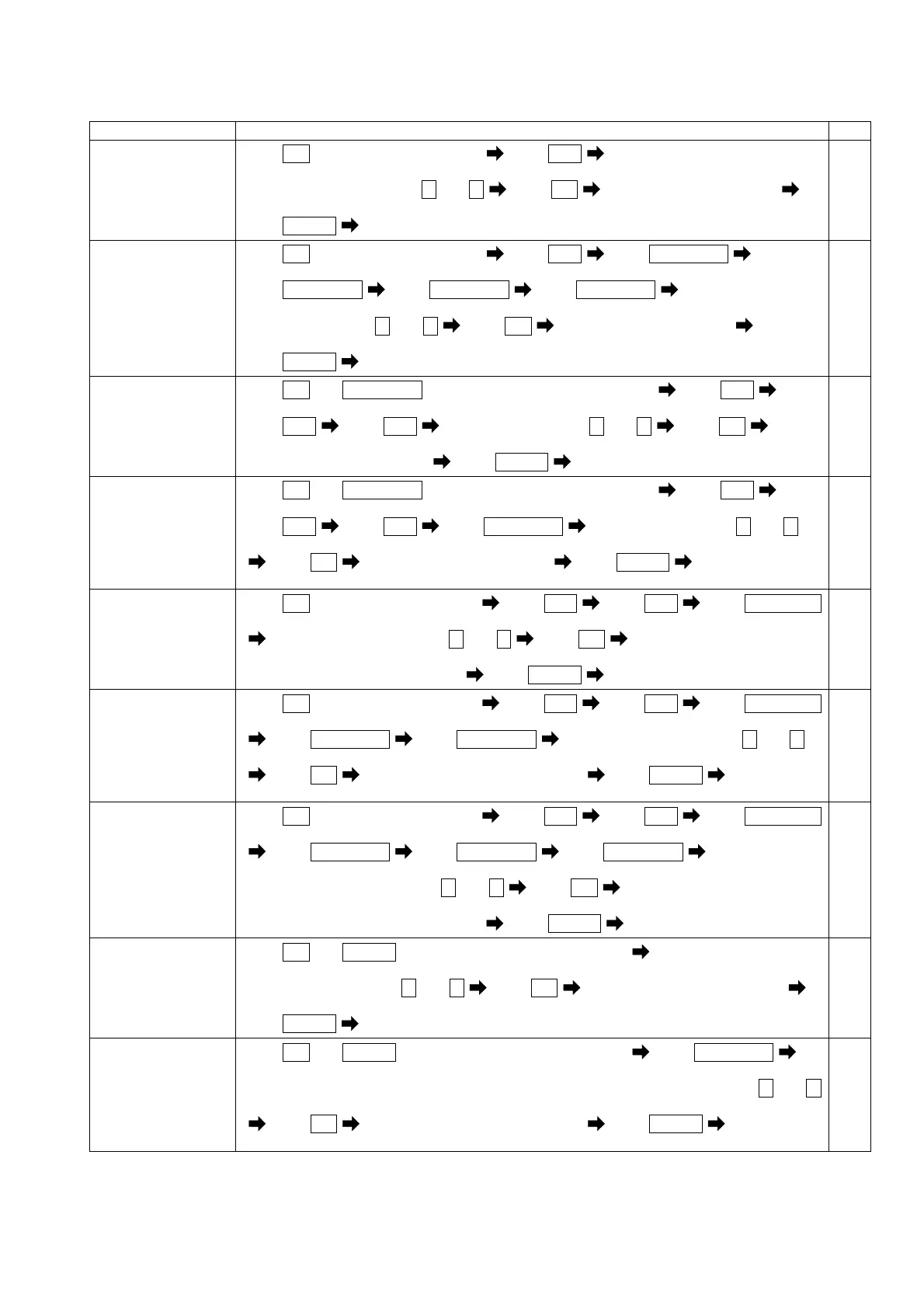
Set the factor of
alarm output 1.
(121AL)
Press
SET
for longer than 3 seconds Press
MODE
(111) (121AL)
Select an output factor by + and -
Press
SET
Selected factor is entered
Press
DISPLAY
Returns to display mode.
52
Set the factor of
alarm output 2.
(125AL)
Press
SET
for longer than 3 seconds Press
MODE
Press
RESET/SHIFT
(111) (121AL) (122AL)
Press
RESET/SHIFT
Press
RESET/SHIFT
Press
RESET/SHIFT
(123AL) (124AL) (125AL)
Select an factor by + and -
Press
SET
Selected factor is entered
Press
DISPLAY
Returns to display mode.
52
Set the external
operation input 1
function.
(251)
Press
SET
and
RESET/SHIFT
together for longer than 3 seconds Press
MODE
(211) (221A)
Press
MODE
Press
MODE
Select an function by + and - Press
SET
(241P) (251)
Selected function is entered
Press
DISPLAY
Returns to display mode.
63
Set the external
operation input 2
function.
(252)
Press
SET
and
RESET/SHIFT
together for longer than 3 seconds Press
MODE
(211) (221A)
Press
MODE
Press
MODE
Press
RESET/SHIFT
Select an function by + and -
(241P) (251) (252)
Press
SET
Selected function is entered Press
DISPLAY
Returns to
display mode.
63
Set the time interval
of demand current.
(132)
Press
SET
for longer than 3 seconds Press
MODE
Press
MODE
Press
RESET/SHIFT
(111) (121AL) (131H)
Select an time interval by + and - Press
SET
(132)
Selected time interval is entered
Press
DISPLAY
Returns to display mode.
53,54
Set the time interval
of demand active
power.
(134)
Press
SET
for longer than 3 seconds Press
MODE
Press
MODE
Press
RESET/SHIFT
(111) (121AL) (131H)
Press
RESET/SHIFT
Press
RESET/SHIFT
Select an time interval by + and -
(132) (133H) (134)
Press
SET
Selected time interval is entered Press
DISPLAY
Returns to
display mode.
53,54
Set the operation
method of demand
active power.
(135)
Press
SET
for longer than 3 seconds Press
MODE
Press
MODE
Press
RESET/SHIFT
(111) (121AL) (131H)
Press
RESET/SHIFT
Press
RESET/SHIFT
Press
RESET/SHIFT
(132) (133H) (134) (135)
Select an operation method by + and -
Press
SET
Selected operation method is entered
Press
DISPLAY
Returns to display mode.
53,54
Set the phase wire of
input circuit.
(311)
Press
SET
and
DISPLAY
together for longer than 3 seconds
(311)
Select an phase wire by + and -
Press
SET
Selected phase wire is entered
Press
DISPLAY
Returns to display mode.
66
Set the input voltage
(phase-voltage full
scale).
(312)
Press
SET
and
DISPLAY
together for longer than 3 seconds Press
RESET/SHIFT
(311) (312)
Select an input voltage (In case of 1φ3W, it is phase-voltage full scale) by + and -
Press
SET
Selected input voltage is entered Press
DISPLAY
Returns to
display mode.
66


 To Next Page