SQLC-214-097
39
(2) A combination except a display pattern.
Each parenthesized number shows a setting number and this number is displayed on the setting screen.
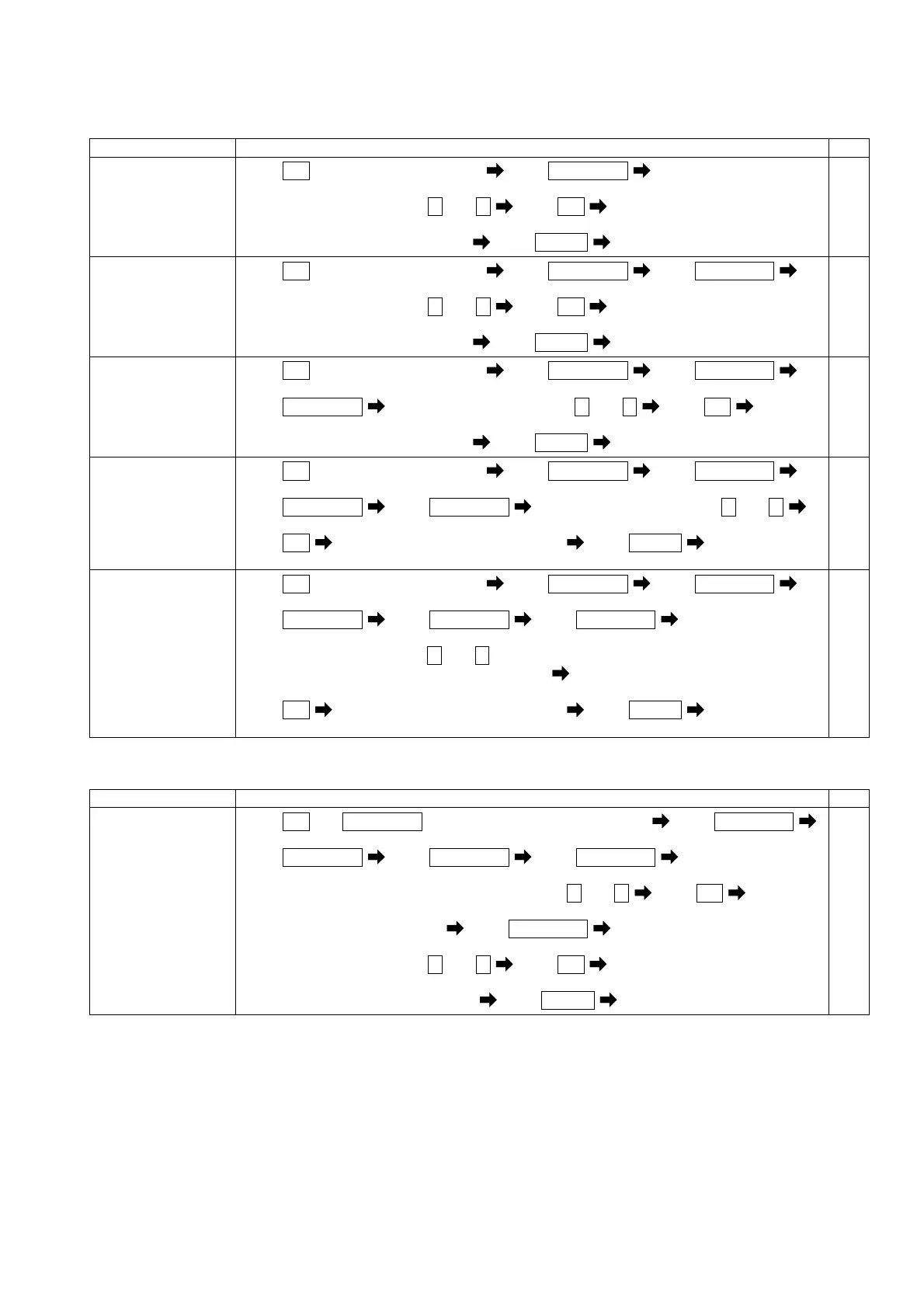
Items Setting and operation procedures Page
Set the display
factor of main
monitor.
(112)
Press
SET
for longer than 3 seconds Press
RESET/SHIFT
(111) (112)
Select an display factor by + and -
Press
SET
Selected display factor is entered
Press
DISPLAY
Returns to display mode.
47-51
Set the display
factor of
sub-monitor (left).
(113)
Press
SET
for longer than 3 seconds Press
RESET/SHIFT
Press
RESET/SHIFT
(111) (112) (113)
Select an display factor by + and -
Press
SET
Selected display factor is entered
Press
DISPLAY
Returns to display mode.
47-51
Set the display
factor of
sub-monitor
(center).
(114)
Press
SET
for longer than 3 seconds Press
RESET/SHIFT
Press
RESET/SHIFT
(111) (112) (113)
Press
RESET/SHIFT
Select an display factor by + and - Press
SET
(114)
Selected display factor is entered
Press
DISPLAY
Returns to display mode.
47-51
Set the display
factor of
sub-monitor (right).
(115)
Press
SET
for longer than 3 seconds Press
RESET/SHIFT
Press
RESET/SHIFT
(111) (112) (113)
Press
RESET/SHIFT
Press
RESET/SHIFT
Select an display factor by + and -
(114) (115)
Press
SET
Selected display factor is entered Press
DISPLAY
Returns to
display mode.
47-51
Set the display
factor of bar graph.
(116)
Press
SET
for longer than 3 seconds Press
RESET/SHIFT
Press
RESET/SHIFT
(111) (112) (113)
Press
RESET/SHIFT
Press
RESET/SHIFT
Press
RESET/SHIFT
(114) (115) (116)
Select an display factor by + and -(If a sub-monitor is selected, an underbar will be
displayed on the bottom of a digital display.)
Press
SET
Selected display factor is entered Press
DISPLAY
Returns to
display mode.
47-51
(3) Setting of active power polarity and measurement range.
Each parenthesized number shows a setting number and this number is displayed on the setting screen.
Items Setting and operation procedures Page
Setting of
measurement range
of active power.
(215)
Press
SET
and
RESET/SHIFT
together for longer than 3 seconds Press
RESET/SHIFT
(211) (212)
Press
RESET/SHIFT
Press
RESET/SHIFT
Press
RESET/SHIFT
(213) (214)
Select an one-side(P)/both-side(-) deflection by + and -
Press
SET
Selected deflection is entered
Press
RESET/SHIFT
(215)
Select a measuring range by + and - Press
SET
Selected measuring range is entered
Press
DISPLAY
Returns to display mode.
58-60


 To Next Page