SQLC-214-097
40
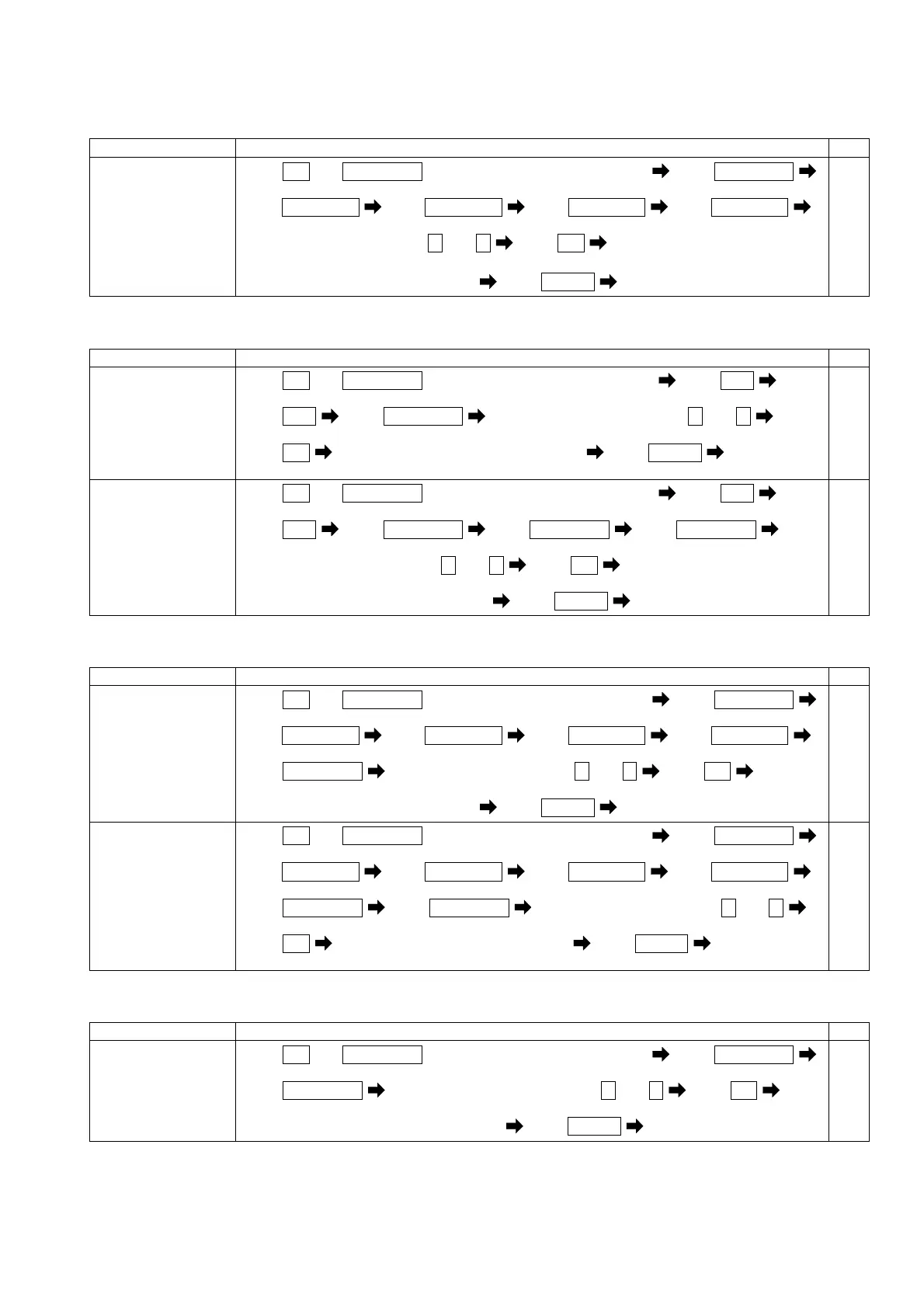
(4) Setting of reactive power measurement range.
Each parenthesized number shows a setting number and this number is displayed on the setting screen.
Items Setting and operation procedures Page
Setting of
measurement range of
reactive power.
(216)
Press
SET
and
RESET/SHIFT
together for longer than 3 seconds Press
RESET/SHIFT
(211) (212)
Press
RESET/SHIFT
Press
RESET/SHIFT
Press
RESET/SHIFT
Press
RESET/SHIFT
(213) (214) (215) (216)
Select a measuring range by + and - Press
SET
Selected measuring range is entered
Press
DISPLAY
Returns to display mode.
58-60
(5) Setting of Wh (varh) output pulse unit.
Each parenthesized number shows a setting number and this number is displayed on the setting screen.
Items Setting and operation procedures Page
Set the pulse unit
of pulse output 1
(Po1).
(242P)
Press
SET
and
RESET/SHIFT
together for longer than 3 seconds Press
MODE
(211) (221A)
Press
MODE
Press
RESET/SHIFT
Select a output pulse unit by + and -
(241P) (242P)
Press
SET
Selected output pulse unit is entered Press
DISPLAY
Returns to
display mode.
62
Set the pulse unit
of pulse output 2
(Po2).
(244P)
Press
SET
and
RESET/SHIFT
together for longer than 3 seconds Press
MODE
(211) (221A)
Press
MODE
Press
RESET/SHIFT
Press
RESET/SHIFT
Press
RESET/SHIFT
(241P) (242P) (243P) (244P)
Select a output pulse unit by + and -
Press
SET
Selected output pulse unit is entered
Press
DISPLAY
Returns to display mode.
62
(6) Setting of active power-factor and frequency measurement range
Each parenthesized number shows a setting number and this number is displayed on the setting screen.
Items Setting and operation procedures Page
Set the measurement
range of active
power-factor.
(217)
Press
SET
and
RESET/SHIFT
together for longer than 3 seconds Press
RESET/SHIFT
(211) (212)
Press
RESET/SHIFT
Press
RESET/SHIFT
Press
RESET/SHIFT
Press
RESET/SHIFT
(213) (214) (215) (216)
Press
RESET/SHIFT
Select a measuring range by + and - Press
SET
(217)
Selected measuring range is entered
Press
DISPLAY
Returns to display mode.
58-60
Set the measurement
range of frequency.
(218)
Press
SET
and
RESET/SHIFT
together for longer than 3 seconds Press
RESET/SHIFT
(211) (212)
Press
RESET/SHIFT
Press
RESET/SHIFT
Press
RESET/SHIFT
Press
RESET/SHIFT
(213) (214) (215) (216)
Press
RESET/SHIFT
Press
RESET/SHIFT
Select a measuring range by + and -
(217) (218)
Press
SET
Selected measuring range is entered Press
DISPLAY
Returns to
display mode.
58-60
(7) Setting of current display intrinsic sensitivity.
Each parenthesized number shows a setting number and this number is displayed on the setting screen.
Items Setting and operation procedures Page
Set the display
sensitivity (% of
a display to an
input) of current.
(213)
Press
SET
and
RESET/SHIFT
together for longer than 3 seconds Press
RESET/SHIFT
(211) (212)
Press
RESET/SHIFT
Select a display sensitivity by + and - Press
SET
(213)
Selected display sensitivity is entered
Press
DISPLAY
Returns to display mode.
58-60


 To Next Page