SQLC-214-097
41
(8) Setting of analog output.
Each parenthesized number shows a setting number and this number is displayed on the setting screen.
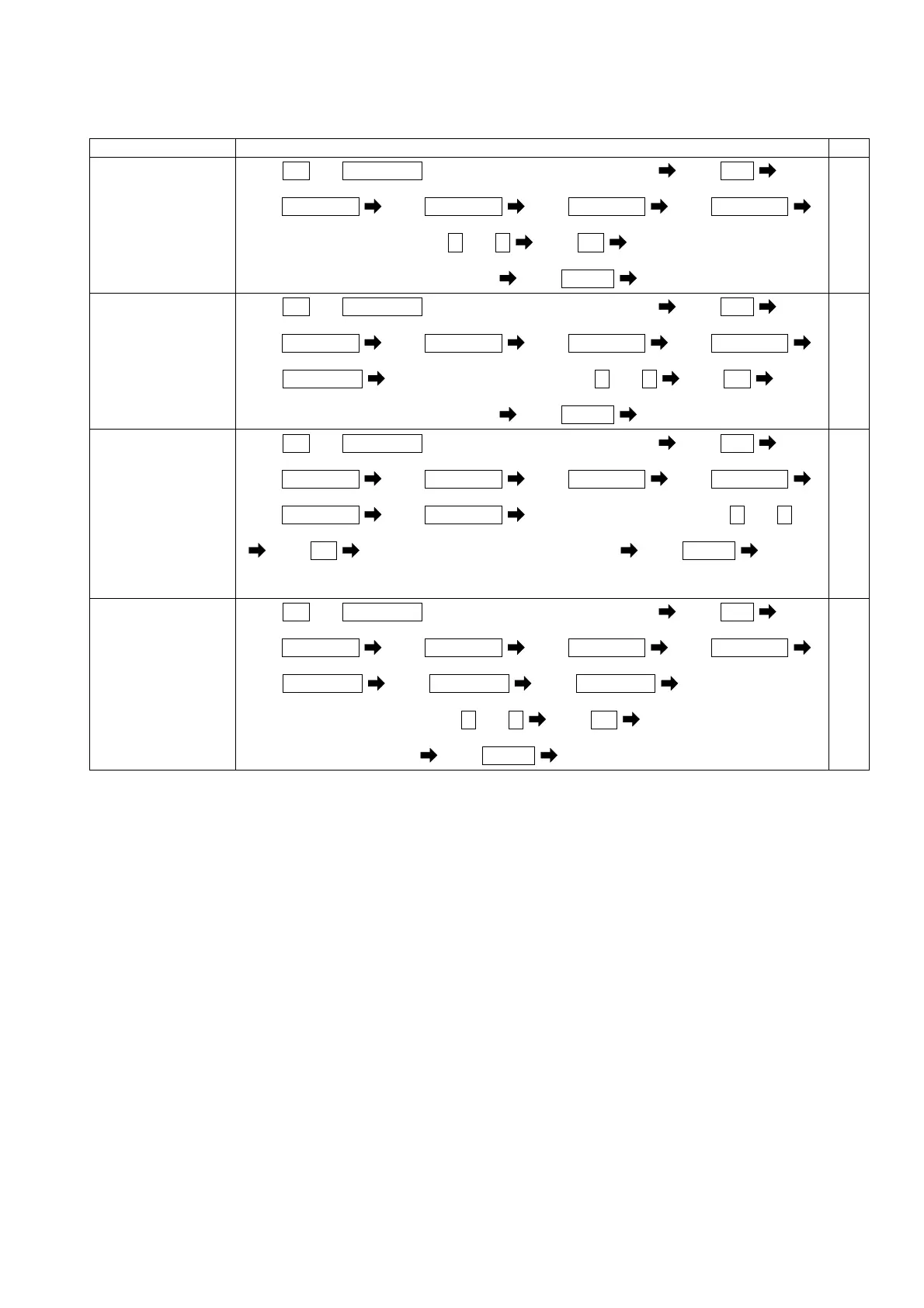
Items Setting and operation procedures Page
Set the analog
output sensitivity
(
%
of an output to
an input) of current.
(225A)
Press
SET
and
RESET/SHIFT
together for longer than 3 seconds Press
MODE
(211) (221A)
Press
RESET/SHIFT
Press
RESET/SHIFT
Press
RESET/SHIFT
Press
RESET/SHIFT
(222A) (223A) (224A) (225A)
Select a output sensitivity by + and -
Press
SET
Selected output sensitivity is entered
Press
DISPLAY
Returns to display mode.
61,62
Set the analog
output sensitivity
(
%
of an output to
an input) of active
power.
(226A)
Press
SET
and
RESET/SHIFT
together for longer than 3 seconds Press
MODE
(211) (221A)
Press
RESET/SHIFT
Press
RESET/SHIFT
Press
RESET/SHIFT
Press
RESET/SHIFT
(222A) (223A) (224A) (225A)
Press
RESET/SHIFT
Select a output sensitivity by + and - Press
SET
(226A)
Selected output sensitivity is entered
Press
DISPLAY
Returns to display mode.
61,62
Set the analog
output sensitivity
(
%
of an output to
an input) of reactive
power.
(227A)
Press
SET
and
RESET/SHIFT
together for longer than 3 seconds Press
MODE
(211) (221A)
Press
RESET/SHIFT
Press
RESET/SHIFT
Press
RESET/SHIFT
Press
RESET/SHIFT
(222A) (223A) (224A) (225A)
Press
RESET/SHIFT
Press
RESET/SHIFT
Select a output sensitivity by + and -
(226A) (227A)
Press
SET
Selected output sensitivity is entered Press
DISPLAY
Returns to display mode.
61,62
Set the output cut
function at the
case in minute input
(0.5
%
or less).
(At the case of
analog output)
(228A)
Press
SET
and
RESET/SHIFT
together for longer than 3 seconds Press
MODE
(211) (221A)
Press
RESET/SHIFT
Press
RESET/SHIFT
Press
RESET/SHIFT
Press
RESET/SHIFT
(222A) (223A) (224A) (225A)
Press
RESET/SHIFT
Press
RESET/SHIFT
Press
RESET/SHIFT
(226A) (227A) (228A)
Select a low Input cut ON/OFF by + and -
Press
SET
Selected action is entered
Press
DISPLAY
Returns to display mode.
61,62


 To Next Page