SQLC-214-097
42
(9) Setting of alarm output.
Each parenthesized number shows a setting number and this number is displayed on the setting screen.
Items Setting and operation procedures Page
Set the return
method of alarm
output 1.
(122AL)
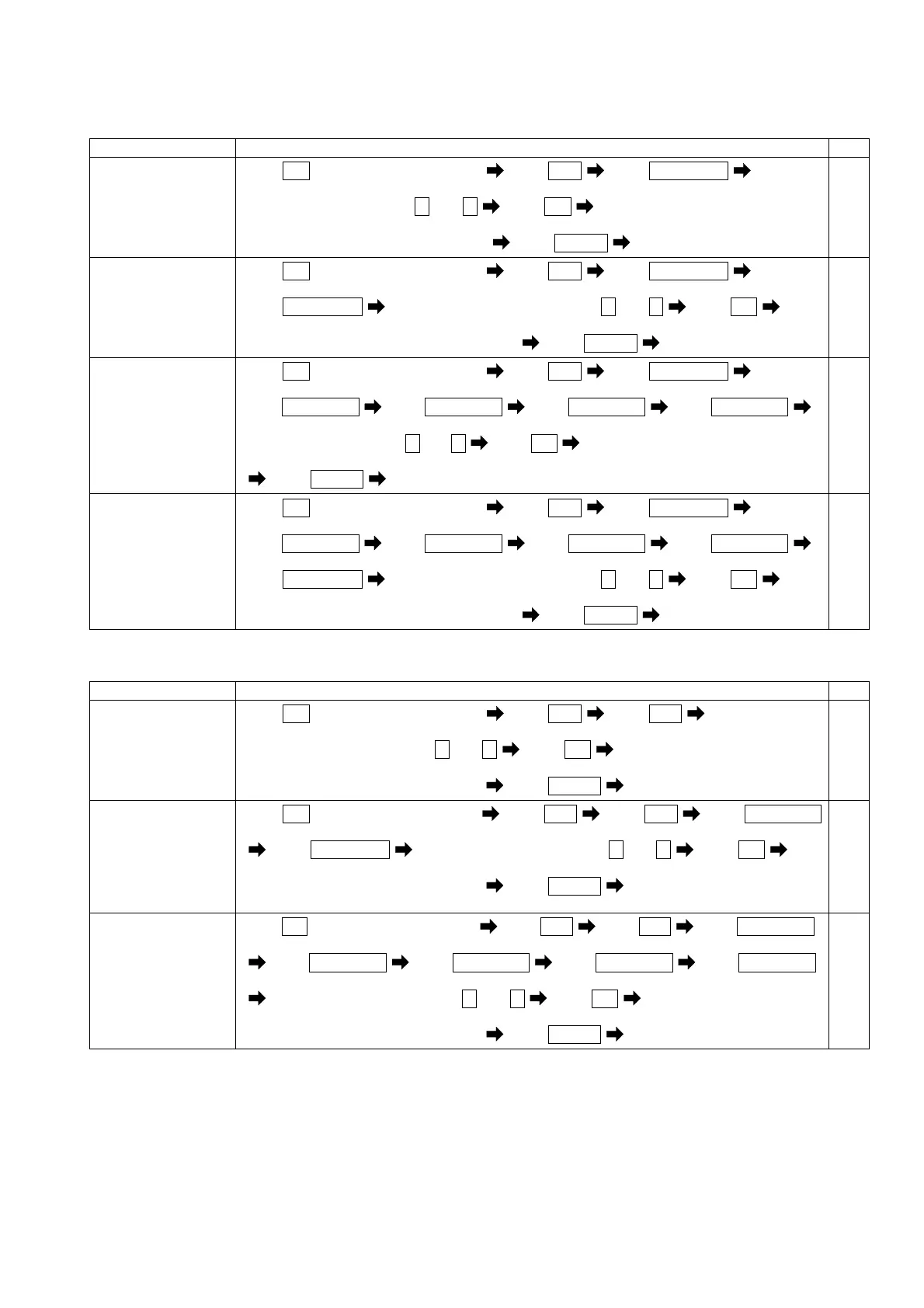
Press
SET
for longer than 3 seconds Press
MODE
Press
RESET/SHIFT
(111) (121AL) (122AL)
Select a return method by + and -
Press
SET
The selected return method is entered
Press
DISPLAY
Returns to display mode.
52
Set the contact
delay time of alarm
output 1.
(123AL)
Press
SET
for longer than 3 seconds Press
MODE
Press
RESET/SHIFT
(111) (121AL) (122AL)
Press
RESET/SHIFT
Select an contact delay time by + and - Press
SET
(123AL)
The selected contact delay time is entered
Press
DISPLAY
Returns to display mode.
52
Set the return
method of alarm
output 2.
(126AL)
Press
SET
for longer than 3 seconds Press
MODE
Press
RESET/SHIFT
(111) (121AL) (122AL)
Press
RESET/SHIFT
Press
RESET/SHIFT
Press
RESET/SHIFT
Press
RESET/SHIFT
(123AL) (124AL) (125AL) (126AL)
Select a return method by + and -
Press
SET
The selected return method is entered
Press
DISPLAY
Returns to display mode.
52
Set the contact
delay time of alarm
output 2.
(127AL)
Press
SET
for longer than 3 seconds Press
MODE
Press
RESET/SHIFT
(111) (121AL) (122AL)
Press
RESET/SHIFT
Press
RESET/SHIFT
Press
RESET/SHIFT
Press
RESET/SHIFT
(123AL) (124AL) (125AL) (126AL)
Press
RESET/SHIFT
Select an contact delay time by + and - Press
SET
(127AL)
The selected contact delay time is entered
Press
DISPLAY
Returns to display mode.
52
(10) Demand measurement (current, active power) setting.
Each parenthesized number shows a setting number and this number is displayed on the setting screen.
Items Setting and operation procedures Page
Set the high-alarm
value of demand
current.
(131H)
Press
SET
for longer than 3 seconds Press
MODE
Press
MODE
(111) (121AL) (131H)
Select a high-alarm value by + and -
Press
SET
Selected high-alarm value is entered
Press
DISPLAY
Returns to display mode.
53,54
Set the high-alarm
value of demand
active power.
(133H)
Press
SET
for longer than 3 seconds Press
MODE
Press
MODE
Press
RESET/SHIFT
(111) (121AL) (131H)
Press
RESET/SHIFT
Select a high-alarm value by + and - Press
SET
(132) (133H)
Selected high-alarm value is entered
Press
DISPLAY
Returns to display mode.
53,54
Set the operation
method of
power-factor
measurement.
(136)
Press
SET
for longer than 3 seconds Press
MODE
Press
MODE
Press
RESET/SHIFT
(111) (121AL) (131H)
Press
RESET/SHIFT
Press
RESET/SHIFT
Press
RESET/SHIFT
Press
RESET/SHIFT
(132) (133H) (134) (135)
Select a operation method by + and - Press
SET
(136)
Selected operation method is entered
Press
DISPLAY
Returns to display mode.
53,54


 To Next Page