BRC2E52C7 / BRC3E52C7 Operation manual
4P368042-1 - 2014.02
38
Menu Manipulation
Setback Condition
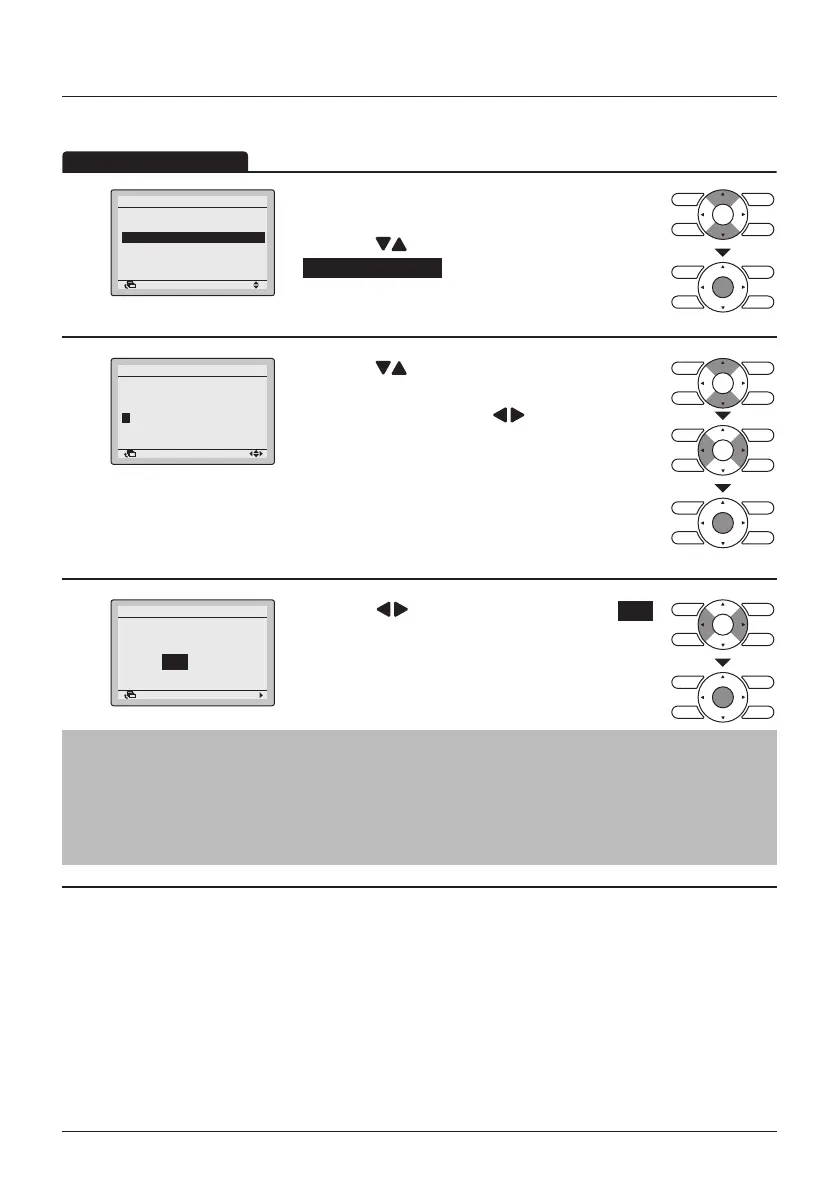
1
1/2
Energy Saving List
Setpoint Range
Setback Condition
Sensing Sensor(Low)
Sensing Sensor(Stop)
Setpoint Auto Reset
Energy Saving Options
SettingReturn
• Display the Energy Saving Options (See "Energy
Saving List" on page 36).
• Press the
(Up/Down) buttons to select
Setback Condition and press the Menu/Enter
button.
2
-2°C
Recovery Differential
Cool Heat
+2°C
Setback Condition
SettingReturn
• Press the (Up/Down) buttons to change the
differential for setback operation.
• Move the cursor using the
(Left/Right)
buttons.
• Press the Menu/Enter button when all changes are
made. The conrmation screen will appear.
3
NoYes
Setback Condition
Save the settings?
SettingReturn
• Press the (Left/Right) buttons to select Yes .
• Press the Menu/Enter button to conrm the
settings and to return to the Basic Screen.
Note
• The default setpoint range restriction is [16°C→32°C]. This setpoint range is the general
setpoint range and is as a result always active regardless of whether Setpoint Range is
enabled or disabled.
• The default setpoint range for setback operation is [33°C→37°C] for cooling and [10°C→15°C]
for heating. This setpoint range cannot be changed.
This function should not be used when a centralised controller is connected.



 To Next Page