EasyManua.ls Logo

Danfoss VLT FC 103 - User Manual

Danfoss VLT FC 103
182 pages
Print Icon
To Next Page IconTo Next Page
Loading...
Operating Guide
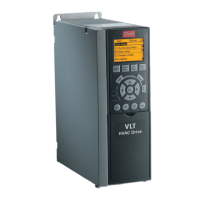
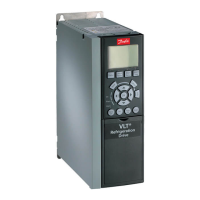
VLT® Refrigeration Drive FC 103
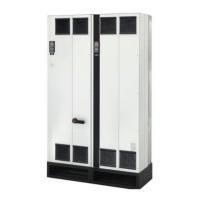
110-800 kW, D9h-D10h and E5h-E6h Enclosed Drives
drives.danfoss.com

Table of Contents

Other manuals for Danfoss VLT FC 103

Questions and Answers

  • E
    ericwilliamsSep 1, 2025
    Why will the motor not brake on my Danfoss DC Drives?
    • T
      Terry CurtisSep 1, 2025
      If the motor won't brake with your Danfoss DC Drives, it could be due to incorrect settings in the brake parameters or ramp-down times that are too short. Check parameter group 2-0* DC Brake and 3-0* Reference Limits.
  • K
    Kara HernandezAug 25, 2025
    What to do if Danfoss VLT FC 103 DC Drives trip lock?
    • F
      Francisco OrtizAug 25, 2025
      If a Danfoss DC drive experiences a trip lock, it means an alarm occurred, and the motor has stopped. To resolve this, first, identify and clear the cause of the alarm. Then, reset the drive by: pressing the [Reset] button, using remote control terminals, or via serial communication.
  • R
    Ryan VazquezSep 23, 2025
    What causes a motor to run rough with Danfoss DC Drives?
    • C
      Christine WalkerSep 23, 2025
      If a motor runs rough with Danfoss DC Drives, it could be due to possible over-magnetization. Check motor settings in parameter groups 1-2* Motor data, 1-3* Adv motor data, and 1-5* Load indep. setting.
  • A
    Ashley HodgesSep 7, 2025
    What to do if Danfoss DC Drives display over current?
    • B
      Bianca AguilarSep 7, 2025
      If Danfoss DC Drives display an over current error, it means the inverter peak current limit (approximately 200% of the rated current) has been exceeded. Turn off the frequency converter and check if the motor shaft can be turned and if the motor size matches the frequency converter.
  • B
    brandi66Sep 12, 2025
    What to do if Danfoss DC Drives display AMA check Unom and Inom?
    • E
      Elizabeth HumphreySep 12, 2025
      If Danfoss DC Drives display AMA check Unom and Inom, it means the setting of motor voltage, motor current, and motor power is presumably wrong. Check the settings.
  • J
    James MurraySep 4, 2025
    What causes intermittent display on Danfoss Media Converter?
    • D
      Derek BoydSep 4, 2025
      An intermittent display could be caused by an overloaded power supply (SMPS) due to improper control wiring or a fault within the adjustable frequency drive. If the display stays lit, check the control wiring for shorts or incorrect connections. If the display continues to cut out, follow the procedure for display dark.
  • T
    teresa07Aug 30, 2025
    Why is the motor not running on my Danfoss VLT FC 103 DC Drives?
    • S
      Sheri FloresAug 30, 2025
      If the motor is not running with your Danfoss DC Drives, ensure the service switch is not open and the motor connection is secure. If you have a 24 V DC option card, make sure mains power is applied to run the unit. If LCP Stop is active, press [Auto On] or [Hand On] (depending on the operation mode) to start the motor. Apply a valid start signal. Ensure the motor coast signal is not active by applying 24 V on terminal 27 or program this terminal to No operation. Also, verify the correct reference signal source is programmed and wired correctly.
  • L
    lkennedySep 15, 2025
    What does DC under voltage mean in Danfoss DC Drives?
    • W
      william53Sep 15, 2025
      If Danfoss DC Drives show DC under voltage, it means if the intermediate circuit voltage (DC) drops below the “voltage warning low” limit, the frequency converter checks if 24 V backup supply is connected.
  • E
    Elizabeth GrantSep 9, 2025
    What to do if Danfoss DC Drives experience a mains failure?
    • B
      Blake Baldwin DDSSep 10, 2025
      If Danfoss DC Drives experience a mains failure, it means the supply voltage to the frequency converter is lost. Possible correction: check the fuses to the frequency converter.
  • D
    Dustin LewisAug 27, 2025
    Why is the Danfoss Controller mains current imbalance greater than 3%?
    • L
      lhenryAug 27, 2025
      A mains current imbalance greater than 3% in your Danfoss Controller setup can stem from issues with the mains power supply. If the imbalanced leg follows the wire, it suggests a power problem, so check the mains power supply. Alternatively, the frequency converter itself might be faulty. If the imbalance leg remains on the same input terminal, it points to a problem with the unit, and you should contact the supplier.

Summary

1 Introduction

1.1 Purpose of this Operating Guide

Explains the objective and intended audience of the manual for safe installation and commissioning.

1.2 Additional Resources

Lists supplementary Danfoss documentation and resources for advanced functions and programming.

1.4 Approvals and Certifications

Lists type approvals and certifications applicable to Danfoss drives for compliance.

1.5 Disposal

Provides instructions for the proper disposal of electrical components according to local regulations.

2 Safety

2.1 Safety Symbols

Defines the standard safety symbols used throughout the manual for hazard indication.

2.2 Qualified Personnel

Specifies the required qualifications and knowledge for personnel handling the equipment safely.

2.3 Safety Precautions

Outlines critical safety precautions to prevent injury and equipment damage during operation.

3 Product Overview

3.1 Intended Use

Describes the purpose and design parameters of the enclosed drive for motor speed and torque control.

3.2 What is an Enclosed Drive?

Explains the basic structure and components of the enclosed drive system, including enclosure types.

3.4 Drive Identification

Details how to identify the specific drive model and its installed options using the type code on the nameplate.

3.5 Power Ratings, Weight, and Dimensions

Provides technical specifications for power ratings, weights, and physical dimensions of drive enclosures.

3.6 Control Compartment and Local Control Panel

Covers the control compartment, its overview, door features, and the Local Control Panel (LCP).

4 Mechanical Installation

4.1 Items Supplied

Lists the components typically supplied with the enclosed drive and packaging check procedures.

4.2 Split Shipment

Explains how drives are separated for shipment and the process for reassembly.

4.5 Operating Environment

Discusses environmental factors affecting drive operation, including condensation and extreme temperatures.

4.6 Installation Requirements

Outlines key requirements for proper drive installation, including mounting, stability, and cable entry.

4.7 Cooling Requirements

Details cooling requirements, clearances, and airflow rates for optimal drive performance and preventing overheating.

4.9 Lifting the Drive

Covers safety precautions and procedures for safely lifting the heavy drive unit using appropriate equipment.

4.11 Installing the Enclosed Drive

Guides on installing the enclosed drive, including creating cable entries and securing the cabinet.

5 Electrical Installation

5.1 Safety Instructions

Provides critical safety warnings and recommendations for all electrical installation procedures.

5.2 EMC-compliant Installation

Outlines essential practices for ensuring electromagnetic compatibility during electrical installation.

5.3 Wiring Overview for D9 h and D10 h Enclosed Drives

Presents a basic wiring diagram for D9h and D10h drives, illustrating terminal connections.

5.4 Wiring Overview for E5 h and E6 h Enclosed Drives

Shows a basic wiring diagram for E5h and E6h drives, detailing terminal connections.

5.6 Split Shipment Wiring Harnesses

Explains how to connect various wiring harnesses based on the drive's split shipment configuration.

5.7 Control Compartment Wiring

Covers wiring within the control compartment, including safety, terminals, and option cards.

5.8 Connecting Motor, Mains, and Ground Cables

Details procedures for connecting motor, mains, and ground cables, with important considerations.

5.9 Installing Upstream Fuses

Discusses considerations for selecting and installing upstream fuses for protection and includes recommended ratings.

5.11 Selecting the Voltage;Current Input Signal

Guides on setting the analog input signal type (voltage or current) using switches and parameters.

5.12 Setting Up RS485 Serial Communication

Provides a procedure for configuring RS485 serial communication, including wiring and parameter settings.

5.17 Safe Torque Off (STO) Wiring

Directs users to further documentation for STO wiring and its function in safety control systems.

6 Pre-start Check List

6.1 Pre-start Check List

Provides a comprehensive checklist of items to verify before starting the drive and motor for safe operation.

7 Commissioning

7.1 Applying Power to the Drive

Details the procedure for safely applying power to the drive after installation checks are completed.

7.2 Programming the Drive

Covers parameter overview, navigation, entering system information, and examples for drive programming.

7.3 Testing Before System Start-up

Outlines procedures for testing motor rotation and encoder rotation before system start-up.

7.4 Starting Up the Drive for the First Time

Recommends a procedure for initial drive start-up after all setup and programming are completed.

7.5 Parameter Settings

Discusses parameter setting overview, uploading/downloading, and restoring factory defaults.

8 Wiring Configuration Examples

8.1 Application Examples

Introduces common wiring configurations for various applications, referencing default parameter settings.

8.1.1 Wiring Configuration for Automatic Motor Adaptation (AMA)

Shows wiring for AMA with T27 connected, including parameter settings and notes.

8.1.3 Wiring Configuration: Speed

Provides wiring configurations for analog speed reference using voltage, current, and potentiometer inputs.

8.1.4 Wiring Configuration: Feedback

Details wiring configurations for analog feedback signals (current and voltage) using different methods.

8.1.5 Wiring Configuration: Run;Stop

Shows wiring for run/stop commands, including options with external interlocks and run permissive.

8.1.6 Wiring Configuration: Start;Stop

Illustrates wiring for start/stop commands, including safe torque off and pulse start/stop configurations.

8.1.8 Wiring Configuration: RS485

Details wiring and parameter settings for RS485 serial communication network connections.

8.1.10 Wiring for Regeneration

Explains how to wire for regeneration and the relevant parameters for controlling it.

8.1.11 Wiring Configuration for a Relay Set-up with Smart Logic Control

Shows wiring for a relay setup using Smart Logic Control, including comparator and relay settings.

9 Maintenance, Diagnostics, and Troubleshooting

9.1 Status Messages

Explains how status messages are displayed on the LCP during drive operation, covering modes and reference sites.

9.2 Maintenance and Service

Outlines normal maintenance requirements and procedures for ensuring drive longevity and preventing issues.

9.3 Warnings and Alarms

Categorizes and describes the types of warnings and alarms the drive can generate, with initial troubleshooting steps.

9.4 Troubleshooting

Provides a table of common symptoms, possible causes, tests, and solutions for diagnosing drive issues.

10 Specifications

10.1 Electrical Data

Provides detailed electrical data tables for various models and voltage ranges (380-480 V and 525-690 V AC).

10.3 Motor Output and Motor Data

Specifies the motor output voltage, frequency, and torque characteristics of the drive.

10.4 Ambient Conditions

Outlines environmental operating conditions, including temperature, humidity, altitude, and EMC standards.

10.5 Motor and Control Cables

Provides specifications for motor and control cable lengths and cross-sections for optimal installation.

10.6 Control Input;Output and Control Data

Details specifications for control card features, digital I/O, analog signals, and relay/pulse outputs.

10.7 Filter Specifications

Lists specifications for Passive Harmonic, Line Reactor, dU/dt, and Sine-wave filters.

10.8 Fuses, Circuit Breakers, and Switches

Covers options for fuses, contactors, fusible disconnects, non-fusible disconnects, and MCCBs.

10.9 Enclosure Dimensions

Provides exterior dimensions for D9h, D10h, E5h, and E6h enclosures with standard pedestals.

10.10 Enclosure Airflow

Illustrates enclosure airflow requirements and clearances for proper ventilation.

10.11 Fastener Torque Ratings

Lists recommended torque values for various fasteners to ensure correct electrical connections.

11 Appendix

11.1 Conventions

Explains the document's conventions for lists, text formatting, and cross-references.

11.2 Abbreviations

Provides a glossary of abbreviations, acronyms, and symbols used throughout the manual.

11.4 Required Parameter Settings for Drive Options

Details parameter settings needed for drive options after a factory reset to ensure proper functionality.

11.5 Block Diagrams

Presents electrical power flow block diagrams for D9h/D10h and E5h/E6h enclosure configurations.

11.6 Input Power Option Losses

Lists power loss data for various input power options like contactors, disconnects, and MCCBs.

Danfoss VLT FC 103 Specifications

General IconGeneral
Protection ClassIP20
SeriesVLT FC 103
Input Voltage380-480 V
Communication ProtocolsCANopen
Supply voltage380-480 V AC
Frequency50 Hz or 60 Hz
EnclosureIP20

Related product manuals