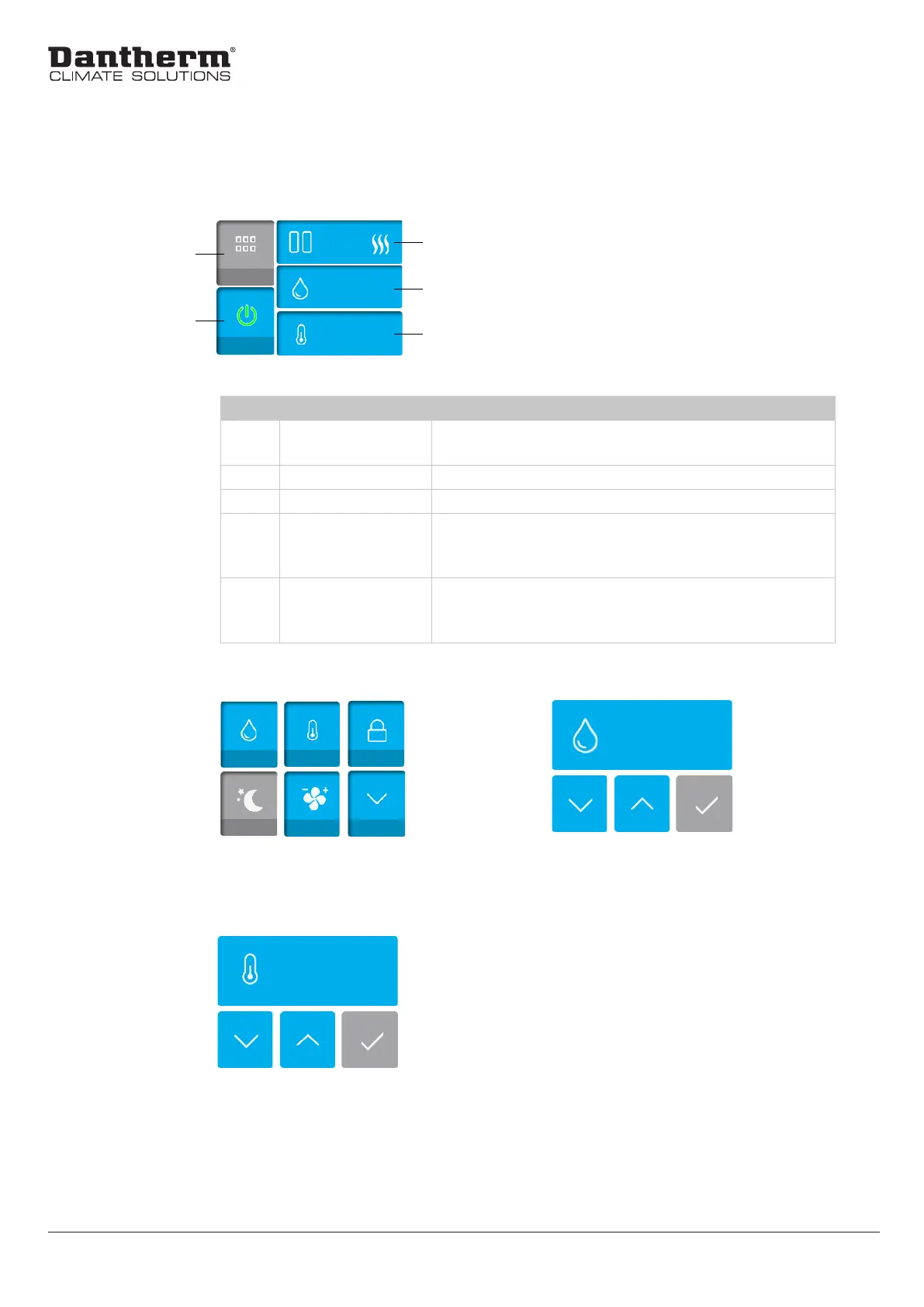
Default view and navigation: Main display layout
Item Button/Indication Description
1 Menu Select the menu button to navigate to the screen
in gure 3
2 ON/OFF Turns the device ON and OFF
3 Status Indicates the current status of the device
4 Humidity Shows the actual relative humidity in percent in
the room. Press to navigate to the screen in gure
4, where the desired RH setpoint can be adjusted.
5 Temperature Shows the actual temperature in °C in the room.
Press and navigate to the screen in gure 5, where
the desired temperature setpoint can be adjusted.
Default view and navigation
Set Value
Set Value
1
Fig. 3: Main display layout in RH control mode
60 %
4
5
2
Fig. 4: Submenu display layout
3
Fig. 5: SetValue display layout
Setpoint temperature: 0 - 38°C
Fig. 6: SetValue display layout
Setpoint humidity: 40 - 100%
Main display
layout
28°C
60 %
12


 To Next Page