Mounting and installation instructions
en
Mounting and installation instructions, continued
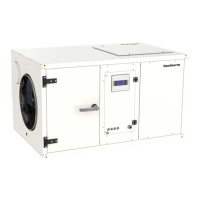
Depending on the design of the plant room, it is possible to blow the warm dry air out through
the top of the unit. In that case, the fan must to be moved from the end to the top. It is done as
follows:
The inspection side of the unit can be changed to the opposite side. It is done as follows:Changing the
inspection side
Step Action
1 Remove the rear cover panel
2 Remove the inspection door and the cover panel on the front of the unit
3 Remove the middle control panel section and move it through the unit to the
rear side
4 Remount the inspection door and the cover panel on the rear of the unit
5 Remount the cover panels on the front of the unit
The inlet and outlet ducts and any inlet and outlet grilles, must be dimensioned so that exter-
nal back pressure never exceed the values mentioned in the table below.
If pressure losses are higher, there is a danger of the unit cutting out via the high-pressure pres-
sostat due to insucient air owing over the condenser.
Duct connection
CDP 85 CDP 135 CDP 175
Pa 300 350 450
Step Action
1 Remove the fan cable and loosen it from terminals 5/6 in the control panel
2 Remove the cover panel with the fan xed to it
3 Remove the top cover panel
4 Ret the cover panel with the fan to the top of the unit
5 Ret the top cover panel to the front of the unit
6 Connect the fan cable to the terminals in the control panel
Air outlet through
the top
19


 To Next Page