Display and menu overview: Settings
en
Display and menu overview, continued
Settings
Settings
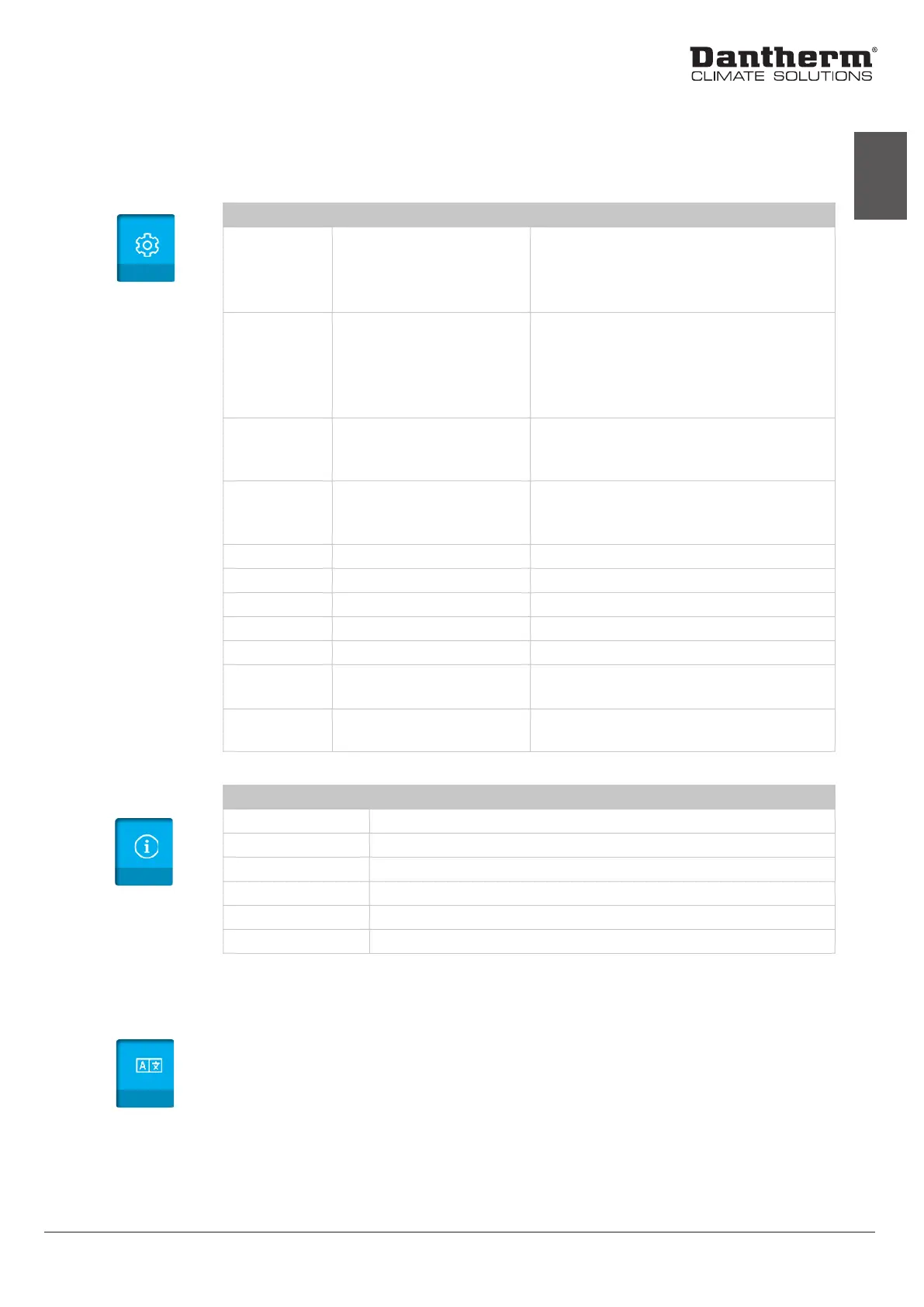
You can make the following settings:
Menu Item Setting/Value Description
Control Mode Dew point
Abs. humidity
Relative humidity
Manual
Dew point control via ext. sensor
Absolute humidity control
Relative humidity control
Dehumidication always ON
Fan Mode Intermittent
Continuous
Sense
Fan only runs when a demand for dehum. or
heat/cooling is present (ext. sensor recom-
mended)
Fan is running continuously
Fan will run periodically
Sense Timing 5-30
1-10
Time interval between fan start sensing, in
minutes
Duration for fan sensing mode, in minutes
UnOcc. Mode Automatic
Manual
Fan runs at min. speed for a dened time
Fan runs at min. speed for a number of hours
after activation
UnOcc. Cong. Hours Duration of UnOcc. mode
Max. Temp. Maximum operational temp. Set the maximum ambient temperature
Date/Time Date and time Set the date and time for the unit
Modbus addr. Modbus address selection Set modbus address for the unit
Upload cong. Upload conguration Upload new conguration from MicroSD card
Air ow Air ow minimum
Air ow maximum
Set the minimum air ow for the unit
Set the maximum air ow for the unit
Live Data Shows live data of sensors Various live engineering and operational
data of the unit
Info
Language
settings
The information menu shows the following:
Menu Item Description
Service Timer indicating the next (user specied) service
Hours Number of hours the compressor has been running
kWh Function is not active in this product
SerNo. The serial number of the unit
Ver. The version of the software
Model The name of the unit model (eg. CDP 85)
Info
Language
No other languages other than English are currently available.
15


 To Next Page