DPR-400 User Manual Rev_01 Firmware V-1.0
- 21 -
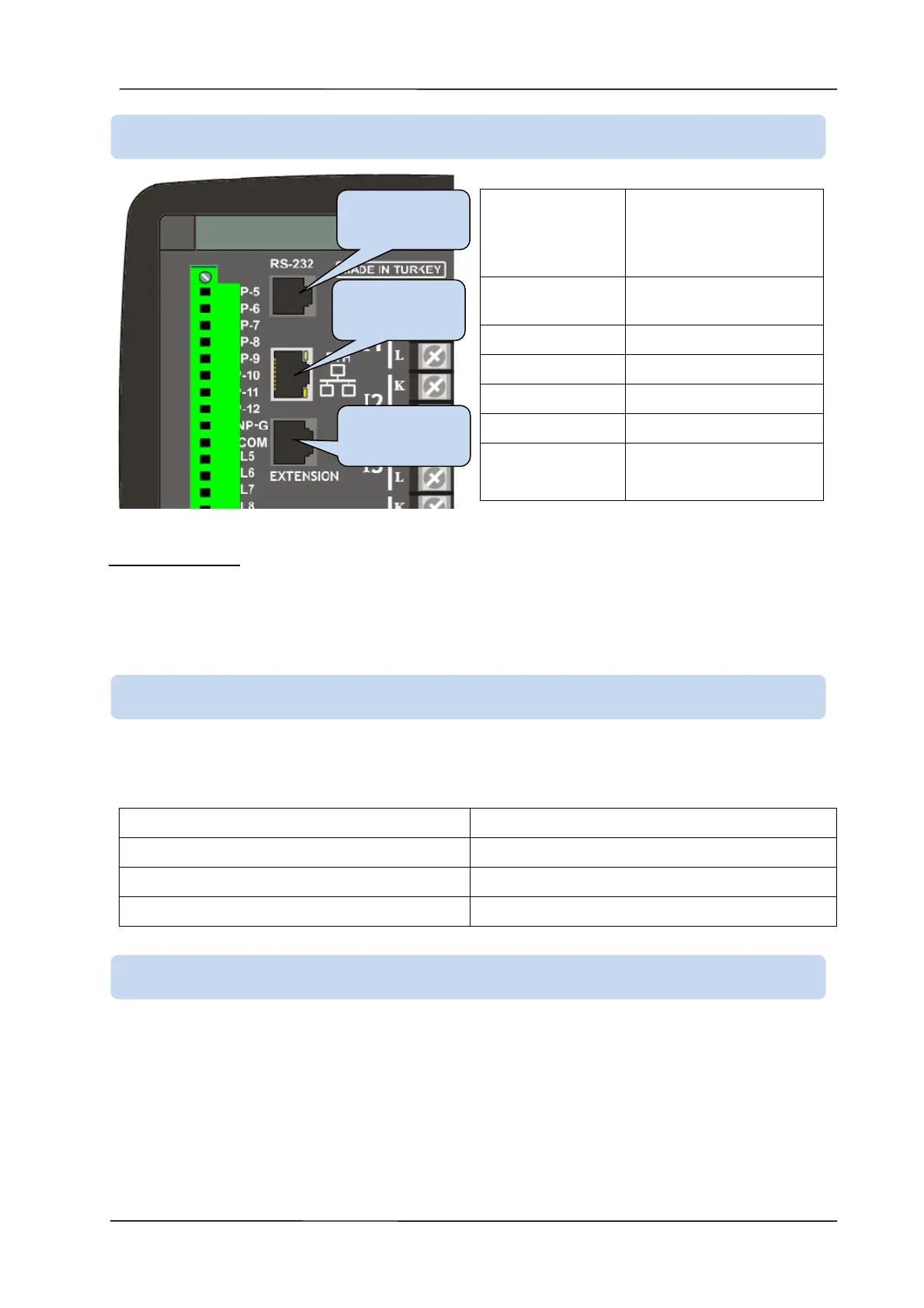
IEEE802.3 compliant,
10/100 Base-TX RJ45
ethernet port with
indicating LEDs
10/100 Mbit/s, auto
detecting
LED FUNCTIONS:
GREEN: This LED turns on when the Ethernet link is established (connectors inserted).
YELLOW: This LED blinks while incoming or outgoing data transfer occurs. Periodic blinking will witness
data flow.
RS-232 port is used to connect the separately sold modem unit. The connection cable is supplied with the
modem.
External DKG-090 GSM modem
2400-115200 baud, selectable.
8 bit data, no parity, 1 bit stop
The expansion port is used to connect to the external input / output expansion modules. The connection
cable is supplied with the external module.
Digital inputs can be extended using extension module, each one providing 8 inputs. Digital inputs are
programmable through the main controller.
Digital outputs can be extended using extension module, each one providing 8 outputs. They have
programmable functions through the main controller.
3.8. ETHERNET PORT (OPTIONAL)
3.9. RS-232 PORT (OPTIONAL)
3.10. EXPANSION PORT (OPTIONAL)


 To Next Page