W-Class 81
Printer Fault Messages (continued)
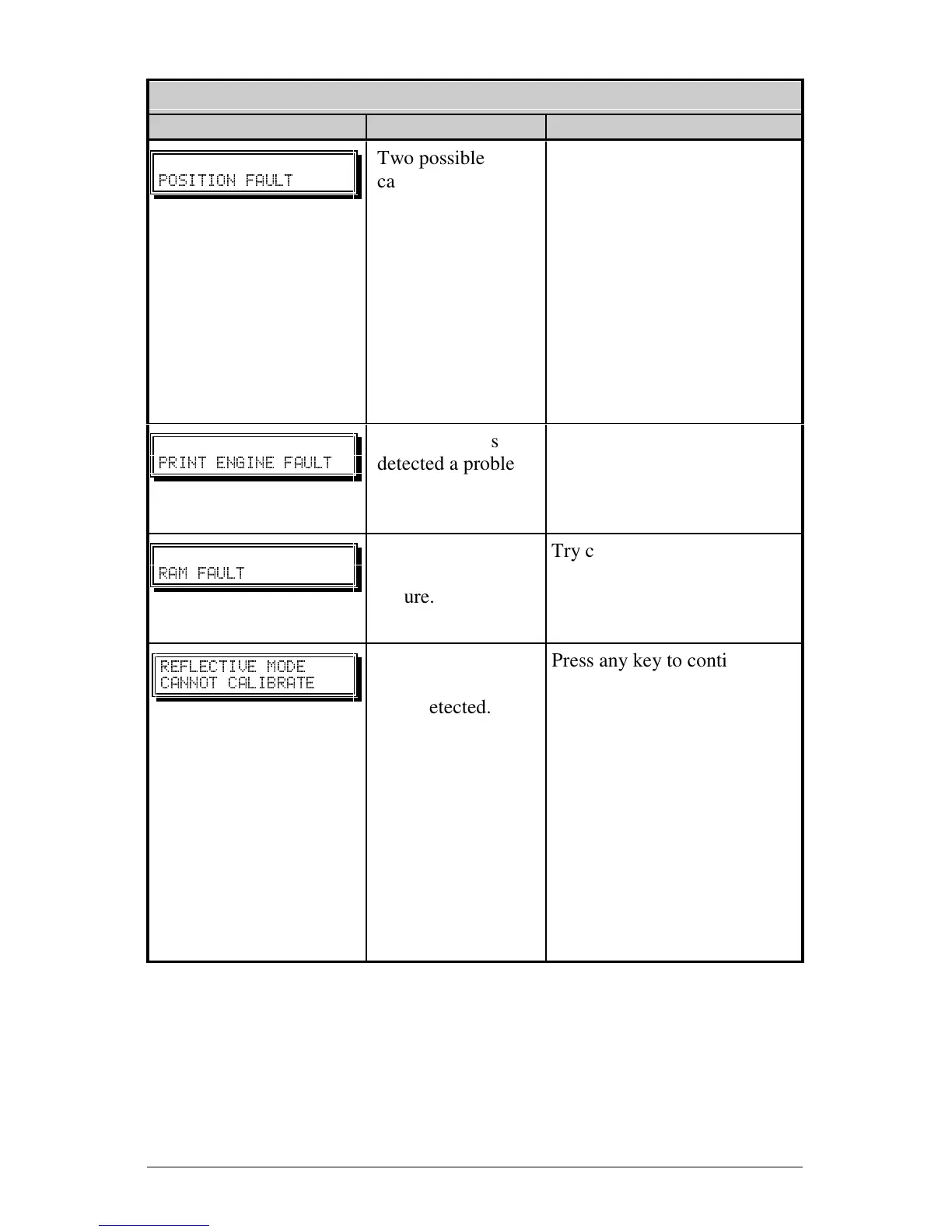
Displayed Message Description Possible Solution(s)
POSITION FAULT
Two possible
causes:
(1) The printer was
powered-off or
reset during a
ribbon, out of stock
or TOF fault; or (2)
the printer was
unable to complete
the Media
Calibration.
Depending upon the cause:
(1) Press the FEED key in an
attempt to identify and then
clear the related fault
condition; or (2) if necessary,
calibrate the printer; see
Section 5.1.
PRINT ENGINE FAULT
The printer has
detected a problem
within the print
logic.
Try cycling the printer power
‘Off’ and ‘On’. If the fault
does not clear, call for
service.
RAM FAULT
The system has
detected a RAM
failure.
Try cycling the printer power
‘Off’ and ‘On’. If the fault
does not clear, call for
service.
REFLECTI VE MOD E
CANNOT CALIBRATE
Consistently low
sensor readings
were detected.
Press any key to continue.
Ensure that the reflective
mark was inserted facedown
in the media sensor during
the appropriate calibration
step; also, ensure that the
reflective mark is made of
carbon based ink, and that the
sensor is free of debris. Retry
calibration. If the problem
persists, try an ‘Advanced
Entry Calibration’; see
Section 5.0.2.












 To Next Page