2-10
001-4006-101
Bytes Tx’ed
Bytes Transmitted shows the number of bytes (characters) transmitted since the port was last opened or
cleared.
Bytes Rx’ed
Bytes Received shows the number of bytes (characters) received since the port was last opened or cleared.
Framing Errors
Framing Errors shows the number of Framing Errors received since the port was last opened or cleared.
2.5.4 Setup Modem/Radio Parameters
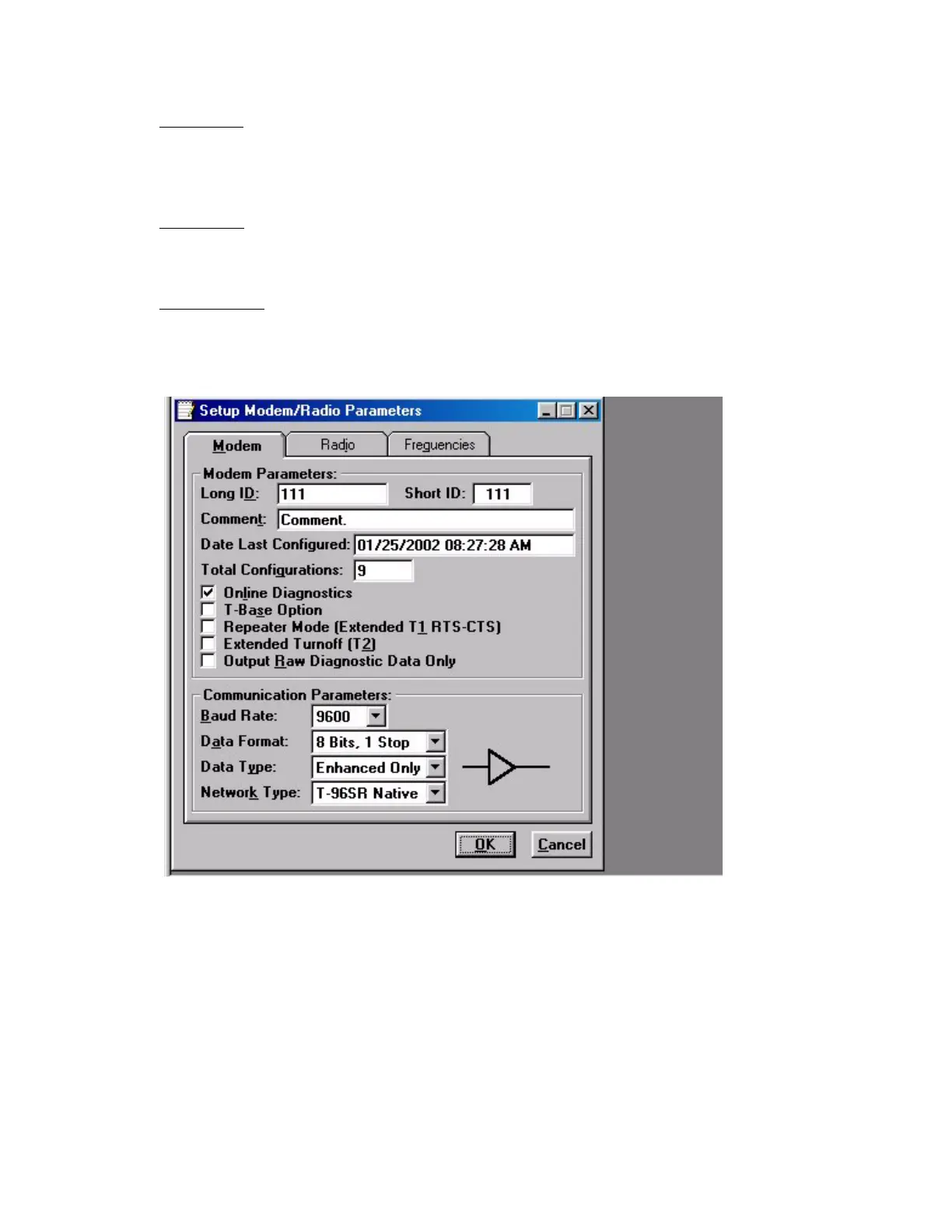
Figure 2-8 Setup Modem/Radio Screen
The Setup Modem/Radio Parameters screen is accessed from the Edit menu pull-down or from the Parms
icon when the tool bar is visible.
2.5.4.1 Modem Operating Parameters
The Setup Modem/Radio Parameters allows the user to view and edit T-96SR’s programmable parameters.
Programming parameters can be stored in a data file with the .DAT file extension. Programmable
parameters are used by the Read/Write Parameters screen for programming into nonvolatile memory.


 To Next Page