TEST
PRODUCT REFERENCE GUIDE
41
TEST
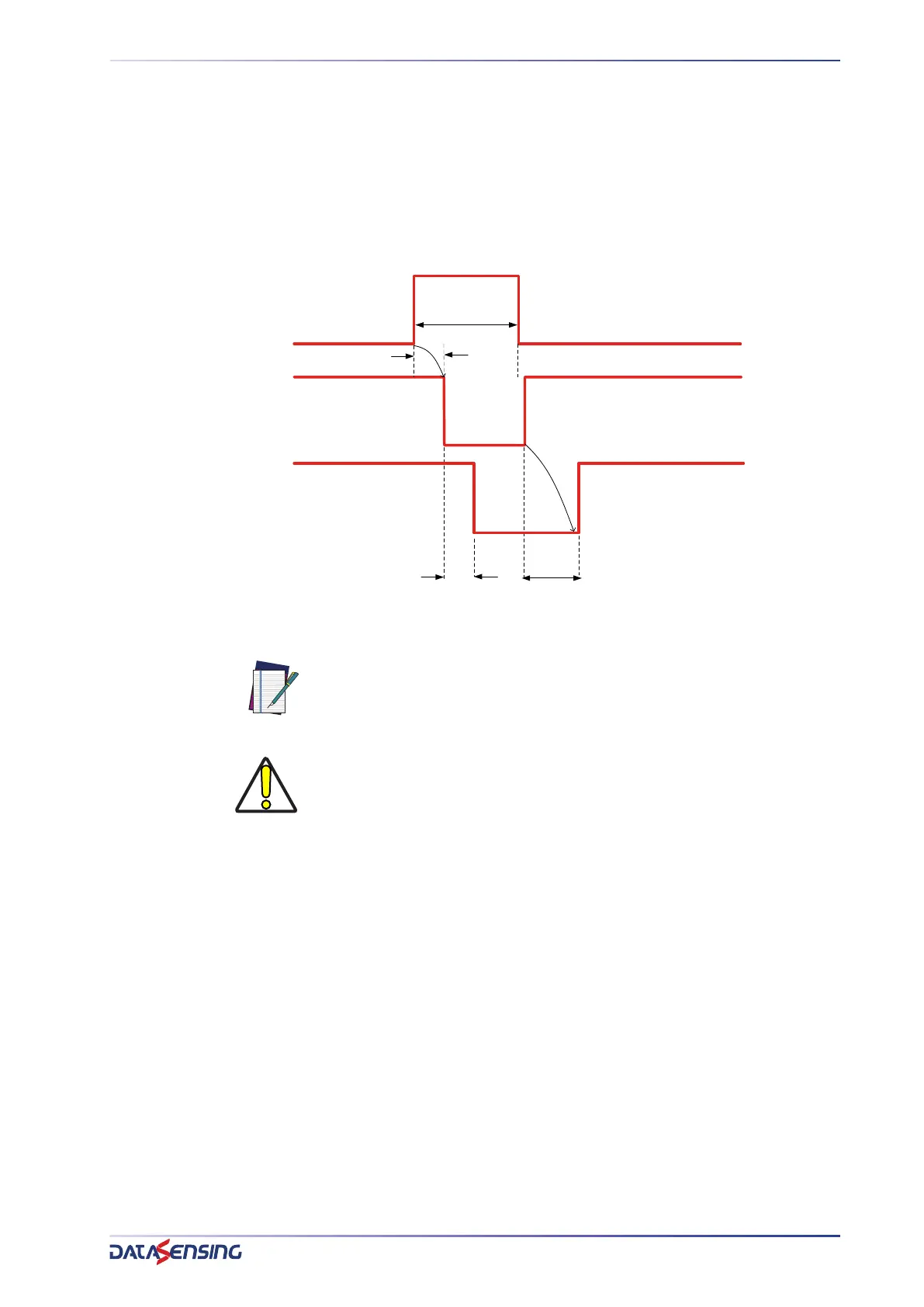
The TEST function can be activated by keeping TEST signal HIGH (pin 2 on TX unit) for at
least 0.5 seconds as shown in the following timing diagram.
The TEST disables the emission stage, so the RX side sees interrupted beams (all) and
the OSSD goes low within response time. As is shown in the timing diagram below, the
OSSDs go OFF (BREAK status) after 0.5s (plus a cycle time) and after the response time
of the light curtain.
Figure 10: OSSDs timing for test on TX
NOTE: On Body models only, TEST input may be used to set Emission
Range. Refer to the next paragraph for more information.
CAUTION: At runtime keep TEST input connected to 24Vdc for more than 2s
and less than 5s to change range setting from Long to Short or vice versa.
Emission Range setting is kept also after a power cycle. Refer to the next
paragraph for more information.
TEST
24Vdc
EMISSION STATUS
OSSDs STATUS
0.5s
0V/FLOAT
OFF
ON
SAFE
BREAK
RESPONSE TIME
RECOVERY TIME
2s


 To Next Page